



USDC Coin

USDC กระเป๋าสตางค์

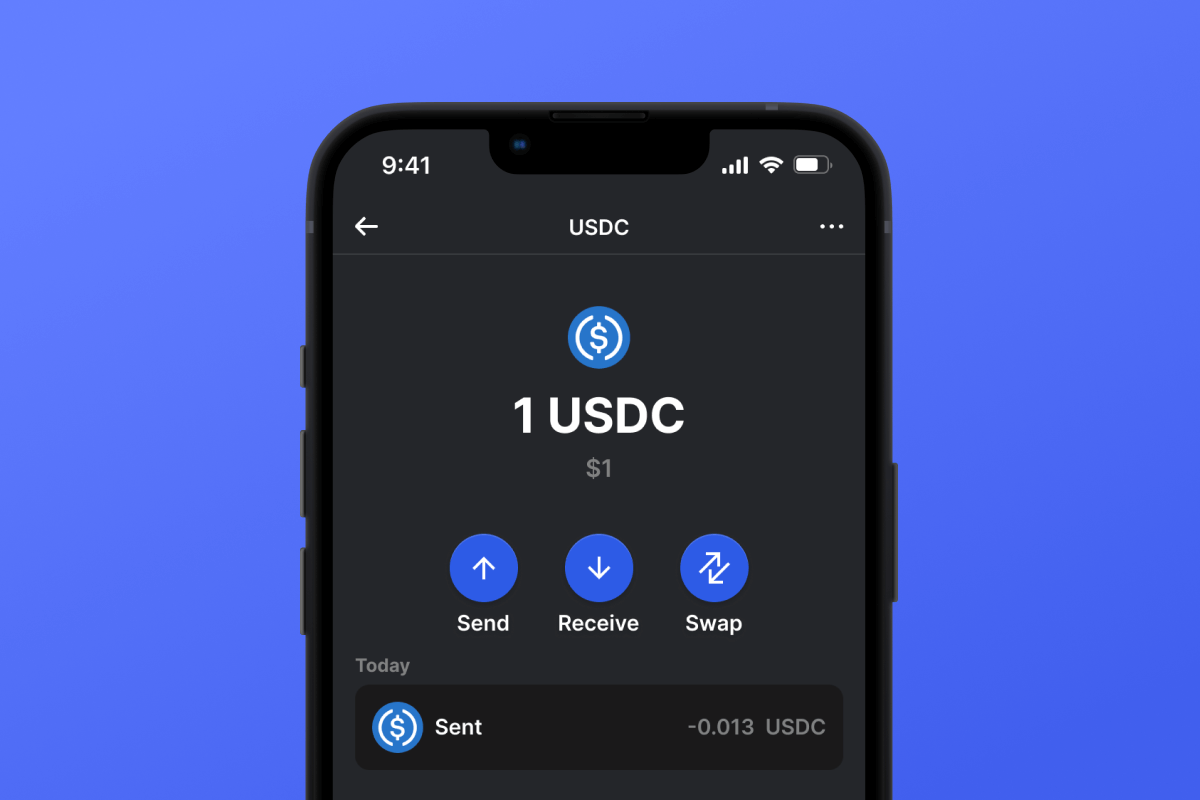
ก้าวสู่อนาคตของการเงินดิจิทัลด้วยกระเป๋าเงิน USDC แอปพลิเคชันมือถือโอเพ่นซอร์สที่ควบคุมด้วยตัวเอง USDC ซึ่งเป็นสกุลเงินดิจิทัลที่มีเสถียรภาพและเชื่อถือได้ ให้การปกป้องต่อความผันผวนของตลาดสกุลเงินดิจิทัล สัมผัสกับความปลอดภัยที่เหนือกว่าและความสะดวกสบายในการจัดการสินทรัพย์ดิจิทัลของคุณ ดาวน์โหลดตอนนี้เพื่อการเดินทางสู่สกุลเงินดิจิทัลที่ปลอดภัยและสร้างสรรค์

USDC กระเป๋าสตางค์

USDC คืออะไร?

USD Coin เป็นสกุลเงินดิจิทัลประเภทหนึ่งที่รู้จักกันในชื่อ stablecoin โดย stablecoin คือสกุลเงินดิจิทัลที่ออกแบบมาเพื่อรักษามูลค่าที่เสถียร ซึ่งโดยทั่วไปจะผูกกับสกุลเงินทั่วไป เช่น ดอลลาร์สหรัฐ โดยเฉพาะอย่างยิ่ง USDC ผูกกับดอลลาร์สหรัฐในอัตราส่วน 1:1 ซึ่งหมายความว่าโทเค็น USDC แต่ละอันมีค่าเท่ากับหนึ่งดอลลาร์สหรัฐ

  • USDC เป็น stablecoin ดิจิทัลที่ยึดตามมูลค่าของดอลลาร์สหรัฐ
  • USDC ได้รับการแนะนำโดย CENTRE Consortium ซึ่งเป็นความร่วมมือระหว่างบริษัทสกุลเงินดิจิทัล Circle และ Coinbase
  • USDC นำเสนอความโปร่งใส ความปลอดภัย และความรวดเร็วของสกุลเงินดิจิทัลในขณะที่รักษามูลค่าที่เสถียร
  • เป็นที่ยอมรับอย่างกว้างขวางในตลาดสกุลเงินดิจิทัลและสามารถใช้สำหรับธุรกรรมทางการเงินต่างๆ ได้
  • โปรโตคอลการโอนข้ามโซ่ของ Circle (CCTP) ช่วยให้สามารถล็อกและสร้าง USDC บนบล็อคเชนที่รองรับได้

กระเป๋าเงิน USDC ERC20

กระเป๋าเงิน USDC ERC20 ใช้ประโยชน์จากความปลอดภัยที่แข็งแกร่งและความนิยมอย่างแพร่หลายของเครือข่าย Ethereum กระเป๋าเงินนี้เหมาะสำหรับผู้ใช้ที่มีส่วนร่วมในระบบนิเวศ Ethereum และมอบสภาพแวดล้อมที่เชื่อถือได้สำหรับธุรกรรม USDC โปรดทราบว่าการใช้ USDC บนเครือข่าย ERC20 จะต้องชำระค่าธรรมเนียมธุรกรรมใน Ethereum (ETH) ค่าธรรมเนียมเหล่านี้สามารถครอบคลุมได้อย่างสะดวกโดยการโอน ETH จากการแลกเปลี่ยนไปยังกระเป๋าเงินหรือโดย ซื้อ ETH โดยตรงภายในกระเป๋าเงินอย่างรวดเร็วและปลอดภัย

USDC ทำงานอย่างไร

USD Coin ทำงานเป็น stablecoin ซึ่งได้รับการออกแบบมาให้มีมูลค่าที่มั่นคงผูกติดกับดอลลาร์สหรัฐ เหรียญนี้สร้างขึ้นบนบล็อคเชน Ethereum โดยใช้ประโยชน์จากความปลอดภัยและความโปร่งใสที่เทคโนโลยีบล็อคเชนมอบให้

  • USDC จะถูกออกเมื่อผู้ใช้ฝากเงิน USD กับผู้ให้บริการที่เข้าร่วม
  • จากนั้นผู้ออกจะผลิต USDC ในจำนวนที่เท่ากันและส่งมอบให้ผู้ใช้
  • สามารถแลกโทเค็น USDC เป็น USD ได้ตลอดเวลา โดยรักษามูลค่าให้คงที่

ประโยชน์ของกระเป๋าเงิน USDC:

การเงินดิจิทัลสมัยใหม่ รวมถึง USDC stablecoin ต้องใช้แนวทางพิเศษในการรักษาความปลอดภัยธุรกรรมและความเป็นส่วนตัวของสินทรัพย์ Gem มีทุกสิ่งที่คุณต้องการเพื่อใช้ USDC:

  • ความปลอดภัย: กระเป๋าเงิน USDC เป็นการแสดงให้เห็นถึงเทคโนโลยีขั้นสูงด้านความปลอดภัยดิจิทัลเพื่อปกป้องสินทรัพย์ของคุณ
  • การดูแลตนเอง: จัดการสินทรัพย์ของคุณโดยตรงโดยไม่ต้องผ่านคนกลาง USDC Wallet เป็นโซลูชั่นการดูแลตนเอง ซึ่งมีเพียงคุณเท่านั้นที่ถือครองกุญแจ
  • USDC Wallet ส่วนตัว: Gem จะไม่ร้องขอหรือประมวลผลข้อมูลส่วนบุคคลของคุณ คุณสามารถดาวน์โหลด APK ของ USDC Wallet ได้โดยตรงจากเว็บไซต์เพื่อหลีกเลี่ยงการโต้ตอบกับบริษัทภายนอกที่อาจทำให้ข้อมูลส่วนบุคคลของคุณตกอยู่ในความเสี่ยง
  • เข้ากันได้กับอุปกรณ์สากล: เข้าถึงได้บน iOS และ Android กระเป๋าสตางค์ของเรารับประกันประสบการณ์ผู้ใช้ที่ราบรื่นบนแพลตฟอร์มต่างๆ
  • การผสานรวมบล็อคเชนที่หลากหลาย: รองรับบล็อคเชนมากมาย รวมถึง Ethereum, TRON, Arbitrum และ Solana ซึ่งมอบความคล่องตัวในการทำธุรกรรมด้วย USDC
  • โอเพนซอร์ส: USDC Wallet โปร่งใสสำหรับผู้ใช้ ตรวจสอบการทำงานและความน่าเชื่อถือของฟีเจอร์ทั้งหมดด้วยตัวคุณเอง
  • เสถียรภาพที่มั่นใจได้ด้วย USDC: USDC ตรึงกับเงินเฟียตที่ 1 ต่อ 1 เพื่อให้แน่ใจว่ามูลค่ามีเสถียรภาพอย่างสม่ำเสมอ
  • อินเทอร์เฟซผู้ใช้ที่ใช้งานง่าย: ออกแบบมาเพื่อความสะดวกในการใช้งาน กระเป๋าเงินของเราทำให้การจัดการสกุลเงินดิจิทัลเป็นเรื่องง่ายสำหรับผู้ใช้ทุกคน
  • การซื้อ USDC โดยตรง: ซื้อ USDC โดยตรงในแอปด้วยสามขั้นตอนง่ายๆ และรับได้เกือบจะทันที ฟีเจอร์ที่สะดวกนี้ช่วยลดความยุ่งยากในการจัดการสินทรัพย์ดิจิทัลของคุณอย่างมาก
  • ประตูสู่โลกของคริปโต: USDC ทำหน้าที่เป็นกุญแจสู่จักรวาลของคริปโต ช่วยให้คุณสามารถ แลกเปลี่ยน เป็นโทเค็นอื่น ๆ อีกนับพันตัว ซึ่งจะเปิดโลกแห่งความเป็นไปได้ของคริปโต

ใช้ประโยชน์จาก USDC stablecoin ให้ได้มากที่สุด! ดาวน์โหลด Gem วันนี้!

Why Gem USDC Wallet App Is the Best Choice?

Gem Wallet stands out as a leading USDC wallet solution, combining security, privacy, and usability in one powerful app. Here's why users choose Gem Wallet for their USDC needs:

Complete Control and Self-Custody

Full control of your private keys and seed phrase. No third party can access or restrict your USDC. Your USDC is truly yours.

Maximum Privacy Protection

No tracking, no personal information, no data collection. Complete privacy and control over your USDC.

Open-Source Transparency

Publicly available code on GitHub. Anyone can verify security and functionality, ensuring no hidden backdoors or vulnerabilities.

Multi-Platform Availability

Available on iOS, Android, and APK. Your USDC wallet works wherever you go.

USDC Wallet in Multiple Languages

Supporting 25+ languages including English, Russian, Spanish, Chinese, and Arabic. Fully localized for worldwide accessibility.

Built-In USDC Services

Buy USDC with 30+ payment methods. Swap USDC through integrated DEX aggregator. Manage all crypto assets in one secure place.

Comparison: Gem Wallet vs Exchange Wallets

See how storing USDC in Gem Wallet differs from keeping it on exchanges

FeatureGem WalletExchange Wallets (Binance, Coinbase)
Registration Required❌ No✅ Yes (Full KYC)
Personal Data Collection❌ None✅ Extensive (ID, address, selfie)
Private Keys Control✅ You own them❌ Exchange controls
Account Can Be Frozen❌ Impossible✅ Yes
Setup Time2 minutes1-7 days (KYC verification)

Professional Security Features

  1. Biometric Authentication: Use Face ID, Touch ID, or fingerprint to secure your wallet
  2. PIN Protection: Set a strong PIN code as an additional security layer
  3. Encrypted Backups: Your seed phrase is stored securely and never leaves your device
  4. Regular Security Audits: Independent security reviews ensure wallet integrity
Gem Wallet private key security and self-custody crypto wallet features

What Users Say About Gem USDC Wallet

Quick Setup Guide (3 Steps)

How to Set Up a USDC Wallet in 2 Minutes

Creating a USDC wallet is simpler than opening a bank account. Gem Wallet guides you through the entire process in minutes, making it accessible for complete beginners.

onboarding view

1.รับ USDC กระเป๋าสตางค์

USDC กระเป๋าเงิน: iOS , Android & APK

recovery phrase screen

2. สร้าง USDC กระเป๋าสตางค์

สร้างกระเป๋าเงินใหม่ บันทึกวลีลับ และรับที่อยู่ของคุณใน USDC.

3. Set Up Security for USDC

Enable PIN or biometric authentication and you're ready to go

Create USDC Wallet for iOS

Creating a USDC wallet on iPhone (2 min):

  1. Open the App Store and search for "Gem Wallet"
  2. Download and install the app (it's free and under 50MB)
  3. Open Gem Wallet and tap "Create New Wallet"
  4. Write down your seed phrase on paper - this is your master backup
  5. Enable Face ID or set a PIN code for quick and secure access
  6. Done! Your USDC wallet address is now active

Create USDC Wallet for Android

Creating a USDC wallet on Android (2 min):

  1. Via Google Play: Search for "Gem Wallet" in the Play Store and install
  2. Via Direct APK: Download the APK file for maximum privacy and control
  3. Open the app and select "Create New Wallet"
  4. Write down your 12-word seed phrase on paper
  5. Set up fingerprint or PIN authentication
  6. Your USDC wallet is ready to use

USDC Wallet Without Registration

One of USDC's core principles is financial freedom and privacy. Gem Wallet embodies this philosophy by offering a USDC wallet without registration - no email, no phone number, no identity verification required.

Why No-Registration Wallets Matter

Custodial USDC wallets and centralized exchanges (Coinbase, Binance) require extensive personal information through KYC (Know Your Customer) verification. Unlike self-custodial wallets, this creates several problems:

  • Privacy Risks: Your financial activity is tracked and can be sold to third parties or accessed by bad actors
  • Data Breaches: Centralized databases of personal information are prime targets for hackers
  • Censorship: Accounts can be frozen or restricted based on location, political views, or arbitrary decisions
  • Time-Consuming: KYC processes can take days or weeks to complete

Gem Wallet: True Private USDC Wallet

With Gem Wallet, you can create and use a USDC wallet with complete privacy:

  • No email address required
  • No phone number needed
  • No identity documents or selfies
  • No IP address tracking
  • No mandatory account creation

Simply download the app, create your wallet, and start using USDC within minutes. Your privacy is protected from the moment you install the app.

How to Get a USDC Address

To get a USDC wallet address, you first need to create or import a USDC wallet. After that, the app will generate addresses for you automatically.

1 Open Gem Wallet

Launch the app on your phone and select USDC (USDC) from your asset list.

2 Tap "Receive" Button

You'll see a large button at the bottom of the screen. Your USDC wallet address will be displayed both as text and as a QR code.

3 Copy Your Address

Copy the address to clipboard, share the QR code, or send it directly through messaging apps.

Get USDC wallet address in Gem Wallet
🔄 Unlimited Addresses

In Gem Wallet, you can generate unlimited USDC addresses for free. Each address is derived from your seed phrase and remains under your control forever.

📱 Using QR Codes

No Typing Errors - Scanning prevents copy-paste mistakes

Faster Transactions - Just show your phone screen

Perfect for in-person USDC payments

คำถามที่พบบ่อย

เหรียญ USD ที่ส่งไปจะมาถึงบล็อกเชนที่ส่งไป แม้ว่าที่อยู่ ERC20 และ BASE จะมีลักษณะเหมือนกัน แต่ทั้งสองอยู่ในเครือข่ายที่แตกต่างกัน และการฝากหรือการชำระเงินของคุณจะไม่ได้รับการเครดิตโดยอัตโนมัติหากส่งไปยังเครือข่ายที่ไม่ถูกต้อง
ใช่ กระเป๋าสตางค์ USDC ช่วยให้คุณเชื่อมโยงหรือแลกเปลี่ยน USDC ของคุณได้ในไม่กี่คลิกโดยตรงภายในแอป เพื่อโอนเหรียญไปยังบล็อคเชนที่ต้องการ
ใช่ กระเป๋าเงิน USDC ช่วยให้คุณควบคุมสินทรัพย์ของคุณได้อย่างเต็มที่ ทำให้คุณสามารถชำระเงินค่าซื้อสินค้าได้อย่างง่ายดาย รวมถึงที่ร้านค้า Shopify
ใช่ USDC Wallet ใช้การเข้ารหัสขั้นสูงและมาตรการรักษาความปลอดภัยทางไซเบอร์เพื่อปกป้องสินทรัพย์ของคุณ สถาปัตยกรรมการดูแลตนเองทำให้มั่นใจได้ว่าบุคคลที่สามจะไม่สามารถเข้าถึงเงินของคุณได้

















