Invite Friends and Earn Rewards
Invite friends and earn real rewards for every friend you bring to Gem Wallet. Together we increase crypto adoption and people will be able to do more with their crypto.



Leaderboard
How To Earn Rewards
follow these 3 simple steps on how to earn rewards by inviting friends to gem wallet
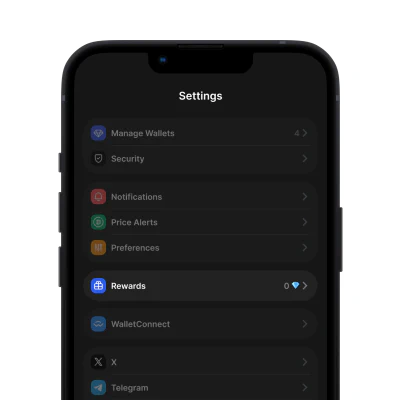
1. Get Gem Wallet
ดาวน์โหลด กระเป๋าสตางค์อัญมณี แอปสำหรับ iOS หรือ Android Once done, go to settings and tap rewards.
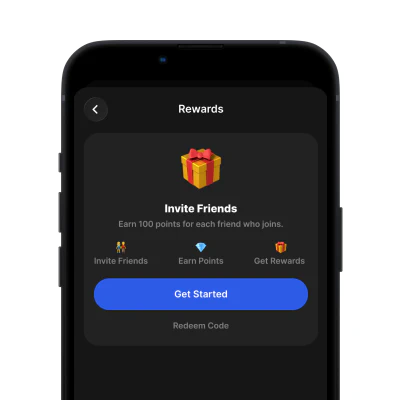
2. Create Referral Code
In rewards view, tap get started and create username which will be your referral code to invite friends.
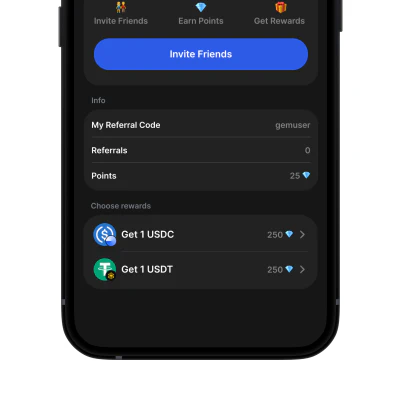
3. Earn Rewards
Receive points for each successful referral. Redeem your points for USDC or USDT directly in the gem wallet app anytime.
Frequently Asked Questions
Common questions about the rewards program
Rewards Program Rules
General Terms
- Rewards are earned when referred users successfully create and verify their Gem Wallet account
- Each referral code is unique and can only be used once per user
- Rewards may take up to 48 hours to be credited to your account
- Redemption for USDC or USDT is available directly within the Gem Wallet app
Fair Use Policy
- Self-referrals are not permitted
- Creating multiple accounts to earn rewards is prohibited
- Using bots, scripts, or automated systems to generate referrals is not allowed
- Rewards earned through fraudulent means will be forfeited
Anti-Abuse Protection
Important: We reserve the right to disable any reward code if we detect suspicious activity, including but not limited to: unusual referral patterns, coordinated fraud attempts, or violation of these terms. Accounts found in violation may be permanently suspended from the rewards program.
Program Changes
- Gem Wallet reserves the right to modify or terminate the rewards program at any time
- Reward amounts and redemption options may be adjusted based on program performance
- We will provide advance notice of any significant changes to the program
- Continued participation after changes constitutes acceptance of updated terms
For questions about the rewards program, please contact our support team through the Gem Wallet app.