


Table of Contents
Ctrl Wallet (formerly XDEFI) disables all functions on August 3, 2026 - the app is already gone from the stores, and every day makes it harder to safely extract your secret phrase from it. Import the phrase into Gem Wallet in 3 steps - same addresses, no transfers. Keep staking ATOM, TIA, and more, plus native RUNE swaps via THORChain.
Key Takeaways
Your assets live on the blockchain, not inside Ctrl Wallet - the app shutdown does not affect them.
On August 3, 2026, all Ctrl functions are disabled - only secret phrase export will remain, and the app was already removed from the stores on July 7.
There is no “migration airdrop” - any site or post offering to connect your wallet for compensation is a scam, as Ctrl itself warned.
What Is Happening to Ctrl Wallet (Formerly XDEFI)?
Ctrl Wallet - the multichain wallet known as XDEFI Wallet before its 2024 rebrand - announced a full shutdown in the official announcement on July 7, 2026. A security incident preceded the closure: on June 23, 2026, Ctrl reported an issue affecting some Cardano wallets on the platform and put the app into maintenance mode - and two weeks later, as Cointelegraph reports, announced the wind-down of a product used by 650,000+ people monthly. The shutdown timeline comes down to three dates:
July 7, 2026: The wallet is removed from the App Store, Google Play, and browser extension stores. An already installed app keeps working.
Until August 2, 2026: Full functionality - sending, receiving, swaps, DApps, and secret phrase export.
From August 3, 2026: All features are disabled. The only thing left is exporting the secret phrase from the installed app.
Just as important is what this timeline does not include: the Ctrl team officially confirmed there will be no migration token, no compensation airdrop, and no refund program. Any site, post, or email featuring a “Ctrl Wallet Migration Airdrop” and a “connect wallet” button is a scam targeting users of the closing wallet.
Your Assets Won’t Disappear With Ctrl Wallet
Crypto is not stored inside an app - it is recorded on the blockchain, and Ctrl Wallet was only an interface to it. The key to those records is your secret phrase: enter it in any compatible wallet, and all your addresses and balances will be restored, even if Ctrl no longer opens by then.
Check before August 3: how many wallets you created in Ctrl. Each has its own secret phrase, and each needs to be exported separately.
Gem Wallet: The Best Alternative to Ctrl Wallet (XDEFI)
Gem Wallet is the best alternative for Ctrl Wallet users: a self-custody mobile wallet for iOS and Android that swaps across chains natively. Why can’t you just stay in Ctrl and do nothing? Because a wallet that no longer gets updates receives no security patches: if a vulnerability is found in the code or its dependencies, there is no one left to fix it. Gem Wallet is a living project: the code evolves in public, the wallet passed a CertiK audit in April 2026, and the team responds to any security question right away.
Here is what Ctrl users get after the import:
Native Cross-Chain Swaps: Gem Wallet supports 100+ networks, including THORChain as a full network - hold RUNE and exchange it for BTC, ETH, USDT, or USDC directly through the protocol, with no external bridge. The built-in DEX aggregator inside the wallet compares Uniswap, PancakeSwap, Jupiter, and other DEX providers to pick the best rate for every swap - Bitcoin to Ethereum, Solana to BNB, plus swaps involving TRON via Chainflip that are rare among mobile wallets.
Fully Open-Source Code: The entire Gem Wallet codebase is published on GitHub, so any developer can verify what happens under the hood - and the wallet collects no data: no email, no phone number, no analytics, no KYC.
Your Cosmos Chains and Staking in One App: Cosmos Hub, Osmosis, Injective, Sei, and Celestia are fully supported - your staking positions travel with the secret phrase and keep earning. You can securely and privately store and send ATOM and other tokens, and stake ATOM, OSMO, INJ, SEI, TIA, and other assets right in the app.
What Transfers to Gem Wallet When You Import
What exactly appears in Gem Wallet after you import the secret phrase? Everything that matters - immediately:
| Asset or Feature | Status in Gem Wallet |
|---|---|
| Addresses and balances tied to your secret phrase | ✅ Same addresses, no fund transfers needed |
| THORChain (RUNE), Bitcoin, Ethereum, and EVM (Ethereum-compatible) networks | ✅ Supported, with native cross-chain swaps |
| Cosmos Hub, Osmosis, Injective, Sei, Celestia, and their staking | ✅ Full support |
| AXL (Axelar token) on Ethereum, BNB Chain, and other networks | ✅ Appears after import |
How to Import Ctrl Wallet Into Gem Wallet: Step-by-Step Guide
The whole migration takes less than 5 minutes.
- Open Ctrl Wallet and go to Settings > Wallet Management, select the wallet you need, and tap “Show Recovery Phrase” to reveal your secret phrase. Write it down on paper in the exact word order.
Never share your secret phrase with anyone, never screenshot it, and never store it in phone notes, cloud services, or messengers - a paper note kept offline is safer than any file.
Download Gem Wallet for free from the official website, the App Store, or Google Play.
Launch the app, tap “Import Existing Wallet”, and choose Multi-Coin. Paste the phrase from Ctrl Wallet and tap “Import” - the same addresses and balances will appear automatically.
A detailed guide with screenshots of every step is in our knowledge base: Migrating From Ctrl Wallet to Gem Wallet.
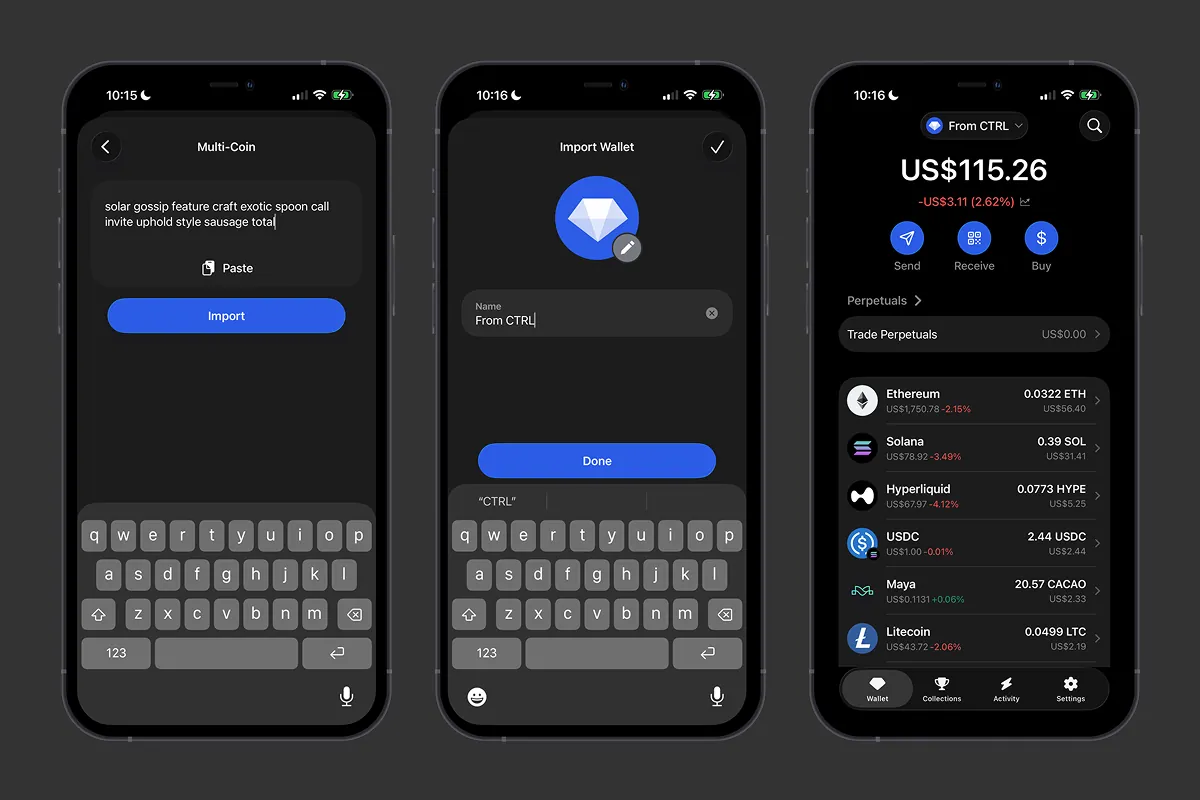 Exporting your secret phrase from Ctrl Wallet and importing it into Gem Wallet - your assets appear instantly.
Is Your Ctrl Account Based on a Private Key or Social Login?
Accounts based on private keys move just as easily: export each key separately from Ctrl’s security settings and choose private key import in Gem Wallet - the address and balance will be restored right away. Accounts created via social login or a hardware wallet are trickier: they may have no secret phrase at all. Check the recovery method in Ctrl’s settings in advance, and if there is nothing to export - simply send the assets in a transaction to your new Gem Wallet address before August 3, while sending still works in Ctrl.
If any step raises questions, Gem Wallet support works 24/7: the AI assistant replies instantly, and a real human team steps in for complex cases - you can reach us via the support bot in the app or by email.
The August 3 Deadline Has Passed - Is Everything Lost?
No: your secret phrase does not expire - not on August 3, not ever. But the Ctrl shutdown has one catch: the app is already gone from the stores, and if it disappears from your device - after a phone change or a storage cleanup - there will be nowhere to export the phrase from. So open Ctrl and save your phrase right now, even if you plan to do the import later.
Don’t risk keeping your assets in a wallet that no longer gets updates - import your secret phrase into Gem Wallet and manage your crypto in an app that evolves, gets audited, and takes responsibility for security every single day.


