


Table of Contents
Token-2022 (Token Extensions) is a token program on Solana for issuing tokens with built-in rules: a transfer fee, a transfer check, and a pause on all transfers. Here we break down how Token-2022 tokens differ from SPL tokens, which rules an issuer can build into them, and what to check before you buy.
Key Takeaways
- A Fee Inside the Token: At a 1% rate, you send 1,000 tokens and the recipient sees 990 - the other 10 are withheld right in their account.
- Issuer Rights: The Permanent Delegate extension lets the issuer transfer or burn tokens in any account, and it is enabled for PYUSD on Solana (October 2026).
- Off Doesn’t Mean Gone: PYUSD already has a Transfer Fee and a Transfer Hook set up but switched off (October 2026), and the issuer can switch them on without issuing a new token.
Open this article in
 ChatGPT
 Gemini
 Grok
 Perplexity
What Is Token-2022?
Token-2022 is the second token program on Solana: it does everything the original SPL Token program does and adds extensions to a token - extra rules the issuer picks at launch. On January 24, 2024, the Solana Foundation introduced Token Extensions, and the first extensions shipped in validator version 1.17.
The extension code is shared by all tokens: the issuer only turns extensions on and configures them, and most of them can only be added when the token is created. That is why a token’s set of extensions is almost always known from day one, and what can change later is mostly their settings.
How Is Token-2022 Different From SPL Token?
Token-2022 differs from SPL Token in its extensions. Tokens of both programs are called SPL tokens, while SPL Token is the original program. SPL Token is the first token program on Solana, and USDC, USDT, and many other tokens on the network are issued on it.
Token-2022 instructions 0 through 24 match SPL Token instructions byte for byte, so basic transfers work the same way in both programs.
We put together a table of six parameters where the two Solana token programs differ, based on the official Solana documentation as of November 2026.
| Parameter | SPL Token | Token-2022 |
|---|---|---|
| Program ID | TokenkegQfeZyiNwAJbNbGKPFXCWuBvf9Ss623VQ5DA | TokenzQdBNbLqP5VEhdkAS6EPFLC1PHnBqCXEpPxuEb |
| Extensions | None | 17 for the token and 4 for the account |
| Metadata (name, ticker, logo link) | In a separate program | Inside the token, if the Metadata extension is on |
| Token account size | 165 bytes | From 170 bytes |
| Transfer fee (Transfer Fee) | None | Yes, if the issuer set one |
| Pause on all transfers | None | Yes, if the issuer turned on the extension |
A token account is a record on the blockchain that holds the balance of one token at your address. The network takes a deposit in SOL for it, and the more bytes it has, the higher the deposit.
What Extensions Does Token-2022 Have?
Token-2022 has 17 extensions for the token itself and 4 for the holder’s account (November 2026). The most important ones for a holder are Transfer Fee, Transfer Hook, and Permanent Delegate, and three more extensions restrict transfers:
- Default Account State: The issuer can make new token accounts start out frozen until the issuer unfreezes them.
- Pausable: The issuer can stop all transfers of the token at once.
- Non-Transferable: The token cannot be sent to another address.
The Interest-Bearing and Scaled UI Amount extensions change what you see in your balance. Interest-Bearing adds interest to the displayed amount, and Scaled UI Amount multiplies the balance by a factor the issuer sets (for example, after a stock split).
The account extensions Immutable Owner and CPI Guard protect the holder’s account itself. Immutable Owner prevents changing the account owner, and CPI Guard blocks hidden withdrawals through third-party programs.
How Does Transfer Fee Work in Token-2022?
Transfer Fee is a fee the issuer sets when the token is created, and a holder cannot turn it off. The network withholds it right in the recipient’s account: at a 1% rate, out of 1,000 tokens sent the recipient sees 990, and 10 tokens stay in their account as withheld.
If the issuer has not given up this right, they can change the rate, including to 0%, and the rate has a maximum in tokens per transfer. A new rate takes effect only 2 epochs after the change. An epoch on the Solana blockchain lasts about 2 days, so a new rate kicks in 2-4 days later.
An account with withheld fees cannot be closed to get its SOL deposit back. First, the withheld tokens are moved to the address of the token itself, and anyone can do that, including you, but only an address the issuer assigned can withdraw them from there.
What Does Transfer Hook Do?
Transfer Hook calls the issuer’s program on every transfer, and that program decides whether the transfer goes through. With a Transfer Hook, the issuer can allow the token to move only between whitelisted addresses or collect royalties. If the issuer’s program blocks the transfer, you cannot sell the token until the rule is lifted. The xStocks tokenized stocks have a Transfer Hook set up but switched off (August 2025).
What Can Permanent Delegate Do?
Permanent Delegate is an address that can transfer or burn tokens in other people’s accounts without the owner’s signature. This right works even when only you have the 12-word secret phrase: it is written into the token itself, not into the wallet.
Which Tokens Use Token-2022?
Token-2022 on Solana is used by regulated stablecoins, tokenized gold and stocks, and memecoins with a transfer fee. According to blockchain data as of November 2026, the best-known ones include:
- PYUSD: The PayPal stablecoin issued by Paxos: it has Permanent Delegate on, while Transfer Fee and Transfer Hook are set up but switched off (October 2026).
- USDG (Global Dollar): A Paxos stablecoin with the same Permanent Delegate as PYUSD.
- PAXG (Paxos Gold): A gold-backed token, on Solana since June 2026.
- xStocks: Tokenized stocks and ETFs of US companies, such as SPYx and TSLAx, that you can buy with crypto right in Gem Wallet.
- BERN: A memecoin that takes 2.69% of every transfer through Transfer Fee.
How to Check a Token-2022 Token Before You Buy
You can check a Token-2022 token in three steps - in Gem Wallet and in a Solana explorer:
- Token Address: Copy it from the issuer’s website, not from a ticker search - a copy with the same ticker may be issued with different extensions.
- Program: Open the token in Gem Wallet - for Token-2022, the “Network” row says “Solana (SPL2022)”.
- Extensions: Paste the token address into Solana Explorer or Solscan and look at the list of extensions and their settings.
In the list of extensions, check four issuer settings:
- Transfer Fee Rate: For BERN, it is 2.69%: if you move it to an exchange and back, the fee is charged twice, about 5.3% by our calculation.
- Delegate Address: Whether a Permanent Delegate is set and who it belongs to.
- Transfer Hook: Whether it is on and whose program is behind it.
- Freeze and Pause: Whether Default Account State and Pausable are turned on.
For a regulated stablecoin like PYUSD, a delegate is expected, while for a memecoin from an anonymous issuer, the same setting is a reason not to buy. The Orca, Raydium, and Meteora routes in Gem Wallet do not accept tokens with an active Transfer Hook, pause, freeze, or transfer ban for swaps, so the transaction does not fail.
Which Wallet Supports Token-2022 on Solana?
Gem Wallet is a self-custody Solana Wallet with 100% open-source code for iOS and Android that has supported Token-2022 tokens since August 2024: you can securely store, send, receive, and swap SPL Token and Token-2022 tokens in it, as well as stake SOL. A wallet without Token-2022 support may not show such tokens, even though they stay at your address.
- Self-Custody Wallet: Your secret phrase is created and stored only on your phone, so neither the Gem Wallet team nor any third party has access to your tokens, and only you manage them.
- 100% Open-Source Code: The code of the Gem Wallet apps for iOS and Android is fully open source on GitHub under the GPL-3.0 license, and any developer can check how the wallet signs transfers. In 2026, the wallet’s security was reviewed by independent auditors CertiK (April) and Cure53 (October).
- Privacy by Default: Gem Wallet does not collect its users’ personal data. The wallet needs no sign-up with a phone number or email, no documents, selfie, or video identity check - install the app and start using crypto privately right away.
- Both Solana Token Programs: SPL Token and Token-2022 tokens arrive at the same address in your SPL Wallet, and the wallet picks the right program and creates the token account during the transfer, so you don’t have to deal with the technical details. A token that isn’t on the list can be added by its address via Add Token.
- Built-In DEX Aggregator: Token-2022 swaps go through Orca, Raydium, Meteora, Relay, and other providers, and the wallet finds the best rate among them. For example, holders of USDT on Ethereum can swap it for PYUSD on Solana in a few taps right in the app. On the Orca, Raydium, and Meteora routes, the quote already shows the amount after the Transfer Fee.
- Top Up Your Wallet: Buy SOL and Token-2022 tokens right in Gem Wallet with a credit card, Apple Pay, or Google Pay through MoonPay, Banxa, Mercuryo, and other providers.
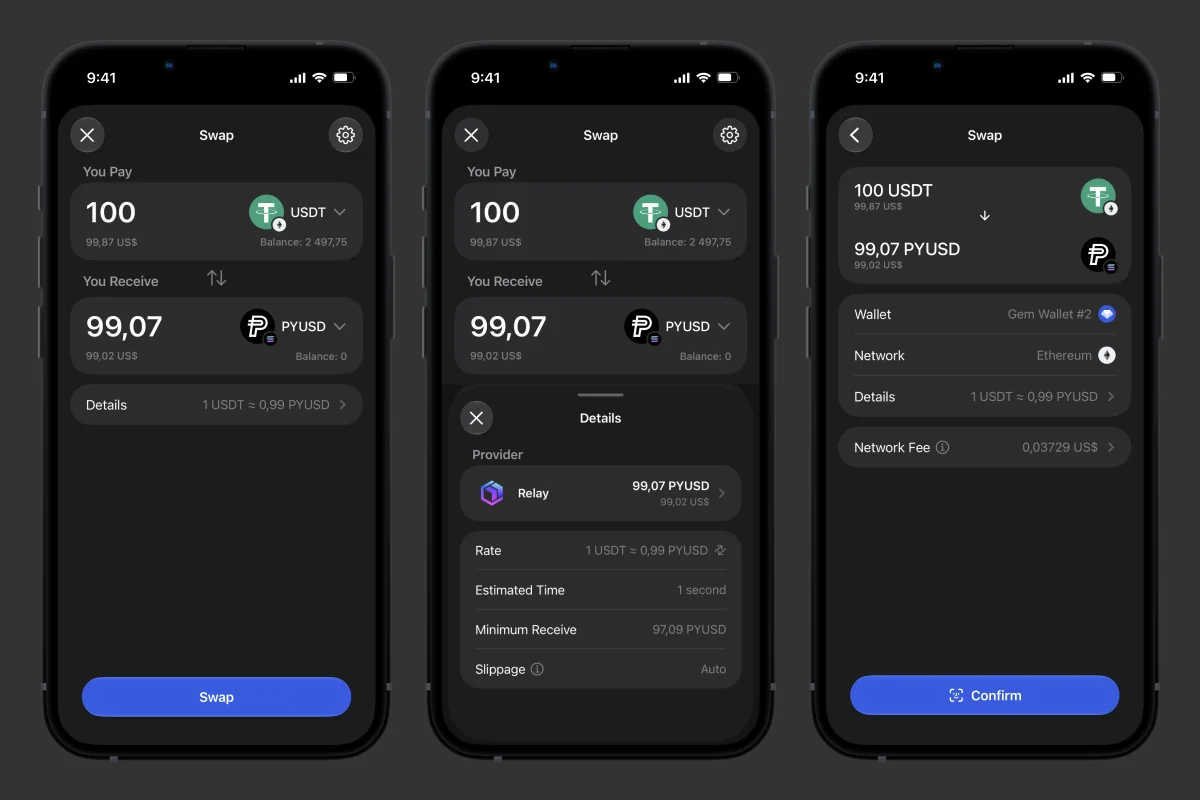 Swapping USDT on Ethereum to PYUSD on Solana in Gem Wallet
Download Gem Wallet and keep your Token-2022 tokens next to SOL, USDC, and other Solana assets in one app where only you hold the keys.
Disclaimer: This article is for informational and educational purposes only and is not financial or investment advice. Crypto assets are highly volatile, and you can lose all the money you invest. Do your own research and make decisions at your own risk.