

Table of Contents
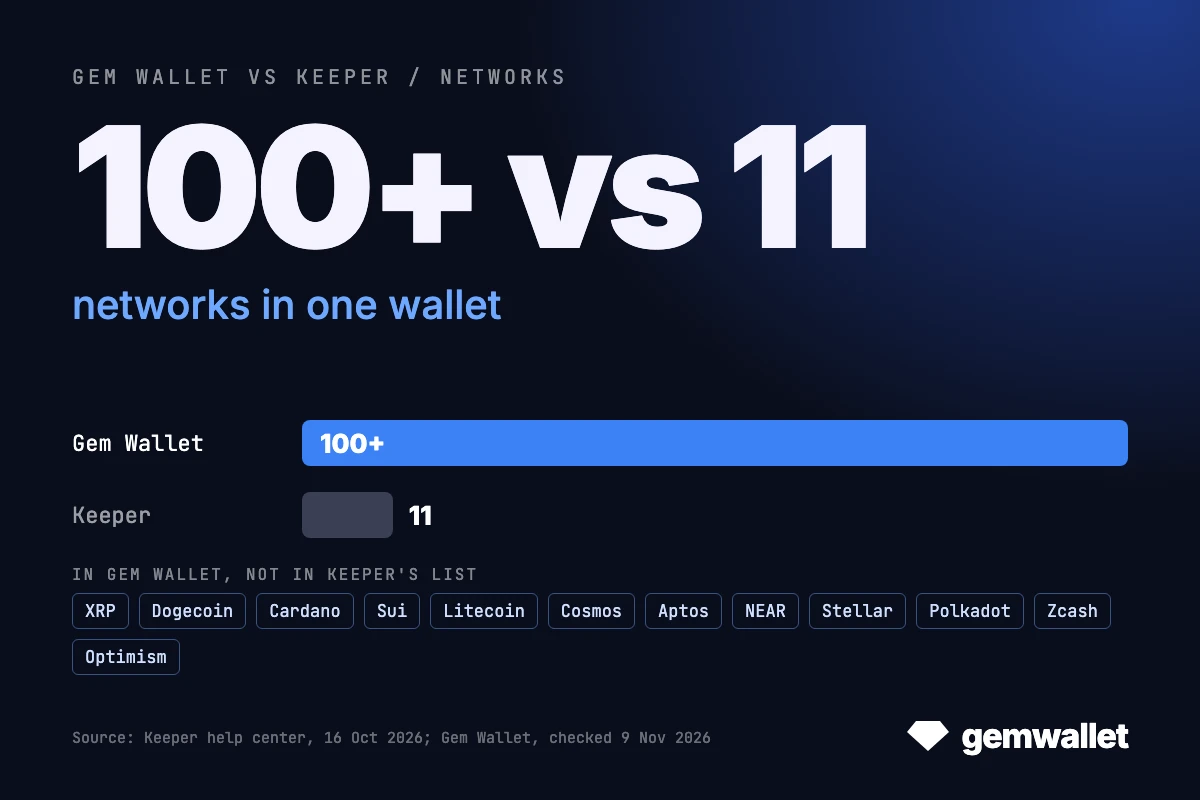
Tonkeeper and Gem Wallet are both self-custodial wallets with no account or KYC, and both hold GRAM, USDT on TON and TRON, jettons and TON NFTs. Two things set them apart. The first is reach: Tonkeeper, now called Keeper, supports 11 networks according to its help center (16 October 2026), while Gem Wallet supports 100+. The second is who pays the network fee: Tonkeeper’s Battery and gasless transfers let a Tonkeeper service cover it, so USDT moves without GRAM or TRX, while in Gem Wallet you send every transaction to the blockchain yourself and pay the fee in the network’s own coin. This comparison explains both, with sources, as of November 2026.
Gem Wallet vs Tonkeeper: our verdict
Gem Wallet is the wallet for everyday crypto, and it suits most people: it holds TON next to 100+ networks such as Bitcoin, Ethereum, XRP, Dogecoin and Sui, sends, swaps, buys, sells and stakes in one app, and covers the everyday tasks of nearly every user. Every transaction goes from your wallet straight to the blockchain, with the fee paid in the network’s own coin and brought down by the protocol’s own tools, such as staking TRX for Energy and Bandwidth; the swap fee is a stated 0.5%, and the code comes with two published 2026 audits. Tonkeeper is the specialist tool for the TON ecosystem: TON Connect and Telegram mini apps, GRAM staking in the app, Ledger and Keystone signing on TON, a desktop app, and Battery and gasless transfers that send USDT without GRAM or TRX. That convenience comes with a service layer: a relay service decides whether and when a gasless transfer reaches the blockchain, and Battery charges are an off-chain balance kept by the service.
Key Takeaways
- Networks: Tonkeeper supports 11 networks, per its help center (16 October 2026); Gem Wallet supports 100+, more than nine times as many.
- Gas: in Tonkeeper, a USDT TRC20 transfer can be paid with 350 to 700 Battery charges instead of 7 to 15 TRX, and gasless TON transfers take the fee from the token you send. Gem Wallet pays fees in the network’s own coin and lets you swap any coin into TRX or GRAM for them.
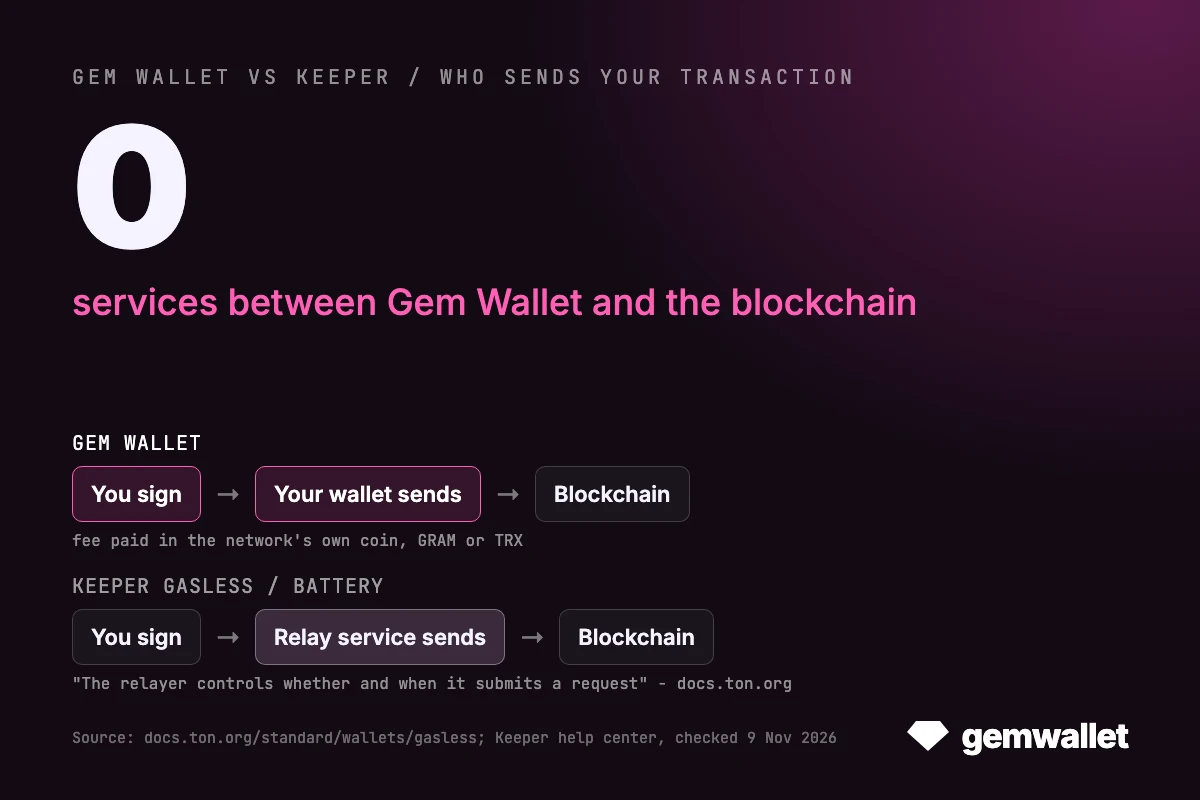
- The trade-off: a gasless transfer is a request you sign and a relay service submits, paying the GRAM. TON’s documentation says the relayer “controls whether and when it submits a request”. In Gem Wallet you send the signed transaction to the network yourself and pay the fee from your own wallet.
- Moving: a 12-word Tonkeeper multichain wallet and Gem Wallet share the Ethereum, Bitcoin, TRON and Solana addresses; on TON the address can differ, because Tonkeeper uses the W5 contract and Gem Wallet uses v4R2.
Open this article in
 ChatGPT
 Gemini
 Grok
 Perplexity
Gem Wallet vs Tonkeeper: Overview
Gem Wallet and Tonkeeper overlap on TON, TRON, Bitcoin, Solana and the main EVM networks; they differ most in network count and in who pays the network fee. Values as of November 2026.
| Feature | Gem Wallet | Tonkeeper (Keeper) |
|---|---|---|
| Started as | Multi-chain mobile wallet | Native TON wallet (iOS app since 2021) |
| Networks | 100+ blockchains | 11: TON, TRON, Bitcoin, Solana, Ethereum, Polygon, BNB Chain, Base, Arbitrum, Avalanche, Robinhood Chain |
| XRP, Dogecoin, Cardano, Sui | Yes | No |
| Who sends the transaction | You, from your wallet | You, or a relay service for gasless transfers |
| Network fee paid in | The network’s own coin | GRAM or TRX, Battery charges, or the token sent (gasless) |
| TON wallet contract | v4R2 | W5 by default, v4R2 supported |
| Recovery phrase | 12 words, BIP-39 | 12 words (multichain wallet); 24 words (older TON wallets) |
| Swap fee | 0.5% | Not published separately; provider fee in the rate |
| Staking | 13 assets, incl. ETH, SOL, TRX, BNB, SUI; no GRAM yet | GRAM liquid staking via Tonstakers |
| TON dApps | WalletConnect; TON Connect on the roadmap | TON Connect and WalletConnect, in-app browser |
| Perpetual futures | Hyperliquid, in the app | Not in the app; Storm Trade as a dApp |
| Mobile apps | iOS, Android (Google Play, APK) | iOS, Android; Telegram mini app |
| Desktop and browser | No extension; desktop app in development | Keeper Pro for Windows, macOS, Linux and web; Chrome extension; multichain there later |
| Hardware wallets | Not yet, on the roadmap | Ledger and Keystone (TON only); Signer app |
| Code | Open source (GPL-3.0) | Open source (GPL-3.0 apps, Apache-2.0 web) |
| Published app audits | CertiK (April 2026), Cure53 (October 2026) | None found |
| Downloads | 1M+ installs | 77M downloads (per Keeper) |
| Store ratings | Google Play 4.5, App Store US 4.5 | Google Play 4.4, App Store US 4.5 |
Checked on 9 November 2026 on keeperwallet.com, the Keeper help center and terms, docs.ton.org, GitHub and the app stores, and in Gem Wallet’s code, docs and app; the sources are linked in each section.
Networks: 11 in Tonkeeper, 100+ in Gem Wallet
Tonkeeper began as the native wallet of TON and added TRON for USDT. On 15 September 2026 it was renamed Keeper and went multichain, per its rebrand article: the app, keys and phrases stayed the same, and tonkeeper.com now redirects to keeperwallet.com. The Chrome extension is still listed as Tonkeeper, and “tonkeeper” is still the name people search for, so this article uses it. The 2026 timeline of both wallets:
- June 2026, GRAM: the TON community voted to rename Toncoin to Gram (ticker GRAM); addresses, balances and phrases stayed the same in both wallets.
- 8 June 2026, Gem Wallet: TON NFTs, including Telegram Gifts, usernames and anonymous numbers.
- 17 August 2026, Gem Wallet: WalletConnect on TON for DeDust, STON.fi, Tonstakers and Storm Trade.
- 15 September 2026, Tonkeeper: renamed Keeper, with Ethereum, Bitcoin, BNB Chain, Arbitrum and Base added to TON and TRON, seven networks in total.
- 16 October 2026, Tonkeeper: the About Keeper page lists 11 networks, adding Solana, Polygon, Avalanche and Robinhood Chain.
- September and October 2026, Gem Wallet: cross-chain Relay swaps on TON on 26 September, DeDust swaps on 19 October, and the Cure53 audit report in October.
The Keeper site says multichain comes to mobile first, with desktop, web and the extension to follow. Gem Wallet supports 100+ blockchains from one recovery phrase, which covers all 11 Tonkeeper networks and many it does not have: XRP, Dogecoin, Cardano, Sui, Litecoin, Cosmos, Aptos, NEAR, Stellar, Polkadot and Zcash, plus EVM networks such as Optimism. None of those 12 is in Tonkeeper’s list. You can also add a token by its contract address and connect your own node.
Both wallets hold USDT on TON and TRON. Gem Wallet holds official USDT on 14 networks, among them TRON, TON, Ethereum, BNB Chain, Solana, Arbitrum and Polygon, plus USDT0 on networks such as Plasma and HyperEVM. If everything you hold is on TON, TRON and the large EVM networks, Tonkeeper’s 11 are enough; once XRP, Dogecoin or Sui come into the picture, Gem Wallet keeps them in the same app.
How Tonkeeper Battery and Gasless Transfers Work
Every transaction on a blockchain pays a network fee in the network’s own coin: GRAM on TON, TRX on TRON. Battery and gasless transfers do not remove that fee. They change who pays it to the network and how you pay them back.
Gasless Transactions on TON: the Mechanism
A gasless transaction lets the wallet owner send without holding GRAM for network fees, according to the TON documentation on gasless transactions. It works in four steps:
- You sign, but do not send. Your wallet builds the transfer, adds a sequence number and an expiry time against replays, and you sign it with your key. The signed request goes to a relay service through its API, not to the blockchain.
- The relayer checks it. Off-chain, the service verifies your signature, the sequence number, the expiry and its payment terms, if any.
- The relayer submits it and pays. The relayer’s own wallet sends your signed request to your wallet as an internal message, attaches enough GRAM for the fee and pays from its own balance.
- Your wallet executes it. Your wallet contract checks your signature on-chain and carries out the transfers you signed.
The wallet contract has to accept such owner-signed internal messages. Wallet V5 (W5) does, through the internal_signed message type: “A relayer can attach Gram to pay network fees and receive USDT as reimbursement. The blockchain still charges network fees in Gram.” TON’s documentation names three ways a relayer gets its GRAM back: a token payment inside the signed request, prepaid credits bought off-chain, or sponsorship, where the relayer pays for you.
Gasless in Tonkeeper
Tonkeeper uses the first model, a payment in the token you send. Per its gasless page, you sign one transaction that sends the tokens to the recipient and a small amount of them to the service; “the service receives your transaction, verifies it, and sends it to the blockchain, paying the fee in Gram.” At the last step of a transfer you choose whether to pay the fee in GRAM or, for example, in USDT. Gasless works only on W5 wallets and for 12 tokens: USDT, jUSDT, NOT, tsTON, DOGS, CATI, HMSTR, CATS, X, MAJOR, PX and BUILD.
Battery in Tonkeeper
Battery is the prepaid model. Tonkeeper’s terms of use define it as “an offchain account measured in charges”, a service that must be prepaid and “does not constitute a bank account”. Per the Battery page:
- Charging: with GRAM, USDT and 12 other TON tokens, in amounts worth $3, or by card as an in-app purchase in the App Store or Google Play.
- Paying: when you start a transaction, Tonkeeper estimates the GRAM needed, credits it to your wallet and deducts the matching charges from your Battery balance. Battery works on all wallet versions and with any tokens.
- Prices: about 5 charges for sending a TON token or NFT, about 130 for a TON swap and about 700 for a USDT TRC20 transfer. Battery does not pay for sending GRAM itself.
- Networks: the help center describes Battery on TON and TRON; the Keeper site lists eight networks.
USDT on TRON in Tonkeeper
TRON charges fees in TRX through two resources, Bandwidth and Energy, and a USDT TRC20 transfer needs Energy. In Tonkeeper that fee can be paid with 0.5 to 2 GRAM, with 350 to 700 Battery charges or, usually, with 7 to 15 TRX, according to its TRON page. Fees for all other TRON tokens are paid only in TRX.
Gasless vs Paying the Fee Yourself: Pros and Cons
What Battery and Gasless Give You
- No gas coin to start with: a new wallet can send USDT on TON or TRON before it holds any GRAM or TRX.
- One balance for many fees: Battery charges cover TON transfers, swaps, NFTs and USDT TRC20, and can be bought by card.
- Your signature still binds: per TON’s documentation, the signature “prevents the relayer from changing authenticated actions or creating a new authorized request”.
What They Take Out of Your Hands
The same documentation lists the limits of the model; they apply to any relay service, not only Tonkeeper’s:
- A service stands between you and the blockchain. With gasless you sign, but the service sends. “The relayer controls whether and when it submits a request”; it can refuse or delay it, and “users depend on relayer uptime, policies, and willingness to serve requests”. If the service is down or declines, the gasless transfer does not go, and the fallback is paying the fee another way, for example in GRAM.
- Timing on swaps. The relayer sees the request before submission and can delay it or submit another transaction first, so a swap “may then fail or execute under changed conditions”.
- Charges are not coins. Battery is an off-chain account kept by the service, not tokens at an address under your keys. For prepaid credits TON’s documentation notes that users trust the relayer to honor the balance, with “no on-chain recourse if the relayer refuses service”. Tonkeeper’s terms also allow dormancy fees after an extended period of non-use and let it change what Battery pays for.
- Privacy. The relay service receives every signed request before the network does. The signature “does not protect privacy, availability, or actions the owner signed”, and a compromised relayer “may also expose request metadata, such as user IP addresses”.
- Not part of the protocol. Gasless is “an application-layer pattern. The blockchain does not enforce or guarantee relayer behavior.”
Gem Wallet’s Approach: Native Blockchain Tools, No Service Layer
Gem Wallet and Tonkeeper solve the same problem, the cost and hassle of network fees, in opposite ways. Tonkeeper adds a service layer on top of the blockchain and asks you to trust it with your transfers; Gem Wallet stays with the tools each blockchain already has, so the path from your keys to the network stays direct. Every transaction is signed on your phone and sent to the network from your own wallet, the fee is paid in the network’s own coin, and no relay service or off-chain balance sits in between. You can even connect your own node.
To make fees cheaper, Gem Wallet uses what the protocols themselves offer:
- TRON Energy and Bandwidth: TRON charges fees through two resources, Energy and Bandwidth, and lets any account get them by staking TRX instead of burning it. In Gem Wallet you can stake TRX for Energy or for Bandwidth: Energy covers USDT TRC20 transfers and Bandwidth covers ordinary transfers, so your regular USDT transfers can cost little or no TRX. The staked TRX stays in your wallet, under your keys.
- The gas coin in one swap: any coin swaps into TRX or GRAM in the app, and USDT swaps into TRX through the built-in SunSwap (the first swap needs a one-time approval, the next ones cost less).
- TON: a small GRAM balance covers jetton transfers, paid straight to the network.
The difference is in the approach. With Battery and gasless transfers you pay for convenience by handing part of the control over your transfers to an intermediary. With Gem Wallet you keep control of every transfer and bring its cost down with the blockchain’s own mechanisms, which makes it the more blockchain-native wallet of the two. The trade-off is one extra step at the start: a little TRX or GRAM, or staked TRX, before your first USDT transfer.
Moving Between Tonkeeper and Gem Wallet
Since the rebrand, Tonkeeper has two kinds of wallets, per its help center. Older TON wallets use a 24-word phrase whose words come from the BIP-39 list but turn into keys TON’s own way, so no other wallet reads it as BIP-39. New multichain wallets use a 12-word BIP-39 phrase, and their derivation paths, published in Tonkeeper’s open-source web wallet code, match Gem Wallet’s:
| Network | Tonkeeper multichain wallet | Gem Wallet | Same address |
|---|---|---|---|
| Ethereum, BNB Chain, Base, Arbitrum, Polygon, Avalanche | m/44’/60’/0’/0/0 | m/44’/60’/0’/0/0 | Yes |
| Bitcoin, native SegWit (bc1q) | m/84’/0’/0’/0/0 | m/84’/0’/0’/0/0 | Yes |
| TRON | m/44’/195’/0’/0/0 | m/44’/195’/0’/0/0 | Yes |
| Solana | m/44’/501’/0’/0' | m/44’/501’/0’/0' | Yes |
| TON | m/44’/607’/0’, W5 contract by default | m/44’/607’/0’, v4R2 contract | Only for a v4R2 wallet |
A wallet contract is the smart contract that holds GRAM and jettons on TON; the same key gives a different address under v4R2 and under W5. Tonkeeper’s gasless transfers need W5.
- Multichain wallet to Gem Wallet: in Tonkeeper open Settings > Recovery phrase, then in Gem Wallet tap Import an Existing Wallet > Multi-Coin. EVM, Bitcoin, TRON and Solana balances appear at once; GRAM and jettons on a W5 address move by a transfer to your Gem Wallet TON address.
- Older 24-word TON wallet: open the Gem Wallet TON address with Receive and send GRAM, USDT, other jettons and TON NFTs there from Tonkeeper.
- Gem Wallet to Tonkeeper: import the phrase with Add wallet > Existing wallet. Tonkeeper’s import code picks the v4R2 contract when only the v4R2 address holds funds, so a funded Gem Wallet TON address shows up as it is.
TON in Both Wallets: GRAM, Jettons, NFTs and dApps
Tonkeeper is the deeper TON wallet: it supports W5 and TON Connect, and its help center covers TON DNS, multisig and Telegram-based two-factor confirmation. Gem Wallet covers everyday TON use inside a wallet for other networks too.
- GRAM and jettons: both hold GRAM, USDT on TON and other jettons; Gem Wallet’s jetton wallet is the same app that holds your bitcoin and TRX.
- NFTs: both show TON NFTs; in Gem Wallet Telegram Gifts, usernames and anonymous numbers appear in Collectibles. Tonkeeper adds verification labels and TON DNS management.
- dApps: Tonkeeper has an in-app browser and TON Connect, TON’s own standard for connecting a wallet to an app, and also runs as the @tonkeeper mini app in Telegram. Gem Wallet connects to TON dApps that offer WalletConnect, such as DeDust, STON.fi, Tonstakers and Storm Trade; TON Connect support is on its roadmap, and it has no Telegram mini app.
More on the network: what is the TON blockchain and the Gram wallet in Gem Wallet.
Swaps, Staking and Trading
Gem Wallet charges 0.5% per swap, and the quote shows every fee and the amount you get before you confirm. Tonkeeper does not publish a separate swap fee: its swap guide says the provider fee is built into the exchange rate. Fee example: a $1,000 GRAM to USDT swap costs $5 in Gem Wallet fees plus the TON network fee; in Tonkeeper the cost shows only inside the quote, so compare both quotes for the same amount at the same moment.
- Swaps on TON: Gem Wallet swaps through STON.fi and DeDust and names the provider of each quote; Tonkeeper’s help center does not name its providers.
- Cross-chain: Tonkeeper swaps between its 11 networks in the app, in about 1 minute on TON, TRON, Base and Arbitrum, 3 on Ethereum and 20 on Bitcoin. Gem Wallet swaps TON with other networks through Relay and Swaps.xyz, and the rest of its 100+ networks through THORChain, Chainflip, Across and others; you can pick another provider before you confirm.
- Staking: Tonkeeper stakes GRAM through Tonstakers from 1 GRAM and gives tsTON; unstaking completes after the current cycle, about 18 hours, per its staking page. Gem Wallet offers native staking of 13 assets: ETH, BNB, SOL, TRX, ATOM, OSMO, APT, SUI, TIA, INJ, SEI, HYPE and MON. Built-in GRAM staking is not available yet; Tonstakers can be reached from Gem Wallet over WalletConnect.
- Buying and selling: Tonkeeper uses Mercuryo, MoonPay, AvanChange and the Telegram Wallet P2P market, per its top-up page; Gem Wallet uses MoonPay, Banxa, Mercuryo and others, and you can sell crypto to fiat in the app. KYC is done by the provider in both.
- Stocks and perps: Tonkeeper trades Backed stock tokens such as TSLAx and SPYx against USDT on TON; Gem Wallet has xStocks on Solana, Robinhood Chain stock tokens and Hyperliquid perps with a taker fee of at most 0.09%. Tonkeeper has no perps of its own; Storm Trade is listed among its dApps.
Is Tonkeeper Safe? Security and Open Source
Both wallets are self-custodial and open source: keys are created and kept on your phone, and the code of both can be read on GitHub.
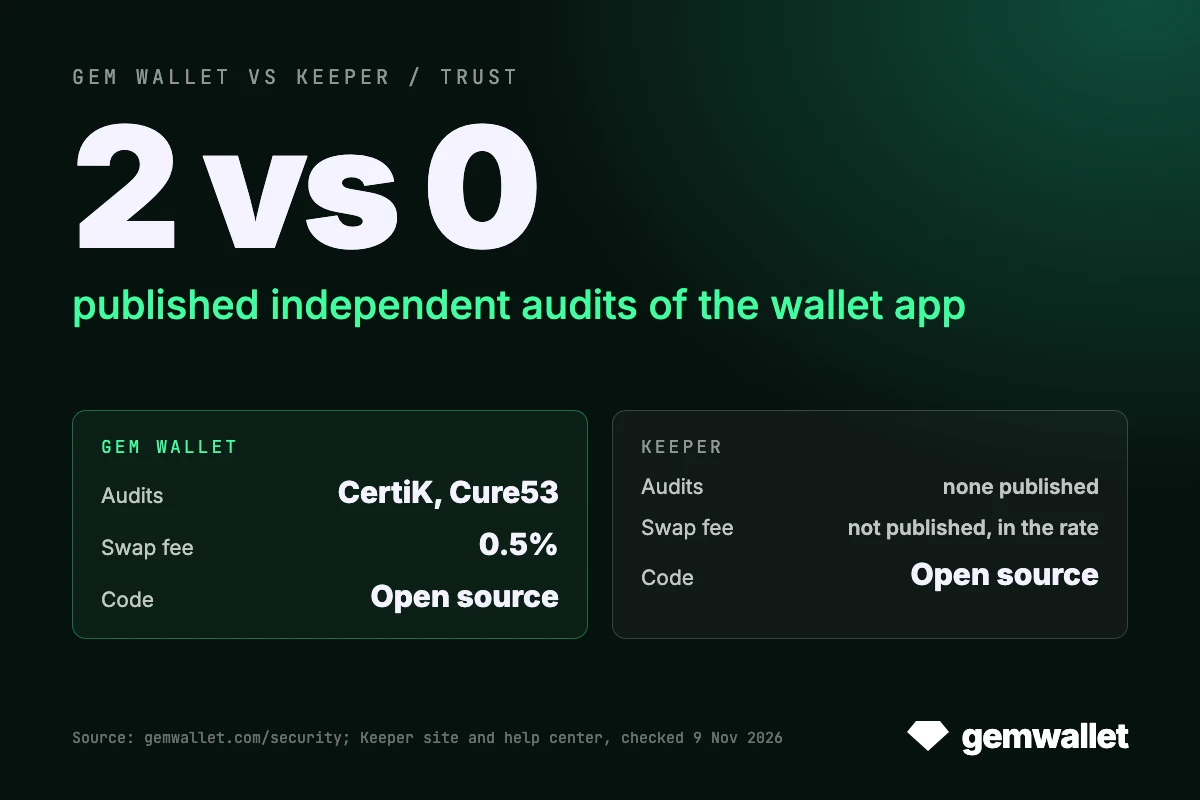
- Tonkeeper: iOS and Android apps under GPL-3.0 and the web, desktop and extension wallet under Apache-2.0 on GitHub; no independent audit report of the app published on keeperwallet.com, in the help center or on GitHub, as of 9 November 2026; a bug bounty of up to $30,000; Telegram two-factor confirmation on W5 wallets in Tonkeeper Pro, the Signer app, and Ledger and Keystone for TON only.
- Gem Wallet: iOS and Android apps and their shared Rust core under GPL-3.0 on GitHub, with a reproducible build on F-Droid (more in open-source crypto wallet); audits by CertiK in April 2026 and Cure53 in October 2026, both on the security page; a responsible disclosure program rather than a cash bug bounty; HashDit and GoPlus risk checks before a send, swap or approval; keys in Apple Keychain on iOS and Google Tink on Android.
Tonkeeper gives TON users more ways to sign, from Telegram 2FA to a Ledger; Gem Wallet gives every user audit reports anyone can read. Hardware wallets are not supported in Gem Wallet yet; they are on the roadmap.
Platforms and Ratings
Tonkeeper runs on more platforms: iOS and Android, Keeper Pro for Windows, macOS and Linux, a web wallet, a Chrome extension and a Telegram mini app, with multichain on mobile first. Gem Wallet lives on the phone: iOS from the App Store, Android from Google Play or as an APK. There is no browser extension, and a desktop app is in development; on a computer, Gem Wallet signs for websites through WalletConnect by scanning the site’s QR code.
Tonkeeper is by far the larger wallet: its App Store description claims 77 million downloads, and it has 10M+ installs on Google Play. As of 9 November 2026 it is rated 4.5 on the US App Store from 3,924 ratings and 4.4 on Google Play from about 145,000 reviews; Gem Wallet is rated 4.5 on both, from 363 ratings and about 4,460 reviews, with 1M+ installs across all platforms.
Is Tonkeeper Better Than Gem Wallet?
Tonkeeper is better than Gem Wallet for specialist work inside the TON ecosystem:
- You send USDT without GRAM or TRX: Battery and gasless transfers pay the fee on TON and TRON, and you accept that a relay service submits gasless transfers and keeps your charges.
- You use Telegram mini apps: TON Connect and the @tonkeeper mini app connect where TON apps expect them.
- You stake GRAM or sign with hardware: Tonstakers is built in, and Ledger, Keystone and Signer work for TON, also on desktop.
Gem Wallet is the better choice for most people and for everyday use:
- You hold coins Tonkeeper does not list: XRP, Dogecoin, Cardano, Sui, Litecoin and 100+ networks in one app.
- You want full control of each transfer: the transaction goes from your wallet straight to the blockchain, with no intermediary, and fees come down through native tools such as TRX staking for Energy and Bandwidth.
- You want known costs and audited code: a 0.5% swap fee with the provider named, 13 staking assets, Hyperliquid perps and two independent audit reports from 2026.
Final Thoughts
Gem Wallet is the wallet most people need for everyday crypto: 100+ networks in one app, the everyday TON work covered from GRAM and USDT to Telegram Gifts and STON.fi swaps, and every transaction sent by you straight to the blockchain, with fees lowered by the protocol’s own tools rather than by a service in the middle. Tonkeeper, now stretching to 11 networks under the Keeper name, is the specialist tool for deep TON work: TON Connect and Telegram mini apps, GRAM staking, hardware signing on TON, and Battery and gasless transfers that trade some control for not holding a gas coin. If your crypto is more than TON, start with Gem Wallet; a Tonkeeper multichain phrase opens most of its addresses there, and the rest moves with one transfer.
See also Gem Wallet vs Trust Wallet, Gem Wallet vs Phantom, Gem Wallet vs MetaMask and Gem Wallet vs Exodus.
Disclaimer: This article is for informational and educational purposes only and is not financial or investment advice. Crypto assets are highly volatile, and you can lose all the money you invest. Do your own research and make decisions at your own risk.