# Gem Wallet vs Ledger (2026): A Free Ledger Alternative, Hot vs Cold Wallet, Cost and Security
> Gem Wallet is a free Ledger alternative: a mobile hot wallet against a $69 to $399 hardware cold wallet. Switch to Gem Wallet or split your crypto between both: cost, security, fees and daily use compared, November 2026.
Gem Wallet and Ledger solve different problems. Gem Wallet is a free, open-source mobile wallet for 100+ blockchains: a hot wallet you use every day to hold, send, swap and stake crypto. Ledger, founded in Paris in 2014, makes hardware wallets: devices that keep the keys offline on a certified secure chip and sign each transaction on their own screen, a cold wallet for savings. This comparison shows where each one is better and two ways to use Gem Wallet as a Ledger alternative.
> **Gem Wallet vs Ledger: our verdict**
>
> **Gem Wallet is a free Ledger alternative, and there are two good ways to use it.** If you want one wallet on your phone with no device to buy, carry and connect, **switch fully to Gem Wallet**: create a new wallet and send your funds to it. If you like your Ledger, **keep it and split your crypto**: savings stay cold on the Ledger, and the money you use often (USDT for living costs, swaps, DeFi, staking) sits in Gem Wallet. Two wallets with two separate phrases are safer than everything in one place.
> **Key Takeaways**
>
> - **Hot and cold:** Gem Wallet keeps keys in your phone's secure storage and signs in the app; Ledger keeps keys offline and signs on the device.
> - **Cost:** Gem Wallet is free; a Ledger signer costs $69 to $399, as of November 2026.
> - **Use both:** Ledger for long-term savings, Gem Wallet for spending, swaps and staking, each with its own recovery phrase.
## Gem Wallet vs Ledger: Overview
Gem Wallet is software on your phone; Ledger is a device plus the free Ledger Wallet app (called Ledger Live until October 2025). Values as of November 2026.
| Feature | Gem Wallet | Ledger |
| --- | --- | --- |
| Type | Mobile hot wallet | Hardware cold wallet (signer) + Ledger Wallet app |
| Price | Free | Device $69 to $399; app free |
| Where keys are kept | Phone's secure storage (Apple Keychain, Google Tink), encrypted | Secure Element chip (CC EAL5+ or EAL6+) on the device |
| How you sign | In the app on your phone | On the device screen |
| Platforms | iOS, Android (Google Play, APK); desktop in development | Device + app for Windows, macOS, Linux, iOS, Android |
| Networks and assets | 100+ blockchains | 15,000+ coins and tokens (Ledger's figure) |
| Recovery phrase | 12 words, BIP-39 | 24 words, BIP-39 |
| Code | Whole app open source (GPL-3.0) | App open source (MIT); device OS partly closed |
| Swap fee | 0.5% | A "Ledger fee" in each quote; about 1.5% on THORChain swaps, other providers vary |
| Staking | 13 assets, incl. ETH, SOL, TRX, BNB, ATOM, SUI | 30+ networks |
| Perpetual futures | [Hyperliquid perps](https://gemwallet.com/perpetuals/), incl. stocks, gold and oil | Hyperliquid, via Yield.xyz |
| Hardware wallets | Not yet, on the roadmap | Is the hardware wallet; also signs for MetaMask, Phantom and others |
| Paid backup | None | Ledger Recover, $99.99 per year, optional |
| Store ratings (app) | Google Play 4.5, App Store US 4.5 | Google Play 4.5, App Store US 4.9 |
*Values checked on 19 November 2026 on ledger.com, shop.ledger.com, the Ledger developer docs, GitHub and the app stores, and in the Gem Wallet app, docs and code.*
## Two Ways to Use Gem Wallet as a Ledger Alternative
Gem Wallet can replace a Ledger completely or work next to it, and the choice depends on how much you hold and how often you move it.
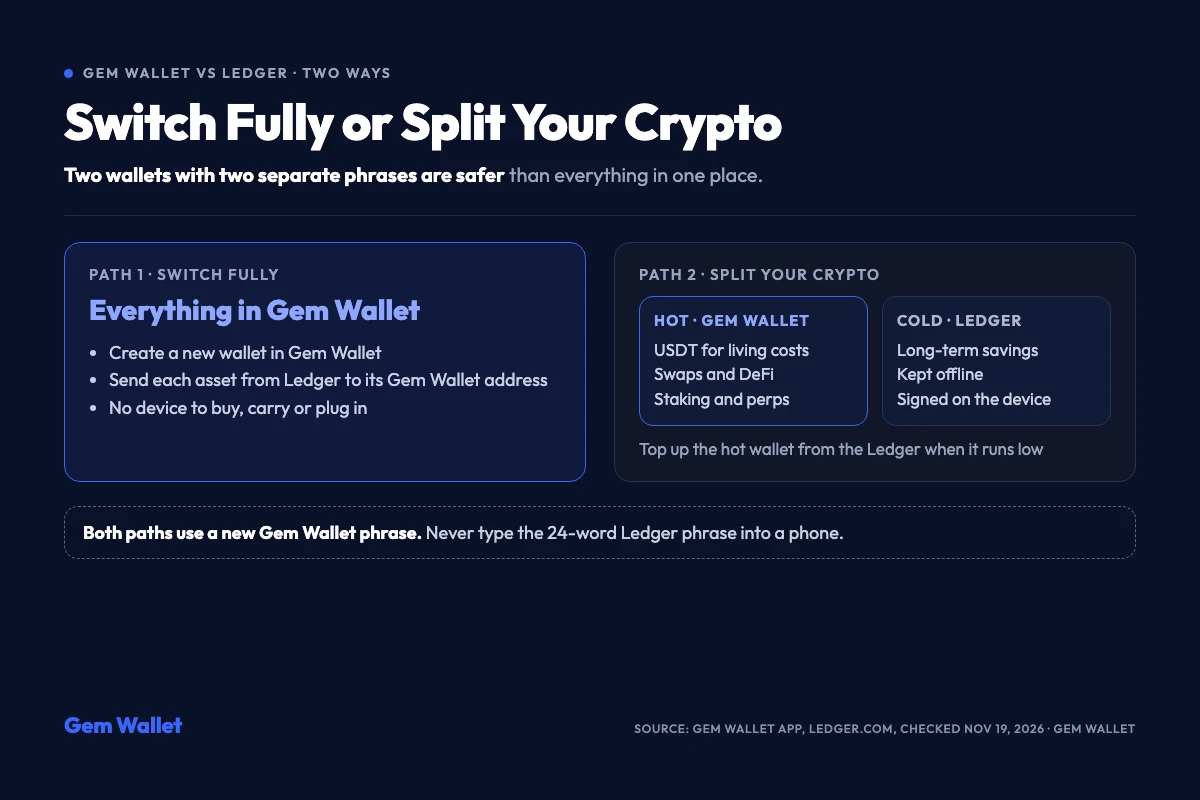
*Two ways to use Gem Wallet as a Ledger alternative, as of 19 November 2026.*
### Path 1: Switch Fully to Gem Wallet
This path suits people who want everything on the phone and no device to keep, charge and plug in.
1. **Create a wallet:** in Gem Wallet tap Create a New Wallet and write down the 12 words on paper.
2. **Send from Ledger:** in Ledger Wallet, connect the device and send each asset to its Gem Wallet receive address on the same network.
3. **Check the balances:** the assets appear in Gem Wallet after the network confirms the transfers.
### Path 2: Split Your Crypto Between Hot and Cold
This path suits people who like their Ledger and want daily use to be fast:
- **Cold, on the Ledger:** savings you do not plan to touch for months, kept offline and signed on the device.
- **Hot, in Gem Wallet:** USDT for living costs, coins to swap, assets you stake or use in DeFi and on Hyperliquid.
- **Top up when needed:** when the hot balance runs low, send a new portion from the Ledger, the same way you move cash from savings to a current account.
**Do not type the Ledger phrase into a phone.** Gem Wallet accepts 12- to 24-word BIP-39 phrases, so a Ledger phrase would import, but Ledger itself says the 24 words should be entered only on a hardware wallet, and once typed on a phone the cold keys become hot. Both paths above use a new Gem Wallet phrase and regular transfers.
## Hot Wallet and Cold Wallet: What Each One Protects
Gem Wallet and Ledger guard the same thing, your private keys, with different trade-offs between protection and speed. The full background is in our guide to [hot and cold wallets](https://gemwallet.com/learn/hot-wallet-vs-cold-wallet/).
### Gem Wallet
- **Key storage:** the recovery phrase is encrypted (Argon2id and AES-256-GCM) and the password is held in Apple Keychain on iOS or protected by Google Tink and the Android Keystore; the phrase is hidden from the app switcher.
- **Checks before signing:** HashDit and GoPlus check sends, swaps and token approvals, and a spam filter hides the tiny transfers used for address poisoning.
- **Limit:** a phone is connected to the internet, so its security depends on the device itself; keep the operating system updated.
### Ledger
- **Key storage:** keys stay in a Secure Element chip certified CC EAL5+ (Nano X) or EAL6+ (other models) and never leave the device, per Ledger.
- **Signing:** every transaction is confirmed on the device screen, with Clear Signing in plain language and Transaction Check for risky contracts.
- **Limit:** the device has to be with you and connected to sign; without it the app works only in Watch Mode.
This is why the split works: the Ledger protects what you keep, and Gem Wallet makes what you use quick to reach.
## Cost: Free App vs Hardware Device
Gem Wallet costs nothing to use; Ledger is bought once as a device, with an optional subscription for backup.
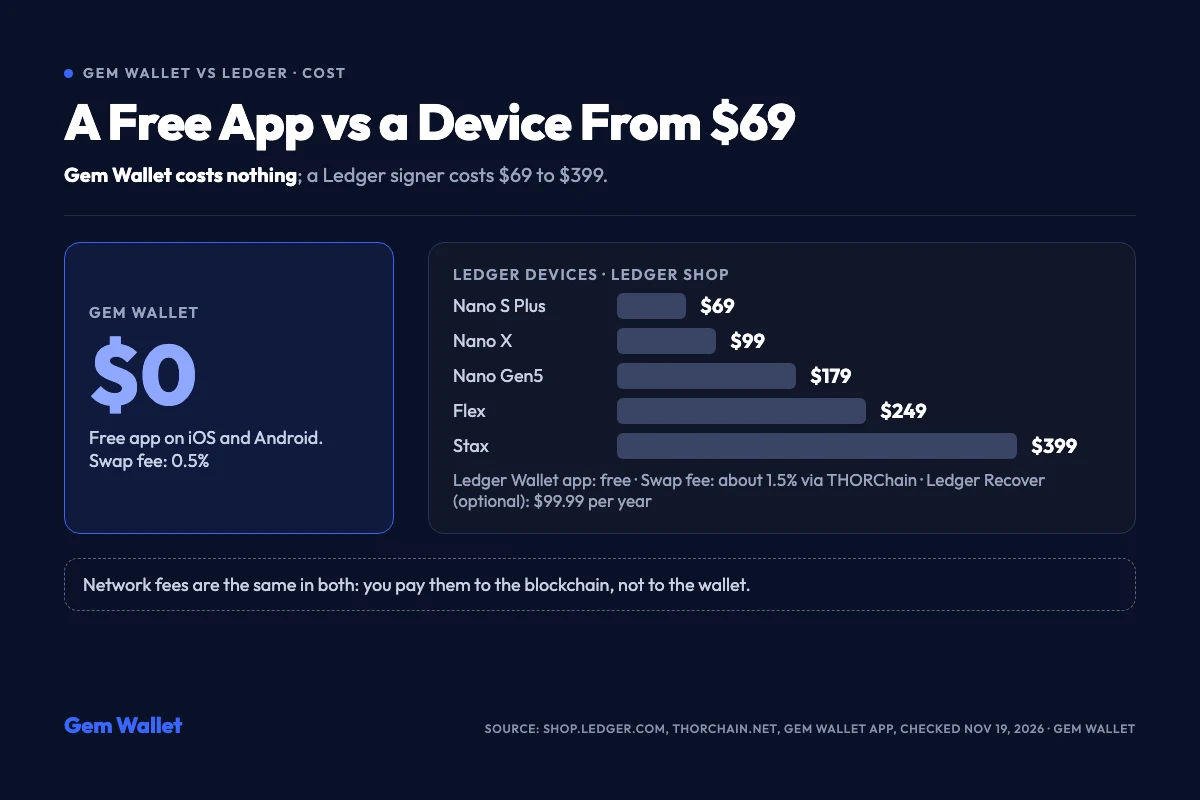
*Prices in the Ledger shop as of 19 November 2026.*
- **Gem Wallet:** free on iOS and Android.
- **Ledger devices:** Nano S Plus $69 (USB-C, does not work with iOS), Nano X $99, Nano Gen5 $179, Flex $249 and Stax $399, per the Ledger shop. The Ledger Wallet app is free.
- **Ledger Recover:** an optional ID-based backup of the phrase, split between Coincover, Ledger and EscrowTech, at $99.99 per year or $9.99 per month.
- **Fees in both:** network fees go to the blockchain and are the same in either wallet; the swap fee is 0.5% in Gem Wallet and about 1.5% in Ledger Wallet on THORChain swaps.
For small balances the price of a device can be a large share of the funds it protects; for savings it is a small, one-time cost.
## Fees for Swaps and Everyday Use
Gem Wallet charges a published 0.5% per swap; Ledger Wallet adds a "Ledger fee" to each swap quote but does not publish its percentage, according to the Ledger developer docs. On swaps routed through THORChain, the Ledger fee is about 1.5%, per THORChain explorer data as of November 2026; with other providers it can differ.
- **Gem Wallet swaps:** on-chain and cross-chain swaps across 100+ blockchains, mostly through protocols such as THORChain, Chainflip, Uniswap and Jupiter. **Fee example:** a $1,000 swap costs $5 in Gem Wallet fees, plus the network fee.
- **Ledger swaps:** 15+ providers, including Uniswap, 1inch and OKX DEX; the total, provider fee and Ledger fee included, is shown in each quote before you confirm. **Fee example:** at about 1.5%, a $1,000 swap through THORChain costs about $15 in Ledger fees, plus the network fee.
- **USDT on TRON:** Gem Wallet sends USDT TRC20 directly, swaps any coin to TRX for fees and has SunSwap built in for cheap USDT to TRX swaps; see our [USDT TRC20 wallet](https://gemwallet.com/trc20-wallet/).
- **Buy and sell:** Gem Wallet works with MoonPay, Banxa, Mercuryo and others; Ledger compares on-ramps such as PayPal, Coinbase Pay, MoonPay and Revolut.
For frequent small swaps and USDT payments the phone is the faster tool; for a rare large move, signing on a Ledger is worth the extra minute.
## Staking, Perps and DeFi
Ledger lists more staking networks, 30+, while Gem Wallet stakes 13 assets; both offer perpetual futures on Hyperliquid.
- **Staking:** Gem Wallet stakes ETH, SOL, TRX, BNB, ATOM, SUI and other assets on our [staking](https://gemwallet.com/staking/) list; Ledger stakes on 30+ networks. Neither charges a staking fee of its own (per Ledger for Ledger); in both, the chosen validator takes its commission from rewards.
- **Perps:** Gem Wallet trades [perpetual futures](https://gemwallet.com/perpetuals/) on Hyperliquid from $5, including stocks, gold and oil; Ledger offers perps settled on Hyperliquid through Yield.xyz and does not publish its minimum order.
- **DeFi and dApps:** Gem Wallet connects to dApps with WalletConnect; Ledger opens dApps inside Ledger Wallet and can sign for MetaMask, Phantom and other wallets.
If you stake and trade often, keeping those funds in Gem Wallet saves plugging in a device for every action.
## Open Source and Audits
Gem Wallet publishes the code of the whole app; Ledger publishes the code of its app, while the low-level code of the secure chip stays closed under its agreement with the chip maker.
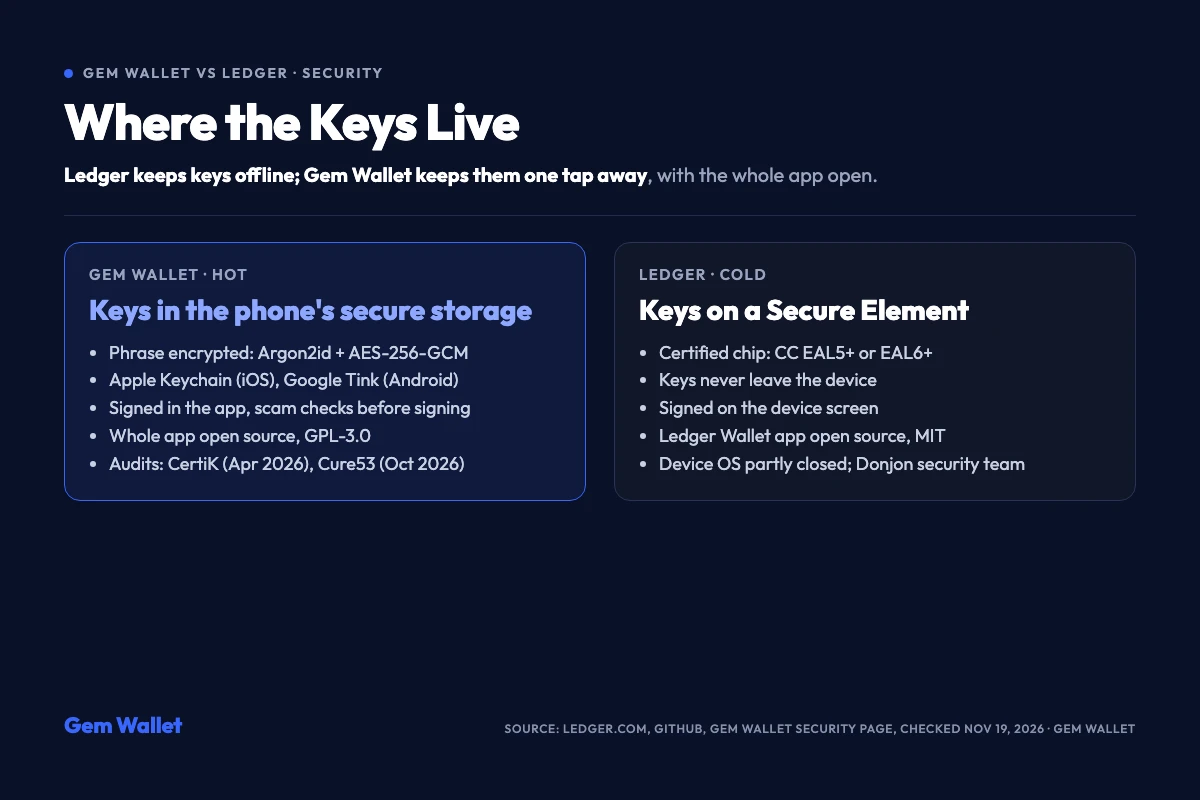
*Security model of both wallets as of 19 November 2026.*
- **Gem Wallet:** both mobile apps and the Rust core are public under GPL-3.0 on GitHub, the F-Droid build is [reproducible](https://gemwallet.com/security/reproducible-builds/), and CertiK (April 2026) and [Cure53 (October 2026)](https://gemwallet.com/learn/gem-wallet-completes-cure53-security-audit/) reports are on the [security page](https://gemwallet.com/security/).
- **Ledger:** the Ledger Wallet app is open source under MIT on GitHub; Ledger describes its device OS as partly reviewable and runs its own security team, Donjon, with a bug bounty paid in bitcoin.
Both models let you check a lot; the difference is that Gem Wallet's whole app is public, while Ledger relies on a certified chip whose lowest layer cannot be read.
## Platforms and Recovery Phrase
Ledger runs on desktop and mobile with a device; Gem Wallet runs on iOS and Android with no device and a desktop app in development.
- **Gem Wallet:** iOS and Android (Google Play and APK), no browser extension; a 12-word phrase created in the app.
- **Ledger:** the device plus Ledger Wallet for Windows, macOS, Linux, iOS and Android; a 24-word phrase created on the device, with a Recovery Key card in the box of newer models.
- **Hardware support:** Gem Wallet does not connect hardware wallets yet; it is on the roadmap.
Keep each phrase on paper, never in photos or notes, and never enter the Ledger phrase anywhere but a Ledger.
## Is Ledger Better Than Gem Wallet?
Ledger is better for large savings you rarely touch; Gem Wallet is better for crypto you use.
- **Pick Ledger** if you hold a large amount for the long term, want keys that never touch an internet-connected device, or need a hardware signer for MetaMask and other wallets.
- **Pick Gem Wallet** if you want a free wallet on your phone for USDT, swaps, staking and perps, with the whole app open source.
- **Pick both** if you already have a Ledger: savings stay cold, everyday money goes to Gem Wallet, and each wallet keeps its own phrase.
## Final Thoughts
A hardware wallet and a phone wallet are not rivals so much as two layers. If carrying a device is not for you, Gem Wallet does the whole job on the phone, free. If you like your Ledger, keep it for savings and let Gem Wallet handle the money that moves.
More comparisons: [Gem Wallet vs Trust Wallet](https://gemwallet.com/learn/gem-wallet-vs-trust-wallet/), [Gem Wallet vs MetaMask](https://gemwallet.com/learn/gem-wallet-vs-metamask/) and [Gem Wallet vs Exodus](https://gemwallet.com/learn/gem-wallet-vs-exodus/).