# Bitget, KuCoin and HTX Have Left the Russian Market: Which Alternative to Choose in 2027
> Bitget, KuCoin and HTX no longer serve Russia, and a password change can block withdrawals for a day. Learn how to withdraw and which wallet to choose in 2027.
In October 2026, Bitget updated its terms for users from Russia, Belarus, and Kazakhstan, KuCoin announced the discontinuation of services in Russia and Belarus, and the HTX User Agreement, updated in September, lists Russia among prohibited countries. Here is how to withdraw crypto from these exchanges and which alternative lets you store and use it safely in 2027 - your own self-custody crypto wallet, such as Gem Wallet.
> **Key Takeaways**
>
> - **Three exchanges in two months:** The HTX User Agreement, updated in September 2026, lists Russia among prohibited countries, Bitget updated its terms in October, and KuCoin announced the discontinuation of services on October 29.
> - **The withdrawal deadline is not the same for everyone:** Bitget and KuCoin state deadlines in notifications, some Bitget clients could withdraw until October 21, and HTX did not name a common date.
> - **A day without withdrawals:** Bitget blocks withdrawals for 24 hours after a password change, and KuCoin does so after a change of two-factor authentication or the trading password, so it is better not to touch security settings on the day of withdrawal.
## What Happened to Bitget, KuCoin and HTX
In autumn 2026, Bitget, KuCoin and HTX restricted services for users from Russia, and none of the three exchanges set a single date for everyone. The table below shows what each exchange announced in September-October 2026, who is affected, and where to find your deadline.
| Exchange | When | Who is affected | Deadlines |
|---|---|---|---|
| Bitget | October 2026 | Russia, Belarus, Kazakhstan | According to client emails: no new trades from October 18, withdrawals until October 21 for some clients, then automatic closing of positions; for others, deadlines are in the notification |
| HTX | September 2026 | Users from Russia | No common withdrawal date; account closure with 7 business days' notice |
| KuCoin | October 29, 2026 | Russia, Belarus | Deadlines for closing positions and withdrawing are in the account notification |
Each of the three exchanges kept the right to decide what happens to your assets after the deadline:
- **Bitget:** In the Terms of Use, Russia, Belarus, and Kazakhstan are on the list of prohibited countries, and the exchange can close positions, restrict withdrawals, and convert assets.
- **KuCoin:** In the announcement of October 29, the exchange cited legal and regulatory requirements and promised an orderly termination so that you have time to close positions and withdraw assets.
- **HTX:** In the User Agreement, updated in September 2026, Russia is on the list of countries whose users are prohibited from using all services, and the exchange can freeze withdrawals without notice and close an account with 7 business days' notice, so it is better not to keep a large balance there.
KuCoin separately warned about phishing links: emails about withdrawals are a convenient pretext for scammers. We recommend opening the exchange app yourself and not following links from emails.
## Why Exchanges Leave Countries
KuCoin explained its exit by legal and regulatory requirements, and such requirements are changing not only in Russia but all over the world.
In Russia, the rules for users themselves are changing too: according to the Bank of Russia's answers to questions about digital currencies, from July 1, 2027, residents may carry out transactions and operations with crypto only through licensed brokers and exchangers.
In the European Union, from July 1, 2026, only platforms authorized under the MiCA regulation work with clients, and Binance France, according to a letter to clients, is closing accounts from December 31, 2026. European Binance clients are now solving the same task, and we have a separate article for them - ["Binance Is Leaving the EU"](https://gemwallet.com/learn/binance-is-leaving-the-eu-after-failing-mica-take-these-3-steps-to-protect-your-crypto/).
You could keep USDT on an exchange for years, trade and save, and one day learn from a notification that you have a few days left to withdraw. Moving to another exchange is not a solution: it is subject to the same regulatory requirements and may one day close access for your country as well. It is safer not to keep a large balance on an exchange and to store crypto in a wallet under your full control.
## Which Alternative to Exchanges to Choose in 2027
The alternative to an exchange account is your own self-custody crypto wallet: in Gem Wallet, a mobile wallet for iOS and Android with support for more than 100 blockchains (as of November 2026), keys are stored only on your device. In your own wallet, coins stay at your address, and only you decide when to store, send, or swap them.
The table below shows how an exchange account differs from your own wallet on four questions that clients of Bitget, KuCoin and HTX faced in autumn 2026.
| Question | Exchange account | Your own Gem Wallet |
|---|---|---|
| Who holds the keys | The exchange | Only you, on your phone |
| Who can restrict access | The exchange, if it stops serving your country | A self-custody wallet cannot freeze your assets |
| Who restores access | The exchange's support | Only you, with the secret phrase |
| Withdrawal deadline on exit | As stated in the exchange's notification | No deadline |
**Here is what those who move from Bitget, KuCoin and HTX get in Gem Wallet:**
- **Self-Custody Wallet:** Your coins sit at your address on the blockchain, not in a company's account, and only you have the keys to them - so access to them does not depend on an exchange's decision to work in your country or on withdrawal deadlines.
- **Open Source:** Gem Wallet is [fully open source](https://gemwallet.com/open-source-crypto-wallet/), and any developer can check how the wallet handles your keys, while security was confirmed by the CertiK audit in April 2026 and the Cure53 audit with a report from October 2026.
- **Privacy Without KYC:** The wallet does not need a passport, phone number, or email, and Gem Wallet does not collect personal data.
- **Built-in DEX Aggregator:** On-chain and cross-chain [swaps](https://gemwallet.com/swap/) are available right in the wallet - [BTC](https://gemwallet.com/bitcoin-wallet/) to [USDT](https://gemwallet.com/usdt-wallet/) on TRC20 and back, ETH to USDC, SOL to BNB, and many other pairs - through connected DEX providers THORChain, Uniswap, PancakeSwap, Relay, Chainflip, and others.
- **Staking:** [Staking](https://gemwallet.com/staking/) in Gem Wallet works on more than 10 networks - for TRX, BNB, SOL, ETH, HYPE, SUI, ATOM, and other assets (as of November 2026); the wallet offers vetted and reliable validators, among them Everstake, Stakin, StakeShark, and others, or you choose a validator yourself. [TRX staking](https://gemwallet.com/tron-staking/) also gives energy that partially or fully covers the fee for USDT transfers on [TRC20](https://gemwallet.com/trc20-wallet/).
- **Perpetual Futures:** Everything you traded on an exchange, without the exchange - [perpetual futures](https://gemwallet.com/perpetuals/) on Hyperliquid for BTC, gold, and stocks right from your own wallet: long and short on 100+ markets with leverage from 1x to 50x depending on the market, with stop loss and take profit.
- **Buying With a Credit Card:** You can [buy crypto](https://gemwallet.com/buycrypto/) with a credit card through payment providers - Mercuryo, Paybis, and others; whether the payment goes through depends on the bank that issued your credit card and on the provider.
A [self-custody wallet](https://gemwallet.com/self-custody-wallet/) removes the dependence on an exchange and its decisions and gives you secure and private control over your crypto. Along with full control comes responsibility for the assets: access to them and every transfer are now in your hands. Here are a few rules that will help you store crypto with peace of mind:
- **Secret Phrase on Paper:** Write down the 12 words by hand and keep them offline, with no screenshots, phone notes, or cloud storage.
- **The Phrase Is Only Yours:** Gem Wallet does not store or receive your secret phrase, so anyone who asks for it is a scammer.
- **Address and Network Before Sending:** A blockchain transfer is irreversible, so check the first and last characters of the address and the network every time.
- **USDT and the Issuer:** USDT is issued by Tether, and under its terms an address with USDT can be frozen by the issuer - this applies to any wallet and any exchange.
- **Native Token for the Fee:** The network fee is charged in the network's native token - TRX on TRON, ETH on Ethereum, BNB on BNB Chain, SOL on Solana, so keep a little of that token on your balance.
## How to Transfer Crypto from an Exchange to Gem Wallet
Gem Wallet receives crypto from Bitget, KuCoin and HTX in four steps:
1. **Create a wallet**
2. **Copy the address**
3. **Withdraw a test amount**
4. **Withdraw the rest**
### Step 1. Create a Wallet and Write Down the 12 Words
Install Gem Wallet, create a new wallet, and write down the secret phrase following the rules above: it is the only way to restore the wallet or import it on another phone.
### Step 2. Copy the Address on the Right Network
Open the coin you need in the wallet, tap Receive, and copy the address, and on the exchange choose the same network as in the wallet: the receiving network and the sending network must match. If you are not sure which network to choose for USDT, see the article ["Which Network Is Best for USDT"](https://gemwallet.com/learn/which-network-is-best-for-usdt-how-to-choose-between-trc20-erc20-and-bep20/).
### Step 3. Withdraw a Test Amount
First, send a small amount from the exchange that is not below its minimum, for example 10 USDT, and wait for it to arrive in the wallet: this way you check the address and the network before moving all your funds. A test withdrawal costs one more fee: as of November 16, 2026, for USDT it ranges from 0.01 USDT on BEP20 at Bitget and HTX to 1.99 USDT on TRC20 at KuCoin.
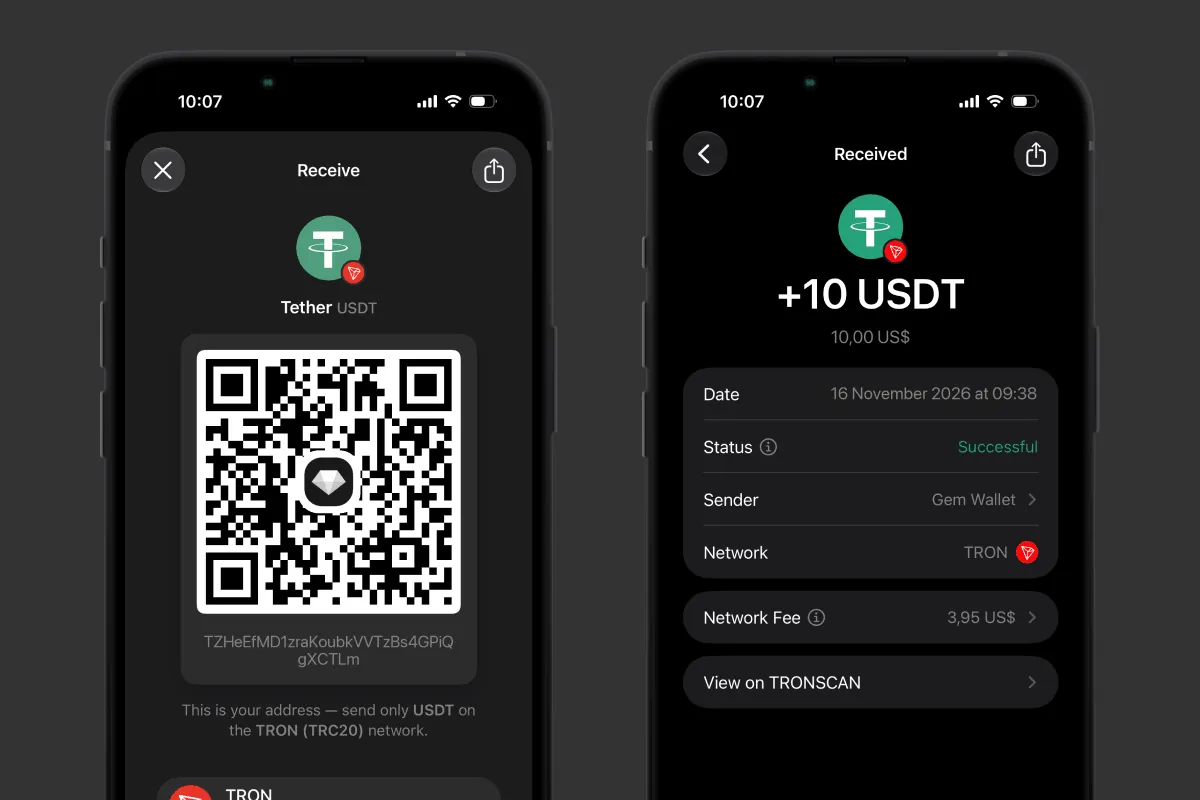
*The USDT address on TRON (TRC20) and the 10 USDT test transfer received in Gem Wallet.*
### Step 4. Move the Rest Before Your Deadline
The rest is a second withdrawal from the exchange to the same address on the same network, and it must be done before the date in your notification. After the withdrawal, look into all accounts on the exchange: coins may remain in Earn, in the futures or trading account, and they are first moved to the spot account or the account used for withdrawals.
## How to Withdraw Crypto from Exchanges
Bitget, KuCoin and HTX withdraw crypto to an external address in the same way: coin, address, network, amount, and confirmation with a code. What differs is the names of the sections, the fees, and the security settings that can delay your withdrawal by a day.
The table below shows the fee and the minimum withdrawal amount for USDT on TRC20, BEP20, and ERC20 at Bitget, KuCoin and HTX, in USDT, according to the exchanges' API data as of November 16, 2026. The fee changes, so check it on the withdrawal page before you withdraw.
| USDT network | Bitget: fee / minimum | KuCoin: fee / minimum | HTX: fee / minimum |
|---|---|---|---|
| TRC20 | 1.5 / 5 | 1.99 / 4 | 1.2 / 1 |
| BEP20 | 0.01 / 5 | 1 / 10 | 0.01 / 1 |
| ERC20 | 0.6 / 5 | 5.5 / 30 | 0.3 / 1 |
According to Gem Wallet's calculation, of the three networks in the table the cheapest USDT withdrawal on all three exchanges is BEP20: at Bitget it is 150 times cheaper than TRC20 (0.01 vs 1.5 USDT), at HTX - 120 times (0.01 vs 1.2 USDT), at KuCoin - half the price (1 vs 1.99 USDT). Keep in mind: you will need a little BNB in the wallet for the fee on your next transfer.
### How to Withdraw Crypto from Bitget
A withdrawal from Bitget in the app takes 5 steps, according to the exchange's guide:
1. **Assets section:** Open Assets and tap Withdraw.
2. **Coin and method:** Choose the coin, for example USDT, and an on-chain withdrawal, not an internal transfer.
3. **Network and address:** Choose the network, for example TRC20, paste your wallet address, and enter the amount.
4. **Fee:** Check the fee and the amount that will arrive in your wallet.
5. **Confirmation:** Enter the code from the email, SMS, or Google Authenticator.
*Important: After a login password change, Bitget disables withdrawals for 24 hours.*
### How to Withdraw Crypto from KuCoin
A withdrawal from KuCoin in the app takes 4 steps:
1. **Withdrawal:** In the Assets section, tap Withdraw.
2. **Coin:** Choose the coin, for example USDT.
3. **Address, amount, and network:** Enter your wallet address and the amount, choose the network, and check it against the network in the wallet.
4. **Confirmation:** Check the fee and pass the security verification.
If your coins are in the trading account, withdraw them directly when the app offers it, or first transfer them to the Funding account.
*Important: After a change of two-factor authentication or the trading password, KuCoin suspends withdrawals for 24 hours.*
### How to Withdraw Crypto from HTX
A withdrawal from HTX in the app takes 3 steps:
1. **Assets section:** Open Assets, tap Withdraw, and choose the coin.
2. **Address and amount:** Choose a withdrawal to a blockchain address, paste your wallet address, and enter the amount.
3. **Confirmation:** Check the details and confirm the withdrawal; for a new address, HTX may additionally verify that it is you making the withdrawal.
*Important: If the whitelist is enabled on HTX - a setting that allows withdrawals only to addresses added in advance - a new address accepts withdrawals not immediately but after a waiting period.*
Install Gem Wallet on iOS or Android, move your crypto from Bitget, KuCoin or HTX to the wallet, and store it safely and privately - at your own address, with keys only you hold and without registration.