

Table of Contents
The best USDT Wallet is the one that sees every network you get paid on and keeps the keys only with you. This matters because more than 650 million people use USDT (Tether, Q2 2026), and the $182.0 billion in circulation (DefiLlama, October 2026) is issued on different networks: half on TRON, the rest on Ethereum, BNB Chain, Solana, TON (The Open Network), and other networks. We’ve picked six popular USDT Wallets and compared them on security, networks, fees, and open-source code.
Key Takeaways
- Half of all USDT sits on TRON: That’s $92.5 billion of the $182.0 billion in circulation (DefiLlama, October 2026), so a wallet without TRON covers only half of the USDT market.
- One wallet for every network: Gem Wallet holds USDT on 23 networks (including networks with USDT0), among them TRON, Ethereum, BNB Chain, Solana, and TON, under one secret phrase and with no KYC.
- The first transfer to a new address on TRON costs twice as much: If the recipient’s address holds no USDT, for example a new wallet, the transfer uses 130,285 energy instead of 64,285, which is 13.03 TRX instead of 6.43 TRX (our calculation on real transfers, October 2026).
What Is a USDT Wallet (Tether Wallet)?
A USDT Wallet is an app or device that stores the keys to your USDT and signs transfers with them. The coins themselves live on the blockchain, and the wallet proves that only you can manage them. USDT from Tether is a stablecoin pegged 1:1 to the US dollar: one USDT usually costs about $1.
The same USDT is issued on different blockchains under different standards: TRC20 on TRON, ERC20 on Ethereum, BEP20 on BNB Chain, SPL on Solana, and Jetton on TON. That’s why the first question to ask any wallet is whether it sees the network you receive USDT on. We explain how a wallet works inside in our guide What Is a USDT Wallet.
A token standard is a set of rules for issuing and transferring a token on a specific blockchain.
Hot vs Cold USDT Wallet
Hot and cold USDT Wallets differ in one thing: whether the key is connected to the internet. That decides both protection and convenience. Read more about the pros and cons of each in Hot Wallet vs Cold Wallet.
Hot USDT Wallet
A hot USDT Wallet keeps the key on a device with internet access: a phone, a browser, or an exchange’s servers. Hot wallets come in two types - custodial and self-custody.
Custodial USDT Wallet
A custodial wallet is your exchange account: the company holds the keys, requires KYC (identity verification with documents), and can stop withdrawals. If the exchange gets hacked, what happens to your USDT depends only on the exchange:
- Bybit: On February 21, 2025, about $1.46 billion was stolen from the exchange, and it covered the loss within three days, according to Bybit CEO Ben Zhou.
- WazirX: On July 18, 2024, more than $230 million was stolen from the exchange, and clients got back about 85% of their balances only after the exchange restarted in October 2025, more than a year later (WazirX blog).
Two exchanges, two outcomes, and in neither case did the clients have a say.
Self-Custody USDT Wallet
A self-custody wallet is the safest option for everyday USDT use: only you have the keys and the secret phrase, neither the developer nor third parties can access your funds, and your assets are never handed over to anyone for safekeeping. No one can block your USDT withdrawals, ask for documents, or cut off your access because of a company’s problems. There is one exception - Tether itself: it can freeze USDT at an address, for example at the request of law enforcement.
Cold USDT Wallet
A cold USDT Wallet is a hardware device that creates and stores the key offline: the transfer is signed inside the device, and the phone or computer only sends the finished transaction to the network.
For a large amount held long term, it’s the most protected option - as long as the device is bought from the official store. But it’s inconvenient for everyday use: unlike a hot wallet, it doesn’t give you instant 24/7 access to your USDT.
Best USDT Wallets Compared
We’ve put six wallets into one table: wallet type, USDT on the five main networks, platforms, and open-source code - based on official websites and apps as of October 2026.
| Wallet | Type | Networks | Platforms | Open source | Best for |
|---|---|---|---|---|---|
| Gem Wallet | Hot | TRC20, ERC20, BEP20, SPL, Jetton | iOS, Android | 100% | USDT on any network |
| TronLink | Hot | TRC20 (+ ERC20, BEP20 in extension) | iOS, Android, extension | Partially | USDT TRC20 only |
| MetaMask | Hot | TRC20, ERC20, BEP20, SPL | iOS, Android, extension | Partially | DeFi on Ethereum |
| Phantom | Hot | SPL, ERC20, BEP20 | iOS, Android, extension | Closed | Solana ecosystem |
| Keeper | Hot | TRC20, ERC20, BEP20, SPL, Jetton (multichain in app) | iOS, Android, macOS, web, extension | Partially | Telegram and TON |
| Ledger | Cold | TRC20, ERC20, BEP20 | Device + app | Partially | Long-term storage |
All six wallets are self-custody, none of them requires KYC to get started, and only Ledger is cold.
Top 6 USDT Wallets in 2027
Gem Wallet comes first in our selection: it’s the only wallet with all five main USDT standards and fully open-source code, and its place is set by five criteria: USDT networks, fees, open-source code, privacy, and scam protection.
The other hot wallets follow the order in which USDT is spread across their main networks: TRON - 50.8%, Ethereum - 39.7%, Solana - 1.6%, TON - 0.3% (according to DefiLlama, October 2026). The cold Ledger closes the list as a separate class.
1. Gem Wallet - All USDT Networks in One App
Gem Wallet is a mobile self-custody USDT Wallet with fully open-source code. While TronLink’s mobile app sees USDT only on TRON, and Phantom only on Solana, Ethereum, and BNB Chain, Gem Wallet gives its users access to USDT on 23 networks (October 2026), including networks with USDT0 - a version of USDT backed 1:1 by USDT on Ethereum, and among them all five main USDT standards. Gem Wallet is listed in the official wallet directories of TRON and Ethereum.
Strengths:
- Full Self-Custody: Your keys and secret phrase are stored only on your phone, and even the Gem Wallet team can’t manage your USDT.
- 100% Open Source: The code of the iOS and Android apps is fully open source and available on GitHub, and the wallet has passed independent security audits by CertiK (April 2026) and Cure53 (October 2026).
- Privacy by Default: Gem Wallet doesn’t collect users’ personal data: to get started, you need neither registration with an email or phone number nor KYC.
- Scam Protection: The wallet checks every transfer, swap, and DApp connection against scam address databases (HashDit, GoPlus, and others, depending on the network), and automatically hides micro-transfers from look-alike addresses (address poisoning) that scammers use to clutter your USDT TRC20 history.
- Transparent Fees: Gem Wallet adds no fee of its own to USDT transfers - you pay only the network fee in its native coin, for example TRX on TRON or ETH on Ethereum.
- Energy From TRX Staking: When staking TRX in Gem Wallet, you can choose energy - the TRON network resource that pays for token transfers - and if you have enough energy, a USDT transfer on TRON uses almost no TRX.
- Built-in DEX Aggregator: In Gem Wallet, you can swap USDT both on-chain and cross-chain - for example, USDT TRC20 to BTC - through DEX providers THORChain, Chainflip, Uniswap, Relay, and others. The Gem Wallet fee is 0.5% per swap and 0.25% for stablecoin swaps on the same network (Gem Wallet docs, October 2026), and it’s already included in the final rate.
- Top Up With a Credit Card: You can buy USDT right in the app through Mercuryo, MoonPay, Paybis, and other providers.
Limitations:
- No Extension or Desktop Version: Gem Wallet works only on iOS and Android, and connects to DApps via WalletConnect right on your phone.
- No Hardware Wallets: You can’t connect a Ledger or another hardware wallet to Gem Wallet yet.
- TRX for TRON Transfers: You can’t pay the fee in USDT itself in Gem Wallet, so to send USDT TRC20 you need TRX or energy. But you can get TRX by swapping any coin right in the app.
Best For: Secure and private everyday USDT storage on any network, swaps, and DeFi with 24/7 access to your crypto.
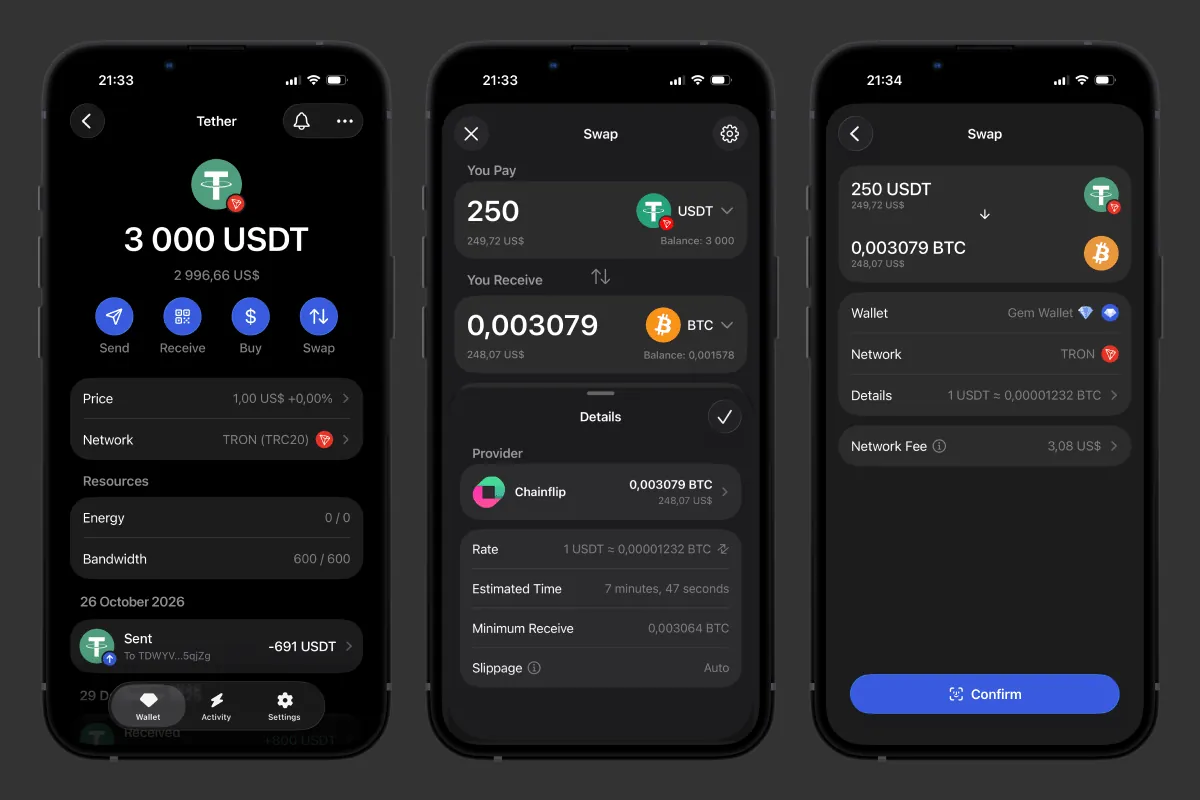 Swapping USDT TRC20 to BTC in Gem Wallet
2. TronLink - Wallet for the TRON Network
TronLink is one of the first wallets on the TRON network: its official version came out in July 2018 as a browser extension, and the TRON blog called it the MetaMask of its network at the time. Today the wallet is developed with the support of the TRON Foundation. For those who receive and send USDT only on TRC20, it’s the most “native” option: GasFree, energy from TRX staking, and swaps are all in one app.
Strengths:
- GasFree: For a USDT transfer on the TRC20 network, you can pay the fee in USDT itself, so you don’t need TRX on your balance, though an activation fee is charged on the first transfer.
- Energy From TRX Staking: Stake TRX in TronLink and get energy to pay less for USDT transfers.
- Built-in Swap: You can swap TRON tokens right in the app, and the TronLink swap fee is 0.85%, with no fee at all for some token pairs (TronLink help center, October 2026).
Limitations:
- USDT Only on TRON on Mobile: In the mobile app, USDT is available only on TRON, while Ethereum and BNB Chain are only in the browser extension, so for USDT on ERC20 or SPL you’ll need a second wallet.
- Swaps Only Within TRON: The built-in swap works only with TRON network tokens. So if you want to swap USDT TRC20 to native BTC, for example, TronLink won’t work: you’ll get only wrapped BTC.
Best For: Those who receive and pay only in USDT TRC20.
3. MetaMask - Wallet for Ethereum and DeFi
MetaMask is the wallet with a fox logo that Consensys developers released in July 2016 as a Chrome extension. The mobile app came only in 2020, but by then MetaMask had already become the standard for Ethereum, where almost 40% of all USDT sits. It’s the pick for those who use DeFi a lot, and it now has Solana and TRON too. We compare the two wallets point by point in Gem Wallet vs MetaMask.
Strengths:
- DeFi Compatibility: Almost every DeFi protocol on Ethereum supports connecting with MetaMask.
- USDT on Four of Five Standards: The wallet natively supports TRON (since January 15, 2026) and Solana, so USDT is available on TRC20, ERC20, BEP20, and SPL.
- Swaps Without a Separate Network Fee: On Ethereum, BNB Chain, Linea, Arbitrum, and Base, some swaps go through without a separate network fee, and the MetaMask swap fee is 0.875% (MetaMask help center, October 2026).
Limitations:
- Partially Open Code: You can view MetaMask’s code, but it remains the property of Consensys.
- Fake Extensions: The main risk is the browser extension: scammers release fake copies of MetaMask that look like the real thing and steal funds, and MetaMask itself warns about this.
- No USDT on TON: MetaMask doesn’t support the TON network.
Best For: Active DeFi users on Ethereum and compatible networks.
4. Phantom - Wallet for the Solana Ecosystem
Phantom launched in April 2021 as a browser extension in the Solana ecosystem. It was founded by people from the team behind the DEX protocol 0x, and over time the wallet grew into a multichain one: it added Ethereum, Bitcoin, BNB Chain, Base, and Polygon (Phantom docs, October 2026). Solana users usually don’t need a second wallet for DeFi.
Strengths:
- USDT on Solana, Ethereum, and BNB Chain: Phantom has USDT on Solana under the SPL standard, as well as on Ethereum and BNB Chain.
- Swaps Without a Separate Network Fee: Some swaps on Solana go through without a separate network fee, and the Phantom fee for most swaps is 0.85% (Phantom help center, October 2026).
- SOL Staking and Hardware Wallets: You can stake SOL and connect a hardware wallet right in the app.
Limitations:
- No USDT on TRON or TON: For these networks, you’ll need a second wallet.
- Code Not Published: The source code of the Phantom app isn’t public, so no one outside can check its security or what it does with your keys and data.
Best For: Those whose USDT and DeFi are on Solana.
5. Keeper (Formerly Tonkeeper) - Wallet for TON and Telegram
Keeper is the former Tonkeeper: the wallet grew up on the TON network and on September 15, 2026, changed its name and went multichain. The team explained the rebrand simply: users held USDT on several networks at once, and the name Tonkeeper no longer fit them. At launch it supported 7 networks, and by October 2026 - already 11. Its main advantage is Battery: a charge you can use to pay for USDT transfers without the network’s native coin on your balance. That’s why Keeper suits those who pay in USDT inside Telegram and TON.
Strengths:
- USDT on All Five Standards: Keeper’s networks include TRON, Ethereum, BNB Chain, Solana, and TON, and on TON, USDT works under the Jetton standard.
- Battery: A charge you top up with crypto or a purchase in the App Store and Google Play pays for USDT transfers on eight networks as of October 2026, including TON and TRON, without Gram (prev. Toncoin) or TRX on your balance.
- Built-in Swap: The provider fee is already included in the exchange rate, and Keeper doesn’t state a separate percentage.
Limitations:
- Multichain Only on Mobile: As of October 2026, multichain works only in the mobile app.
- Partially Open Code: Keeper’s app code is on GitHub, but its multichain engine ChainKit ships as a closed binary, so this part can’t be checked from the outside.
Best For: Those who pay in USDT inside Telegram and on the TON network.
6. Ledger - Hardware Wallet for Storage
Ledger is a cold USDT Wallet: the keys are created and stored in a secure chip (Secure Element), and the device signs transfers without showing the keys to your phone or computer. The Paris-based company Ledger has been making these wallets since 2014, and their secret phrase has 24 words. The devices cost from $69 to $399 (Ledger, October 2026).
Strengths:
- Offline Keys: The key never leaves the device, and every transfer is signed inside it.
- USDT on Three Networks: Through the Ledger Wallet app (formerly Ledger Live), USDT is available on TRC20, ERC20, and BEP20.
- In-App Swap: You can swap coins right in Ledger Wallet through partners, and Ledger charges its own fee for this but doesn’t publish the percentage.
Limitations:
- Inconvenient for Everyday Use: You can’t quickly grab it and send USDT: every transfer has to be confirmed on the device itself, connected to your phone via Bluetooth or to your computer with a cable. And when the market moves sharply, every minute counts.
- No Stablecoins on Solana: According to the Ledger help center as of October 2026, stablecoins on Solana aren’t supported.
- ID for Ledger Recover: To back up your phrase through the paid Ledger Recover service, you need to verify your identity with a government-issued ID.
Best For: A large amount of USDT you don’t touch for months - paired with a hot wallet for everyday transfers.
Which Wallet Is Best for USDT in 2027?
For USDT on several networks, the best choice is Gem Wallet; for TRC20 only - TronLink; for DeFi on Ethereum - MetaMask. We built our ranking on five criteria:
- USDT Networks: A wallet should see every network you get paid on, and in our selection, only Gem Wallet and Keeper have all five main standards - TRC20, ERC20, BEP20, SPL, and Jetton.
- Fees: What matters is how you pay for a transfer when you have no TRX or ETH on your balance: in TronLink, it’s GasFree; in Keeper, Battery; and in Gem Wallet, you can swap any coin for TRX right in the wallet, while energy from TRX staking lowers the fee for your next transfers.
- Open Source and Audits: Open code lets anyone check what a wallet does with your keys. MetaMask’s code is visible but remains the property of Consensys, Phantom’s app code isn’t published, and Keeper’s multichain engine ChainKit is closed.
- Privacy: A wallet shouldn’t require an email, phone number, or documents: Gem Wallet, TronLink, and Keeper don’t ask for them. In MetaMask and Phantom, you can get by with a secret phrase, but if you choose to sign in with Google or Apple, the wallet will be tied to your account.
- Scam Protection: A wallet should stop a transfer to a known scam address right on the confirmation screen and hide micro-transfers from look-alike addresses.
Gem Wallet covers every everyday scenario at once: secure USDT storage, payments and transfers on any network, swaps, and DeFi. Narrow wallets win only if all your USDT lives on one network:
- USDT TRC20 Only: TronLink with GasFree, if you don’t need ERC20 or SPL on your phone.
- DeFi on Ethereum: MetaMask, if you don’t need USDT on TON.
- Solana Ecosystem: Phantom, if you don’t need TRON or TON.
- Telegram and TON: Keeper with Battery, if you need multichain only on your phone.
- A Large Amount Long Term: Ledger from the official store, if your USDT isn’t on Solana.
Common USDT Wallet Mistakes
Most USDT losses happen not because a wallet gets hacked, but because of mistakes and details people miss when sending:
- The First Transfer to a New Address on TRON: If the recipient’s address holds no USDT, for example a new wallet, the transfer costs twice as much: by our calculation on real transfers in October 2026 - 130,285 energy instead of 64,285. At the TRON network’s energy price of 0.0001 TRX per unit, that’s 13.03 TRX instead of 6.43 TRX, or about $4.31 instead of $2.13. Energy from TRX staking lowers this cost.
- Sending on the Wrong Network: If you send USDT on a network the recipient’s wallet doesn’t support, the transfer usually can’t be reversed. Before sending, check the network with the recipient: a TRON address starts with T, while Ethereum and BNB Chain addresses start with 0x, so you can’t tell these two networks apart by the address.
- No Coin for the Fee: To send USDT, you need the network’s native coin: TRX on TRON, ETH on Ethereum, SOL on Solana. Without it, the transfer won’t go through, even if you have enough USDT.
- Look-Alike Address: This scheme is most common on TRON and Ethereum, where most USDT transfers happen. Scammers create an address with the same first and last characters as your recipient’s and send a micro-transfer from it, for example 0.00001 USDT, hoping you’ll copy this address from your history.
- Fake Support: Real wallet support never asks for your secret phrase. Anyone who asks for it in a chat, on Telegram, or by email is a scammer: with the phrase, they get full access to your USDT.
How to Create a USDT Wallet
If you chose Gem Wallet after this comparison, you can start right now: creating a wallet takes a couple of minutes. Install the app, write down your secret phrase - and your USDT Wallet is ready for secure and private use, with no registration or KYC. You’ll find every step with tips in our guide How to Create a USDT Wallet.
Disclaimer: This article is for informational and educational purposes only and is not financial or investment advice. Crypto assets are highly volatile, and you can lose all the money you invest. Do your own research and make decisions at your own risk.