

Table of Contents
The best TRON Wallet keeps TRX and USDT TRC20 under your own key, turns frozen TRX into energy for cheaper transfers, earns staking rewards, and opens dApps on the TRON network. To find such a wallet, we compared seven popular wallets on security, fees, staking, and open-source code using November 2026 data, and Gem Wallet took first place.
Key Takeaways
- Gem Wallet Is First in the Ranking: Gem Wallet is the only one of the seven wallets with fully open-source code under the free GPL-3.0 license. TRX staking, swapping USDT TRC20 to native BTC, and buying TRX with a credit card all work in one app on your phone.
- USDT to an Address Without USDT Takes Twice the Energy: A USDT transfer to a recipient without USDT burns 13.03 TRX, and to a recipient who holds USDT - 6.43 TRX: the whole difference is in energy. To cover one such transfer a day with staking, you need to freeze about 6,659 TRX (Gem Wallet calculation based on network data and a sample of 2,239 transactions sending USDT on November 19, 2026).
- TRON Holds More Than Half of All USDT: Of the $175.07 billion USDT in circulation, $91.64 billion, or 52.34%, is on the TRON network, and across all stablecoins ($92.98 billion) it is second only to Ethereum (DefiLlama, November 19, 2026).
 ChatGPT
 Gemini
 Grok
 Perplexity
What Is a TRON Wallet?
A TRON Wallet is an app, browser extension, or hardware device that stores the private key to an address on the TRON network and uses that key to sign transfers, staking votes, and dApp requests. A TRON address always starts with the letter T, and the balances live in the TRON blockchain itself: the wallet does not hold coins inside it, it gives you the right to manage them.
What Assets a TRON Wallet Holds
One TRON address holds four kinds of assets:
- TRX: The native token of the network - it pays the fees, and frozen TRX gives energy, bandwidth, and staking rewards.
- TRC20 Tokens: USDT, USDD, and other tokens, each living in its own smart contract.
- TRC10 Tokens: An early token standard built right into the TRON protocol: unlike the TRC20 standard, it works without a smart contract.
- NFT TRC721: Non-fungible tokens on the TRON network.
How the TRON Network Fee Is Calculated
The fee on the TRON network is paid mainly with two resources: bandwidth and energy. An activated address gets 600 bandwidth free every day, and energy comes from frozen TRX - your own, delegated by another address, or rented. The network spends the address’s resources first: it covers missing energy by burning TRX, and if there is not enough bandwidth for the whole transaction, it burns TRX for its entire size. That is why one wallet pays zero for the same transfer and another pays a few TRX.
Bandwidth is the TRON network resource that pays for the size of a transaction in bytes and recovers within 24 hours.
Energy is the TRON network resource that pays for running a smart contract, for example when you send USDT, and also recovers within 24 hours.
Hot vs Cold TRON Wallet
A hot TRON Wallet keeps the key on a device connected to the internet, while a cold TRON Wallet signs transactions on a separate device that the key never leaves. The first is for what happens every day - USDT transfers, voting for an SR, and dApps, and the second is for savings that stay untouched for months. The pros and cons of both types are compared in detail in the article “Hot Wallet vs Cold Wallet”.
A Super Representative (SR) is one of the 27 nodes that produce blocks on the TRON network. TRX holders vote for SRs with frozen coins, and voting rewards go both to them and to 100 more candidates - SR partners.
Hot TRON Wallet
A hot TRON Wallet is a wallet whose key sits on a phone, in a browser, in a desktop program, or on an exchange server, that is, close to the internet. An online key is a risk, but it is also why a vote for an SR or a USDT transfer is signed in seconds, and TRX for the fee is always at hand.
Custodial TRON Wallet
A custodial TRON Wallet is an exchange account: the key to the address with your TRX and USDT is held by the exchange, and you can open the account only after identity verification (KYC). That is why a hack of exchange wallets also hits customers’ money: on October 29, 2026, assets worth about $6.3 billion were withdrawn from the hot wallets of Binance on several networks, and the exchange temporarily paused withdrawals (Binance statement of October 30, 2026), and on February 21, 2025, about $1.5 billion was stolen from Bybit (FBI estimate).
Self-Custody TRON Wallet
A self-custody TRON Wallet is a wallet where the key to your T address is created on your phone or computer and stays there. It is secure because only you have access to the key: no one else can block or move your TRX. Just keep in mind that keeping your secret phrase safe is up to you.
Cold TRON Wallet
A cold TRON Wallet is a hardware device like Ledger that keeps the key in a separate chip and shows every TRON transaction on its own screen before signing. To vote for an SR or use dApps, it needs a go-between - a companion app or a hot wallet, and the device itself is bought separately, so a cold wallet is chosen for long-term TRX storage.
Best TRON Wallets Compared
The seven TRON Wallets in this list differ in type, support for TRON standards, platforms, and open-source code. So that you do not have to open seven websites, we put the essentials into one table based on help centers, GitHub, and app stores (November 2026). There is only one cold wallet in it, Ledger, and only TronLink explicitly supports all four kinds of TRON assets, including TRC721 NFTs.
| Wallet | Type | Networks | Platforms | Open Source | Best For |
|---|---|---|---|---|---|
| Gem Wallet | Hot | TRX, TRC20 + 100+ networks | iOS, Android | 100% | TRX, USDT, staking, swaps to BTC, buying, and dApps on your phone |
| TronLink | Hot | TRX, TRC10, TRC20, TRC721 (+ 3 EVM networks in the extension) | iOS, Android, extension | Partly (core modules) | Only TRON and all its standards |
| TokenPocket | Hot | TRX, TRC20 + 1000+ networks | iOS, Android, extension | Not published | Energy rental and fees in USDT |
| Trust Wallet | Hot | TRX, TRC10, TRC20 + 100+ networks | iOS, Android, extension | Partly (library) | TRON among many networks |
| Exodus | Hot | TRX, TRC20 + 50+ networks | Windows, macOS, Linux, iOS, Android | Partly | A portfolio on a computer |
| Zengo | Hot (MPC, no secret phrase) | TRX, TRC20 + 10+ networks | iOS, Android | Partly (MPC library) | Buying and swapping TRX |
| Ledger | Cold | TRX, TRC10, TRC20 + 100+ networks | Device + Ledger Wallet | App - MIT, device OS partly | Long-term TRX storage |
None of the seven wallets asks for documents when you create it: KYC is done only with providers that sell and buy TRX for regular money. Connecting to dApps on the TRON network is available in all of them except Exodus and Zengo.
TRX Staking, Energy, and Fees
Staking on TRON is not only about income: frozen TRX gives energy, and a USDT transfer becomes cheaper or goes through without burning TRX at all. That is why we compared separately whether a wallet lets you stake TRX and choose who gets your vote, whether it shows energy, how much it charges for swaps, and whether you can send a transfer without TRX on the balance.
| Wallet | TRX Staking | SR Choice | Energy | Wallet Swap Fee | Network Fee Without TRX |
|---|---|---|---|---|---|
| Gem Wallet | Yes, from 1 TRX | Yes | Shown: available / total | 0.5% (0.425% via SunSwap) | No |
| TronLink | Yes | Yes | Shown, delegation | 0.85% on some pairs | GasFree wallet: USDT, USDD |
| TokenPocket | Yes | Yes | Shown + rental | 0.3% | USDT, USDD via energy rental |
| Trust Wallet | Yes, from 1 TRX | Validator choice, SR list not described | Rental when sending | 0.7% | Energy rental for USDT |
| Exodus | No, unfreezing only | No | Paid in TRX only | Spread, from 0.5% | No |
| Zengo | No | No | Paid in TRX only | Up to 4% | No |
| Ledger | Via Yield.xyz or TronScan | Not in the app | Balance shown | Not published | No |
Top 7 TRON Wallets in 2027
Gem Wallet leads the ranking of TRON Wallets: in one mobile app it offers secure and private storage of TRX and USDT TRC20, staking, swaps within TRON and to other networks, buying TRX, and scam protection before every signature. Second and third place go to TronLink and TokenPocket - the wallets listed first in the official TRON network catalog that offer the most tools for TRON itself. Next come multichain wallets: Trust Wallet with staking and energy rental, Exodus with apps for Windows, macOS, and Linux, and Zengo, where you can buy and swap TRX. Ledger comes last as a different class - a device for storing TRX that is inconvenient for everyday use.
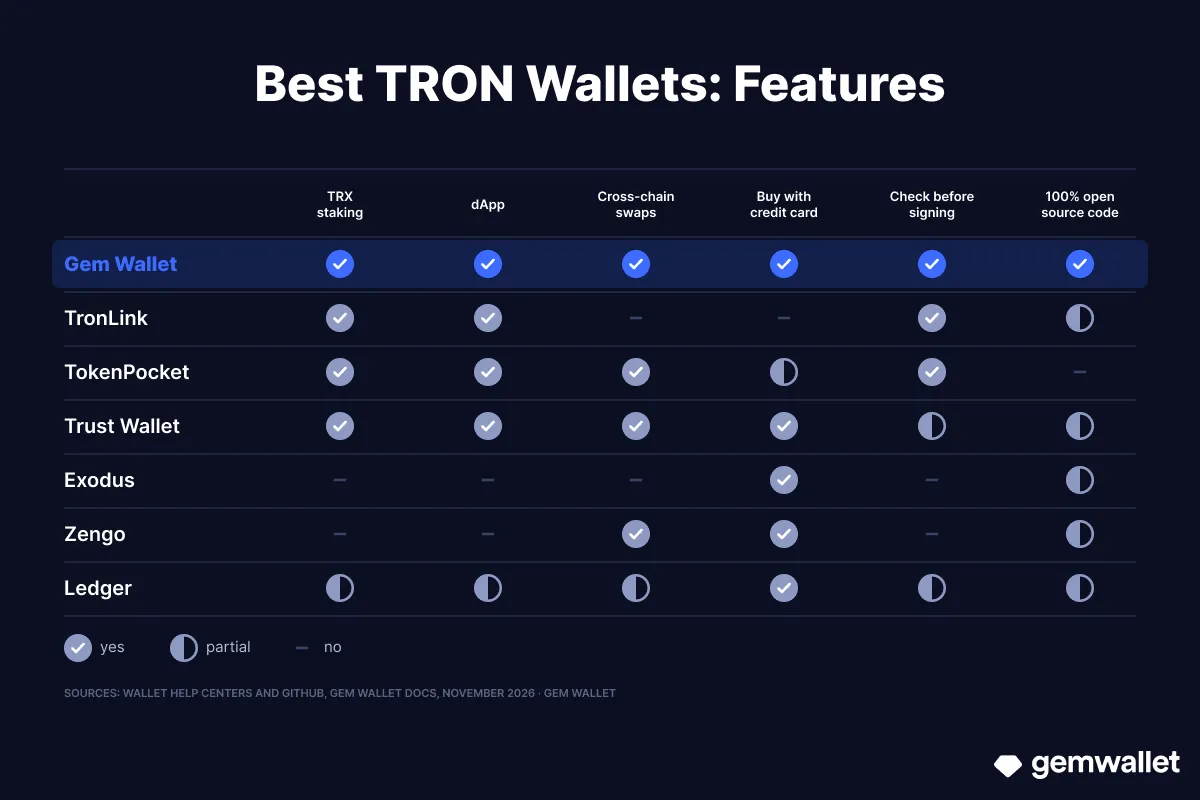 What the seven TRON Wallets can do. Source: Gem Wallet
1. Gem Wallet - TRX, USDT TRC20, and 100+ Networks in One App
Gem Wallet is a self-custody mobile wallet with fully open-source code: it holds TRX and TRC20 tokens of the TRON network, next to assets of 100+ other networks, from Bitcoin to Solana. Gem Wallet is listed in the official TRON wallet catalog (November 2026).
Strengths:
- Self-Custody Wallet: The secret phrase is created and stored only on your phone, and neither the Gem Wallet team nor third parties have access to it.
- 100% Open-Source Code: The code of the iOS and Android apps is fully open source on GitHub under the GPL-3.0 license, and in 2026 the wallet’s security was reviewed by CertiK (April) and Cure53 (October).
- No Registration or KYC: You do not need an email, phone number, documents, selfie, or video verification to create a wallet.
- Built-In DEX Aggregator: You can swap USDT TRC20 and TRX to BTC, ETH, USDT on other networks, and other assets - within the TRON network via SunSwap and cross-chain via THORChain, Relay, Chainflip, and other providers. The wallet fee is included in the rate: usually 0.5%, 0.425% via SunSwap, and 0.25% between stablecoins on the same network (Gem Wallet documentation, November 2026).
- TRX Staking: Staking TRX from 1 TRX brings two benefits at once: frozen TRX gives energy that makes USDT transfers cheaper, plus voting rewards. You give your vote to the SR you choose: each SR decides what share of rewards to pass on to voters, so your income depends on the choice. On November 19, 2026, Gem Wallet showed an estimated APR of 3.26%, and in the same app you can stake SOL, ETH, BNB, and other coins.
- TRX with a Credit Card: You can buy TRX in the app with a credit card or Apple Pay from Mercuryo, MoonPay, Transak, and other providers, and sell TRX where a provider serves your country.
- Energy and Bandwidth in View: The staking screen shows how much energy and bandwidth your address has available and in total, so before signing you already know whether the resources cover the transfer.
- Scam Protection: Before a transfer, a swap, or a dApp signature, Gem Wallet checks the address and token against the GoPlus and TronScan databases, catches look-alike addresses via HashDit, and warns about suspicious ones before the money leaves. For a dApp token approval, the wallet shows the recipient and amount and flags an unlimited approval with a warning, so you see how much the contract will be able to spend.
- dApps via WalletConnect: The wallet connects via WalletConnect to SunSwap, SunPerp, SunPump, and other dApps on the TRON network right from your phone.
Limitations:
- Phone Only: Gem Wallet has apps for iOS and Android, but no browser extension or desktop version.
- No Hardware Wallets: You cannot sign transactions with Ledger or Trezor in Gem Wallet yet.
- Network Fee in TRX Only: Under the TRON network rules, missing energy is paid by burning TRX, and you cannot pay the fee in USDT or rent energy in Gem Wallet.
- No TRC10 or TRON NFTs: TRC10 tokens and TRC721 NFTs are not displayed in Gem Wallet.
Best For: Secure and private everyday use of TRX, USDT TRC20, staking, and dApps in the TRON ecosystem, when the wallet is always on your phone and your assets are accessible 24/7.
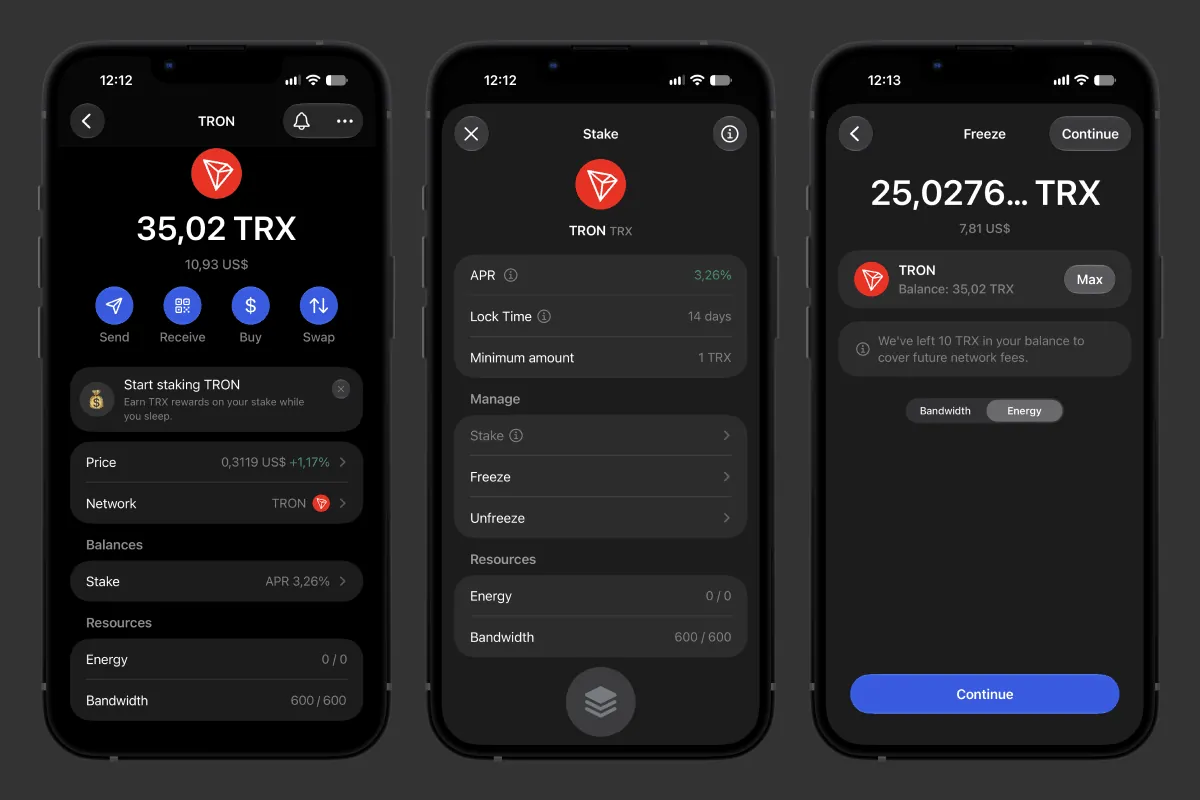 TRX staking in Gem Wallet: APR, resources, and freezing for energy
2. TronLink - The TRON Network Wallet
TronLink is a self-custody wallet by Helix Tech that has been built since 2018 for the TRON network alone and, as its App Store description says, was first released on the official TRON website. In July 2023, the browser extension learned to work with Ethereum, BNB Chain, and BTTC too, while the mobile app has stayed a single-network wallet.
Strengths:
- All TRON Standards: TronLink works with TRX and TRC10, TRC20, and TRC721 tokens, and the built-in browser opens dApps on the TRON network.
- Voting for SRs: You can give votes to one or several Super Representatives and split them, and the Quick Vote feature speeds up voting.
- Checks by Default: Before a transfer and a signature, TronLink checks the address, token, and website against the TronScan scam database, and the Approval Management section shows and revokes granted approvals.
- USDT Without TRX: In a separate GasFree wallet, you can send USDT and USDD without TRX, and the transfer fee is taken in the token itself.
Limitations:
- Swap Fee of 0.85%: Since version 4.19.7, TronLink charges 0.85% for swaps on some pairs (TronLink help center, November 2026).
- No Cross-Chain Swaps: The built-in swap works with tokens on the TRON network, and the TronLink help center has no cross-chain swaps, for example USDT TRC20 to native BTC.
- Only the Core Is Open: GitHub has the core modules under the Apache-2.0 license - address creation and signing, but not the full code of the apps.
Best For: Those who keep assets only on the TRON network and use all its standards, from TRC10 to NFTs.
3. TokenPocket - A Multichain Wallet with Tools for TRON
TokenPocket is a self-custody multichain wallet by TP Global, founded in 2018, that claims support for 1000+ blockchains. In the App Store its app was published under the name TP Wallet, and besides the wallet, the team has its own KeyPal hardware device and a swap aggregator.
Strengths:
- Energy Rental: According to TokenPocket, the built-in energy rental saves up to 75% of the fee on transfers, swaps, and dApp actions on the TRON network.
- Fees in USDT: If there is no TRX on the address, you can pay the network fee in USDT or USDD, and daily subsidies with a limit cover part of the transfers.
- Voting for SRs: In the Voting Management section, you can freeze TRX, vote for the SRs you choose, and claim rewards.
- Swap Fee of 0.3%: That is what the built-in aggregator charges for swaps, and TPT token holders get discounts (aggregator documentation, November 2026).
Limitations:
- App Code Not Published: GitHub has SDKs and an early single-network version of the wallet, but not the code of the current app.
- Selling TRX Not Described: You can buy TRX through third-party providers, but the TokenPocket help center does not describe selling it for regular money.
Best For: Those who often send USDT TRC20 and want to pay less for transfers by renting energy.
4. Trust Wallet - TRON Among 100+ Networks
Trust Wallet is a self-custody wallet for 100+ networks that Viktor Radchenko launched in 2017 as an Ethereum app and that Binance bought a year later. Here TRX sits next to coins of other networks, and the browser extension opens dApps on the TRON network from a computer. How it differs from Gem Wallet is covered in the article “Gem Wallet vs Trust Wallet”.
Strengths:
- Energy Rental When Sending: When renting is cheaper than burning TRX, the wallet rents energy and bandwidth itself and, according to Trust Wallet, saves up to 40% on a transfer, and you can pay in TRX or USDT.
- More Than 300 TRON Tokens: The open Trust Wallet token registry has 145 TRC10 tokens and 201 TRC20 tokens.
- Staking from 1 TRX: You can stake TRX right in the app from 1 TRX by choosing a validator on the staking page.
Limitations:
- Swap Fee of 0.7%: Trust Wallet states this swap fee on its pages comparing it with other wallets (November 2026).
- Only the Library Is Open: GitHub has Wallet Core under the Apache-2.0 license, but not the code of the apps themselves.
- TRON Without Ledger: The extension connects Ledger only with the Bitcoin, Ethereum, and Solana apps.
Best For: Holders of TRX and coins of many other networks who want to save on energy without manual setup.
5. Exodus - TRX on Desktop and Mobile
Exodus is a self-custody portfolio wallet by JP Richardson and Daniel Castagnoli, who started it in 2015 and, according to the team, have released updates every two weeks since then. On October 1, 2026, Exodus shut down its Exodus Web3 Wallet browser extension. How it differs from our wallet is covered in the article “Gem Wallet vs Exodus”.
Strengths:
- Apps for Windows, macOS, and Linux: You can keep TRX in a full desktop program, not only on your phone.
- Buying and Selling TRX: TRX is bought and sold in the app through third-party providers, and the set of providers depends on the country.
- Ledger on Mobile: Mobile Exodus signs TRON transactions with Ledger Nano X and Ledger Flex.
- Phrase Backup in the Cloud: You can save the secret phrase encrypted in iCloud or Google Drive, protected by a passkey.
Limitations:
- No TRX Staking: Freezing TRX is disabled in Exodus: already frozen TRX can only be unfrozen.
- No dApps: Mobile and desktop Exodus have no connection to web3 apps, so for dApps on the TRON network you will need another wallet.
- Swap Fee from 0.5%: Exodus does not fix the percentage: the fee is built into the spread, starts at 0.5%, and varies from pair to pair.
Best For: Those who need TRX in a program for Windows, macOS, or Linux.
6. Zengo - TRX and USDT Without Staking or dApps
Zengo is a mobile wallet built on MPC technology (multi-party computation: instead of one key there are two independent parts that sign a transaction together without revealing their data to each other), founded in 2018 by Ouriel Ohayon and Tal Be’ery. In April 2026, eToro bought it, and the app is now called Zengo by eToro. The TRON network was added to the wallet in December 2024.
Strengths:
- Buying TRX: You can buy TRX with a credit card, PayPal, Apple Pay, or Google Pay from third-party providers.
- Cross-Chain Swaps: USDT TRC20 can be swapped to BTC, and TRX and USDT to assets of other networks right in the app.
- Protection in the Pro Plan: For $89.99 a year, Pro adds Theft Guard protection and passing wallet access to loved ones (Legacy Transfer).
Limitations:
- Part of the Key on Zengo’s Server: There is no secret phrase: instead of a key there are two parts, and one of them is stored not with you but on the company’s server (Zengo help center).
- Swap Fee Up to 4%: Plus a liquidity fee (Zengo help center, December 2025).
- No TRX Staking or dApps: You cannot freeze TRX, and WalletConnect in Zengo works only with Ethereum, Optimism, Arbitrum One, and Polygon.
Best For: Those who need only buying, storing, and swapping TRX and USDT, without staking or dApps.
7. Ledger - A Hardware Wallet for Storing TRX
Ledger is a Paris-based company that has made hardware wallets with the key inside a Secure Element chip since 2014. In October 2025, its Ledger Live app was renamed Ledger Wallet, and the Tron app installed on the device itself is developed not by Ledger but by the TRON community.
Strengths:
- TRC10 and TRC20: In Ledger Wallet you can hold TRX and tokens of both standards, and the energy balance is shown in the TRON account.
- Staking via Discover: You cannot stake TRX directly in Ledger Wallet, but you can do it in the Yield.xyz app from the Discover section or in TronScan with a signature on the device.
- Signing in TronScan and TronLink: For dApps on the TRON network, the device connects to TronScan or TronLink and confirms transactions on its own screen.
- Code Under the MIT License: GitHub has both Ledger Wallet and the Tron app for the device, which is written by the TRON community.
Limitations:
- The Device Costs Money: Prices start at $69 for Nano S Plus and go up to $399 for Stax (shop.ledger.com, November 2026).
- Swap Fee Not Disclosed: Swaps in Ledger Wallet include a Ledger fee, but the company does not name its size.
- Not for Everyday Use: Without the device at hand, you cannot re-vote for another SR or send USDT, so there is no 24/7 access to your assets from your phone, which is inconvenient for everyday transfers.
Best For: Long-term storage of TRX and USDT that you touch once every few months.
Which Is the Best TRX Wallet in 2027?
For everyday use of TRON, the best choice is Gem Wallet: in one app on your phone you can buy TRX, stake it, swap USDT TRC20 to BTC, and see before signing whether you have enough energy. If all your assets live on the TRON network and you need TRC10 and NFTs, choose TronLink. Frequent USDT senders will pay less with energy rental in TokenPocket, and for TRX you are saving for years ahead, Ledger fits.
Trust Wallet makes sense if TRX is just one of many coins you hold and you want to rent energy without setup, Exodus - if you need a wallet on a computer, and Zengo - if all you need from a wallet is buying, storing, and swapping TRX. Beginners will find it easier to start with a mobile TRON Wallet app: Gem Wallet is available for iOS and Android and creates a wallet without registration in a couple of minutes.
Beyond the staking and fees in the tables above, the wallets differ in how open their code is, who audited them, how they handle approvals, where you buy TRX, how the secret phrase is stored, and which devices connect:
- Open Source: If the code is published, any developer can check that the key is not sent anywhere. Gem Wallet’s code is open under GPL-3.0, and its Android build from F-Droid can be rebuilt from source to get the same file - these are reproducible builds. Ledger opens its app under MIT, TronLink - the core modules, Trust Wallet - a library, Exodus - some components, Zengo - only the MPC library, and TokenPocket does not publish the code of its current app.
- Audits: An independent audit finds vulnerabilities before someone exploits them, and a public report shows what was fixed. Gem Wallet publishes reports by CertiK (April 2026) and Cure53 (October 2026), TronLink - penetration test reports for Android, iOS, and the extension, and Trust Wallet lists CertiK, Cure53, Halborn, Kudelski Security, and Quantstamp among its auditors.
- dApps and Approvals: An approval for a TRC20 token lets a contract spend your USDT until you revoke it. A list of granted approvals is built into TronLink and TokenPocket, and Gem Wallet shows the token, recipient, and amount of an approval on the confirmation screen when a dApp requests it.
- Staking Rewards: The network accrues rewards for votes, but they do not land on the balance by themselves: you need to claim them manually with the Claim Rewards button - this is how it works in Gem Wallet, TronLink, and TokenPocket. Staking is explained step by step in the article “How to Stake TRON”.
- Buying TRX: TRX can be bought through third-party providers in six wallets out of seven, and those providers also verify the buyer’s identity. A credit card is named explicitly by Gem Wallet, Trust Wallet, Exodus, Zengo, and Ledger, TokenPocket names Google Pay, and the TronLink help center has no buying.
- Secret Phrase: The secret phrase is the only way to restore a wallet on a new device. The hot wallets in this list usually create it from 12 words, Ledger from 24, Trust Wallet and Exodus offer to keep an encrypted copy in the cloud, and Zengo does without a phrase, but one part of the key is stored on the company’s server.
- Hardware Wallets: The hardware wallet makes the signature, while the hot wallet only passes the TRON transaction to it and sends the result to the network. TronLink and Exodus sign TRX via Ledger, TokenPocket connects Ledger and its own KeyPal, but this is not described for TRON in its help center, the Trust Wallet and Zengo help centers have no hardware wallet connection for TRON, and Gem Wallet does not support hardware wallets.
Common TRON Wallet Mistakes
Most often, TRON Wallet owners overpay for energy, get stuck without TRX for the fee, and copy a fake address:
- USDT to an Address Without USDT: A recipient who does not hold USDT yet, for example a newly created wallet, costs twice as much: 130,285 energy instead of 64,285. Before such a transfer, make sure there is enough TRX on your address with a margin.
- USDT but No TRX: Even for a USDT transfer, the TRON network takes the fee in TRX. Without a TRX reserve, the transfer will not be sent or will fail with the OUT OF ENERGY error if the wallet does not pay the fee another way. The Ledger help center, for example, recommends keeping at least 100 TRX on the address.
- Expecting Staking to Cover Everything: Freezing lowers the fee but rarely makes it zero: on November 19, 2026, 1,000 TRX in staking gave only about 15% of the energy for one regular USDT transfer.
- Forgetting the 14-Day Unfreeze: After unfreezing, TRX returns to the balance only after 14 days, so freeze only what you will not need in the coming weeks.
- A Fake Address in Your History: Scammers send USDT transfers worth fractions of a cent from an address whose beginning and end match your recipient’s address, so that in the transaction list the fake T address looks familiar. How this scheme works is explained in the article “Address Poisoning Is No Longer a Problem”.
- Someone Else’s Secret Phrase with Money: Scammers “accidentally” publish the secret phrase of a wallet with USDT whose control rights have already been transferred to another address through multisig. You cannot withdraw the USDT, and the TRX you send for the fee goes to the scammer. The control rights of any address are visible in the TronScan explorer.
- The TRC20 Network When Withdrawing from an Exchange: An exchange withdraws USDT on several networks, and the token reaches an address starting with T only if you choose the TRON (TRC20) network. If you choose ERC20 or BEP20 in the list, the exchange simply will not accept a T address.
How Much a Transfer on the TRON Network Costs
A USDT transfer on the TRON network costs many times more than a TRX transfer: a TRX transfer usually fits into the free daily bandwidth, while USDT uses energy. We calculated this from a sample of 2,239 transactions sending USDT on November 19, 2026 (blocks 88,135,880-88,135,904): 1,699 of them used 64,285 energy each, and 540 used 130,285.
Without energy, the network burns 0.0001 TRX per unit, so the two transfers burn 6.43 TRX and 13.03 TRX. On that date, 1 frozen TRX gave about 9.65 energy per day, so covering one such transfer a day takes about 6,659 TRX and 13,495 TRX in staking.
At the TRX rate of $0.312 on November 19, 2026, that is about $2.01 and $4.06 per USDT transfer. The rate changes every day, while the energy for the same operation stays the same.
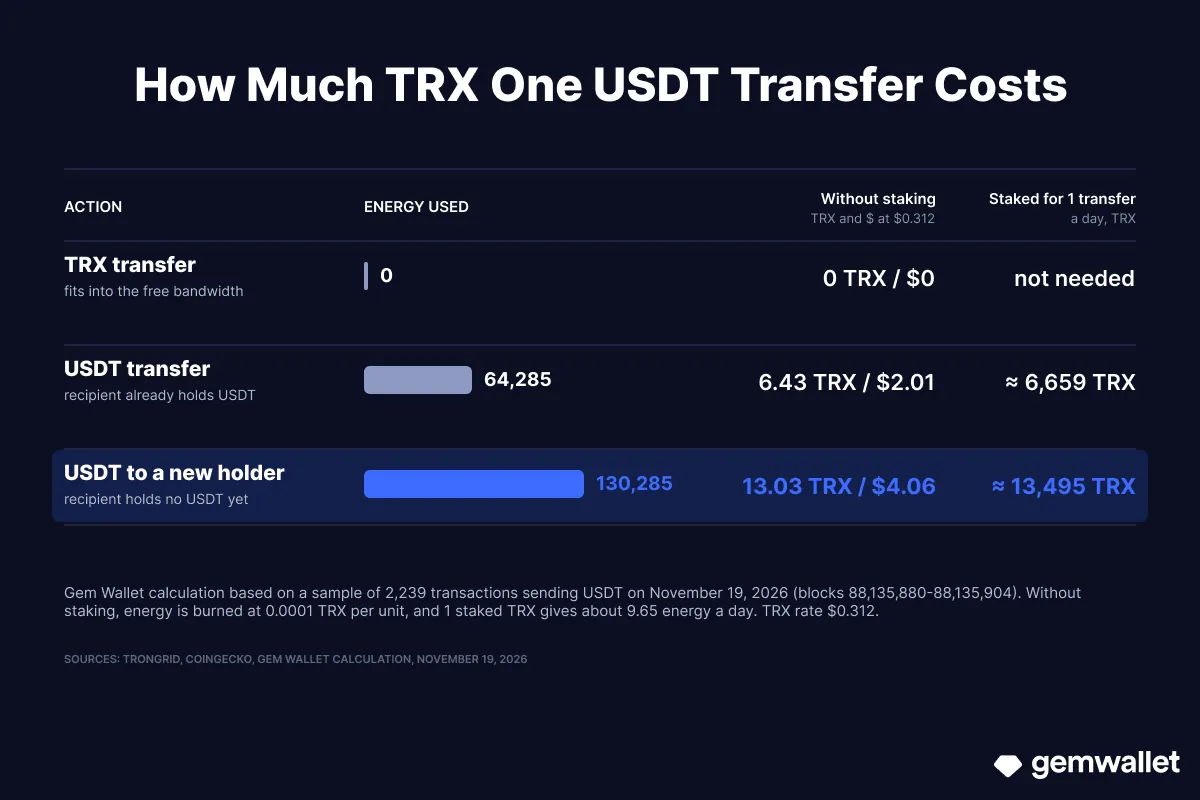 How much TRX one USDT transfer on the TRON network costs. Source: Gem Wallet
How to Create a TRON Wallet
Chosen your TRON Wallet? Install the app, keep your secret phrase offline, and in a couple of minutes your T address is ready to receive its first TRX and USDT TRC20. Step by step with tips - in the guide “How to Create a TRON Wallet”.
Disclaimer: This article is for informational and educational purposes only and is not financial or investment advice. Crypto assets are highly volatile, and you can lose all the money you invest. Do your own research and make decisions at your own risk.