

Table of Contents
The best Solana Wallet is the one that keeps the keys only with you and lets you store, stake, swap SOL, and connect to dApps without extra apps. We compared Gem Wallet, Backpack, Phantom, Solflare, Exodus, and Trezor on staking, swap fees, NFT and dApp support, and open-source code using November 2026 data, and Gem Wallet took first place.
Key Takeaways
- Solana Is the Third Network for Stablecoins: $15.07 billion in stablecoins has been issued on it, behind only Ethereum and TRON, and $5.43 billion is locked in the network’s DeFi protocols (DefiLlama, November 2026).
- Gem Wallet Is First in the Ranking: It is the only wallet in this list that combines SOL staking with validator choice, NFTs, dApps, SOL to native BTC swaps, and buying SOL with a credit card with 100% open-source code.
- Sending a Token to a New Address Costs Almost 300 Times More: If the recipient has no token account for USDC, the sender pays 0.00148844 SOL of rent for it, about $0.14, against a base fee of 0.000005 SOL (our calculation based on Solana network data, November 1, 2026).
What Is a Solana Wallet?
A Solana Wallet is a phone app, browser extension, desktop program, or hardware device that stores the keys to your address on the Solana blockchain. With it, you send and receive SOL and tokens, stake SOL, swap tokens, and connect to dApps, and the wallet signs every transaction with your key. A Solana address is a string of 32-44 Latin letters and digits without a prefix like 0x.
One Solana address holds both SOL and all SPL tokens: USDC, USDT, meme coins, and NFTs. The network records the balance of each token in a separate token account and requires rent for creating it - a deposit that is returned when the account is closed, so the first transfer of a token to a new address costs more than usual. We explained how the network’s tokens work in the article “What Is SPL”.
A token account is a record on the Solana blockchain that stores the balance of one token at your address.
Hot vs Cold Solana Wallet
A hot Solana Wallet keeps the key on a device with internet access, while a cold Solana Wallet keeps it in a separate device that signs transactions without going online. A hot wallet is convenient for everyday transfers, staking, and swaps, and a cold one is for a large amount you don’t touch for months. See the full comparison in the article “Hot Wallet vs Cold Wallet”.
Hot Solana Wallet
A hot Solana Wallet is a mobile app, browser extension, or exchange account: the key to the address is stored on a device or server connected to the internet. Such a wallet lets you send SOL, stake it, swap tokens, or connect to a dApp in seconds. A key on an internet-connected device is exposed to malware and phishing sites, so a large amount is kept in a cold wallet. Hot wallets are either custodial or self-custody, depending on who holds the key.
Custodial Solana Wallet
A custodial Solana Wallet is an account on a centralized exchange where the exchange, not you, holds the keys to your SOL. The exchange requires KYC (identity verification with documents) and can limit withdrawals at any moment. For Solana holders, the best-known example is FTX: on November 8, 2022, the exchange stopped withdrawals, on November 11 it filed for bankruptcy, and the first payouts to customers started only on February 18, 2025 (FTX Trading).
Self-Custody Solana Wallet
A self-custody Solana Wallet is an app in which the secret phrase and keys are created and stored only on your device. No one, including the wallet’s developers, can block your SOL, limit withdrawals, or ask for documents. You sign every transaction yourself - a transfer, staking, a swap, or a dApp connection. The flip side is responsibility: if the secret phrase is lost, no one, including the wallet’s developers, can restore access to your SOL. The exception is tokens whose issuer kept the right to freeze them: the issuer can freeze USDC, USDT, and some other SPL tokens on any address.
Cold Solana Wallet
A cold Solana Wallet, or hardware wallet, is a device such as Trezor or Ledger that creates the key and signs transactions inside itself, passing only the finished signature to your phone or computer. Even if your computer gets a virus, the key to your SOL stays on the device.
A cold Solana Wallet is a paid device, and for staking, swaps, and dApps you need a companion app or a hot wallet, while you confirm every action with a button on the device, so a cold wallet is better suited for storage than for everyday operations.
Best Solana Wallets Compared
The six Solana Wallets in this list differ most in the number of networks, platforms, and code openness: only Gem Wallet and Trezor have fully open-source code (help centers, websites, and app stores, November 2026).
| Wallet | Type | Networks | Platforms | Open-Source Code | Best For |
|---|---|---|---|---|---|
| Gem Wallet | Hot | Solana + 100+ networks | iOS, Android | 100% | Everyday Solana use on your phone |
| Backpack | Hot | Solana + 6 networks | iOS, Android, extension | Partly (old version) | Solana with Ledger and Trezor |
| Phantom | Hot | Solana + 8 networks | iOS, Android, extension | Not published | Solana, Bitcoin, and EVM in an extension |
| Solflare | Hot | Solana only | iOS, Android, extension, web | Not published | Solana only |
| Exodus | Hot | Solana + 50+ networks | Windows, macOS, Linux, iOS, Android | Partly | A portfolio on your computer |
| Trezor | Cold | Solana and other networks | Device + Trezor Suite | Open (firmware, Suite) | Long-term storage |
All six Solana Wallets are self-custody: the keys stay with the user, and none of them requires KYC to create a wallet.
Staking and fees are where the six Solana Wallets differ most as of November 2026: you can choose a validator in four wallets, while Exodus and Trezor stake SOL only with Everstake. Only three publish their own swap fee.
| Wallet | SOL Staking | Wallet Swap Fee | Network Fee Without SOL |
|---|---|---|---|
| Gem Wallet | 20+ verified validators | 0.5% (0.25% between stablecoins) | No |
| Backpack | Search and choose + liquid staking | 0.85% | Not described |
| Phantom | Search and choose + liquid staking | 0.85% | In the token, from $0.30 |
| Solflare | Search and choose | Not published | In the token |
| Exodus | 1 validator (Everstake) | Spread in the rate | Only in Exodus Pay |
| Trezor | 1 validator (Everstake) | Not published | No |
Top 6 Solana Wallets in 2027
Gem Wallet tops the Solana Wallet ranking: it offers SOL staking, NFTs, dApps, token swaps within Solana and into coins of other networks, buying SOL with a credit card, and fully open-source code. We ranked the other wallets by which of these features they lack.
Backpack and Phantom have the same features, but Backpack’s code is open only in an old version, and Phantom does not publish its app code. Solflare does not swap SOL into coins of other networks and does not open its code, while Exodus works without dApps and NFTs. Trezor is a cold wallet, so we rate it separately and place it last.
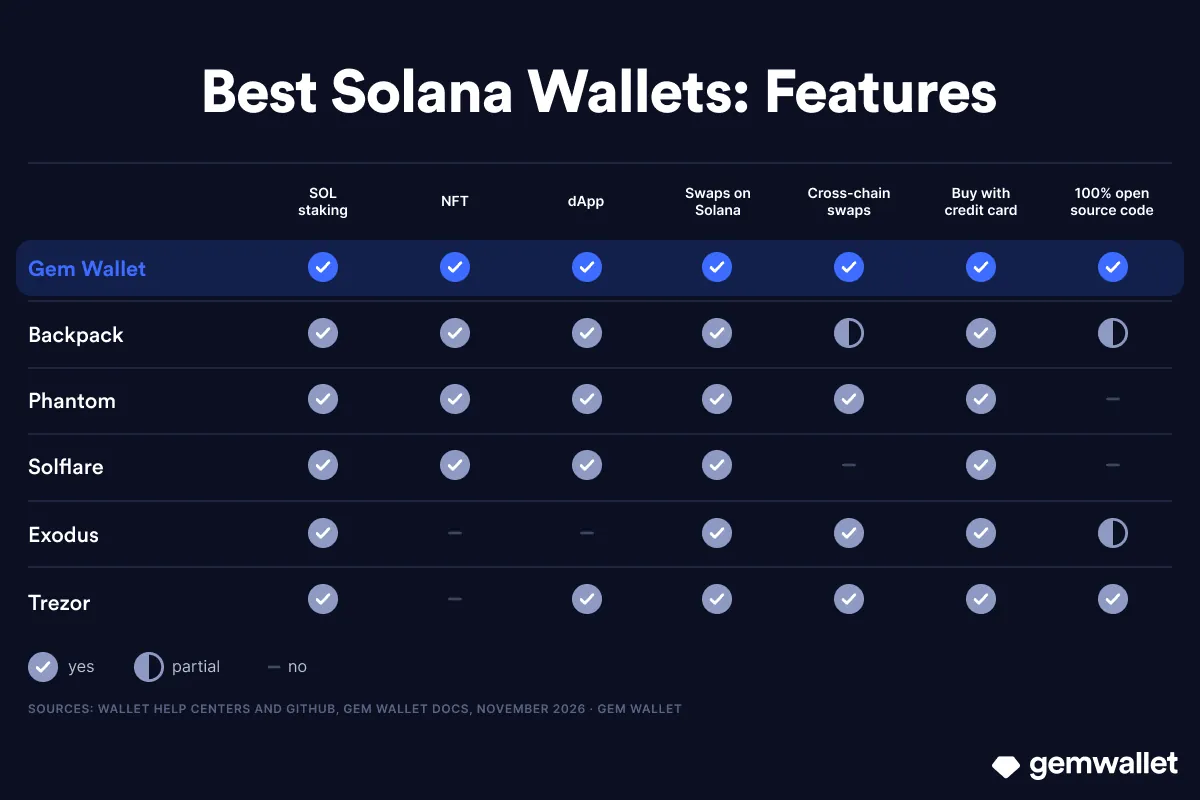 Solana Wallet features: staking, NFTs, dApps, swaps, buying with a credit card, and open-source code. Source: Gem Wallet
1. Gem Wallet - Solana and 100+ Networks in One App
Gem Wallet is a self-custody mobile wallet with fully open-source code, where Solana works alongside 100+ other networks. It is listed in the official wallet catalog on the Solana website and has been available in the Solana dApp Store since June 2025, and on Solana Mobile smartphones, apps connect to it without a QR code.
Strengths:
- Keys Only With You: The secret phrase is created and stored on your phone, and neither the Gem Wallet team nor third parties have access to it.
- 100% Open-Source Code: The source code of the Gem Wallet iOS and Android apps is fully open source and published on GitHub, and the wallet’s security was audited in 2026 by CertiK (April) and Cure53 (October).
- No Sign-Up and No KYC: Gem Wallet does not ask for an email, phone number, or documents and does not verify your identity.
- SOL Staking With 20+ Validators: SOL staking in Gem Wallet starts from 1 SOL, and the wallet keeps another 0.005 SOL on your balance for the network fee. You choose the validator yourself from 20+ verified ones, including Everstake, Jupiter, and Stakin (Gem Wallet validator list on GitHub, November 2026).
- NFTs and dApps: Gem Wallet supports Solana NFTs of the SPL and Metaplex standards and connects to Jupiter, Magic Eden, and other dApps via WalletConnect.
- Built-In DEX Aggregator: You can swap Solana tokens within the network via Jupiter, Raydium, Orca, and other DEXs, and swap SOL into native BTC or ETH on other networks via THORChain, Relay, and Mayan. Gem Wallet’s swap fee is 0.5% on most swaps and 0.25% between stablecoins on the same network (Gem Wallet documentation, November 2026), and it is already included in the rate.
- SOL With a Credit Card: You can buy SOL right in the app with Apple Pay, Visa, Mastercard, and 30+ other payment methods in 170 countries - via Mercuryo, MoonPay, Paybis, and other providers.
Limitations:
- Phone Only: There is no browser extension or desktop app, and the wallet connects to dApp websites securely via WalletConnect.
- No Hardware Wallets: Ledger and Trezor do not connect to Gem Wallet yet.
- Network Fee Only in SOL: Gem Wallet follows the rules of the Solana network, and the network fee is charged only in its native token, SOL.
Best For: Secure and private everyday use of the Solana ecosystem, and for those who hold SOL alongside BTC, ETH, and USDT and want to stake, swap, collect NFTs, and use dApps in one app.
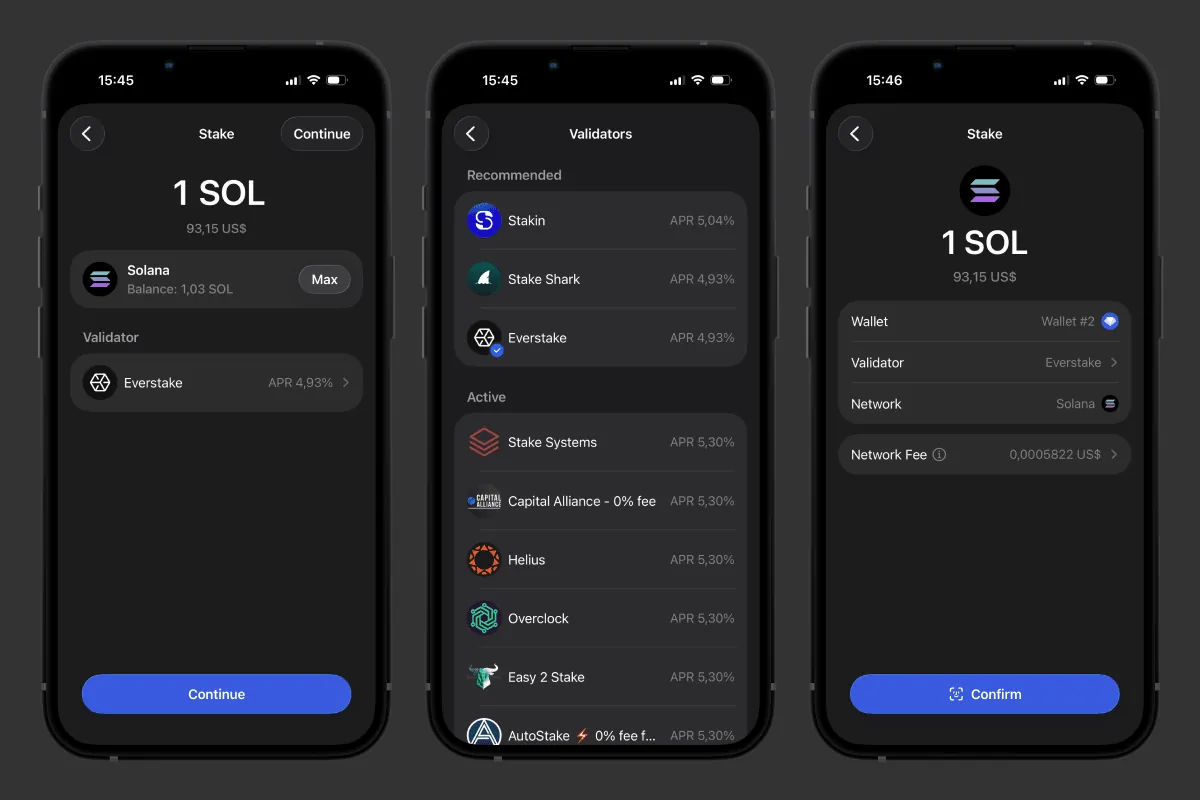 Choosing a validator for SOL staking in Gem Wallet
2. Backpack - Solana With Hardware Wallets
Backpack is a self-custody wallet for Solana and six other networks that connects Ledger, Trezor, and Keystone. It was released in 2022 by the team of Armani Ferrante, the author of Anchor - the framework used to write Solana smart contracts. Backpack works on iOS, Android, and as a browser extension, and besides Solana it supports Ethereum, Optimism, Arbitrum, Polygon, Base, and Sonic (Backpack help center, November 2026).
Strengths:
- Ledger, Trezor, and Keystone: Backpack connects all three hardware wallets and lets you build a 3-of-3 multisig from them.
- Two Types of Staking: You can delegate SOL to a validator of your choice from 1 SOL or swap it for liquid bpSOL from 0.01 SOL.
- SOL Swaps Into Another Network’s Coin: In the swap tab, SOL can be swapped, for example, into native ETH on Ethereum, and Backpack’s swap fee is 0.85%, already included in the rate (Backpack Wallet terms, January 2026).
Limitations:
- Partly Open Code: Backpack’s public GitHub repository was last updated in August 2024, and the code of the current app version is not published.
- No Documented Way to Pay Fees in a Token: The Backpack help center describes no way to pay the network fee without SOL on your balance.
- No Bitcoin: Swaps connect Solana with 14 networks, but you can’t swap SOL into native BTC (Backpack blog, March 2026).
Best For: Those who keep their main amount on Ledger or Trezor and want to use it on Solana.
3. Phantom - Solana, Bitcoin, and EVM in One Extension
Phantom is a self-custody wallet for Solana, Bitcoin, and EVM networks that works on iOS, Android, and as a browser extension. It was founded in 2021 by Brandon Millman, Francesco Agosti, and Chris Kalani, who had previously worked on the 0x protocol. From a Solana-only extension, Phantom has grown to 9 networks: Solana, Ethereum, Bitcoin, Base, Polygon, BNB Chain, HyperEVM, Arc, and Robinhood Chain, and it ended Sui support on September 24, 2026 (Phantom help center, November 2026). We compare the two wallets in detail in the article “Gem Wallet vs Phantom”.
Strengths:
- Staking and PSOL: Phantom stakes SOL with a validator of your choice from 1 SOL and also offers liquid PSOL: the protocol takes 4% of rewards and 0.1% on exit.
- Paying Fees in a Token: If you have no SOL on your balance, Phantom can take the network fee for a swap or for sending a verified token in the token itself, for amounts from $0.30.
- SOL Swaps Into Another Network’s Coin: SOL can be swapped, for example, into native BTC via several providers, and Phantom’s fee on most swaps is 0.85% (Phantom help center, November 2026).
Limitations:
- Closed Code: Phantom’s app code is not published on GitHub, where only the audit reports by Kudelski Security (2021) and Least Authority (2024) are available.
- Ledger Is the Only Hardware Option: No Trezor model connects to Phantom.
Best For: Those who need Bitcoin and EVM networks next to Solana and connect to dApps through a browser extension.
4. Solflare - A Wallet Only for Solana
Solflare is a self-custody wallet for the Solana network only, founded in 2020 by Vidor Gencel and Filip Dragoslavić. Solflare works as iOS and Android apps, a browser extension, and a web version.
Strengths:
- Staking With Validator Choice: SOL is staked right in the app, and you can replace the default validator with any validator from the list.
- Paying Fees in a Token: If you don’t have enough SOL on your balance, Solflare can take the network fee for a transfer or swap in the token itself.
- Its Own Solflare Shield Card: Besides Ledger and Keystone, Solflare connects its own hardware wallet - the Solflare Shield NFC card, which you use to confirm transactions.
Limitations:
- Solana Only: For Bitcoin, Ethereum, and other networks, you’ll need separate wallets, and you can’t swap SOL into native BTC or ETH inside Solflare.
- Swap Fee Not Published: Solflare’s built-in swap works within Solana, but Solflare does not state its own percentage (Solflare terms, September 2026).
- Closed Code: Solflare has only SDKs and libraries on GitHub, and the app code is not published.
Best For: Those who work only on Solana and want to confirm transactions with the Solflare Shield card.
5. Exodus - A Wallet for a Portfolio on Your Computer
Exodus is a self-custody desktop and mobile wallet for 50+ networks with partly open-source code, founded in 2015 by JP Richardson and Daniel Castagnoli. In 2026, Exodus launched Exodus Pay - payments in USDC and USDT on Solana. We compare the two wallets in detail in the article “Gem Wallet vs Exodus”.
Strengths:
- Desktop Apps: Exodus works on Windows, macOS, and Linux, not only on your phone.
- SOL Staking via Everstake: You can stake SOL from 1 SOL right in the app.
- Hardware Wallets: On desktop, Exodus connects Trezor, and on mobile - Ledger Nano X, Flex, and Trezor Safe 7, including for Solana.
Limitations:
- No dApps and NFTs: By October 2026, Exodus removed WalletConnect, the dApp browser, and the extension, and on December 1, 2026, it ends NFT support (Exodus help center, November 2026).
- Swap Fee Not Published: Exodus does not show the wallet’s swap fee, its income is the spread in the swap rate, and the spread depends on the pair.
- Paying Fees in a Token Only in Exodus Pay: Without SOL, you can send money only to another Exodus Pay user, and other USDC transfers require SOL.
Best For: Those who hold SOL in a large portfolio and manage it from a computer, without dApps and NFTs.
6. Trezor - A Hardware Wallet for Storage
Trezor is a hardware wallet from a Prague company whose Model One became the world’s first such device in 2014. Solana is supported by Trezor Safe 3, Safe 5, Safe 7, and Model T, but not by Model One. The key never leaves the device, and you check every transaction on its screen.
Strengths:
- Open-Source Code: The firmware and the Trezor Suite app are published on GitHub.
- SPL Tokens With Verification: Trezor Suite shows SOL and SPL tokens, and you confirm the token’s contract address on the device screen.
- SOL Staking via Everstake: In Trezor Suite, SOL is staked from 1 SOL, and the key stays on the device.
- dApps via WalletConnect: Trezor Suite connects to dApps on Solana, and you confirm every signature on the device.
Limitations:
- Paid Device: Trezor Safe 3 costs $59, and Trezor Safe 7 costs $249 (trezor.io, November 2026).
- Swaps via Third-Party Providers: In Trezor Suite, swaps go through third-party services, some of which are centralized and may ask for KYC, and Trezor does not state its own swap fee in its help center. You pay the network fee in SOL.
- No Solana NFTs: Trezor Suite does not show NFTs on Solana, so for them Trezor is connected to Backpack (Trezor help center, November 2026).
Best For: A large amount of SOL that you hold for months, confirming every signature on the device screen.
Which Is the Best Wallet for Solana in 2027?
For secure and private everyday use of Solana, the best choice is Gem Wallet: in one app on your phone, you hold SOL and tokens, stake with a validator of your choice, swap SOL into native BTC, and connect to dApps without giving away your keys or going through KYC. Backpack suits Ledger and Trezor owners, and Phantom suits those who use dApps through a browser extension. Beginners will find it easier to start with a mobile app: Gem Wallet creates a Solana Wallet with no sign-up in a couple of minutes. Before choosing, compare wallets on five criteria:
- Staking: With native staking, SOL stays at your address with the validator you chose, while with liquid staking you give SOL to a pool and get a token in return, such as bpSOL or PSOL, which you can swap right away, but the pool chooses the validators. The Solana network has more than 660 active validators (getVoteAccounts method, November 3, 2026), and your yield depends on the commission of the one you choose. The minimum for native staking is 1 SOL in any wallet, set by the network (getStakeMinimumDelegation, November 2026).
- Fees: The final swap price is made up of the wallet fee already included in the rate, the network fee, and rent for a new token account, so compare the “you receive” amount on the confirmation screen. A published percentage is easier to check than a spread hidden in the rate: on a $1,000 swap, the wallet fee is $5 in Gem Wallet and $8.50 in Phantom and Backpack (our calculation based on published rates, November 2026).
- Open-Source Code: Fully open-source code means that every line of the app can be read on GitHub to check where your keys go and what the wallet does with your transactions. You rely on verifiable code rather than on promises in ads. Gem Wallet goes further and publishes reproducible builds: you can match the app from the store with the code on GitHub. The code is fully open at Gem Wallet and Trezor, partly at Backpack and Exodus, while Phantom and Solflare do not publish their app code.
- Privacy: None of the wallets in this list requires KYC to get started, but Phantom and Solflare offer sign-in with Google or Apple - convenient, but it links your wallet to your account, so a secret phrase is more reliable. Exchanges and financial apps ask for a phone number, email, passport, selfie with a document, and video verification, so a wallet without personal data is rare.
- Hardware Wallets: A hardware wallet signs the transaction inside the device, so a hot wallet that supports it opens dApps and swaps without the key going online. Trezor connects to Backpack and Exodus, Ledger to Backpack, Phantom, Solflare, and Exodus, Keystone to Backpack and Solflare, and Solflare also has its own Solflare Shield card.
Common Solana Wallet Mistakes
Solana Wallet mistakes are most often related to token account rent, which EVM networks don’t have, network fees only in SOL, and fake tokens that anyone can issue:
- The First Token Transfer to a New Address: If the recipient doesn’t have a token account for USDC or another token yet, the sender creates it and pays the rent. As of November 1, 2026, the rent is 0.00148844 SOL (about $0.14) - almost 300 times the base network fee of 0.000005 SOL without a priority fee (our calculation based on Solana network data and the CoinGecko rate). Only the owner of the token account, that is, the recipient, can get the rent back by closing the empty account.
- An Outdated Rent Figure: Many guides still show 0.00203928 SOL. In September 2026, the network cut the rent by 27% in two steps, and the SIMD-0437 proposal plans three more steps, so the amount will keep changing.
- Too Small an Amount to an Empty Address: An address with no SOL at all won’t accept a transfer of less than 0.00065024 SOL (about $0.06) - the minimum account balance on the network.
- No SOL for the Fee: Sending USDC, USDT, or a meme coin requires SOL for the fee, and in most wallets the transfer won’t go through without it, no matter how many tokens you have. The exception is Phantom and Solflare, which can take the fee in the token itself.
- A Fake Token: Anyone can issue a token on Solana with the name USDC and the same logo. Only the contract address (mint) tells the real one apart: for USDC it starts with EPjFWdd5, for USDT with Es9vMFrz, so check it against the issuer’s website before buying.
- NFT Bait: An unknown NFT arrives at your address with a “claim your reward” link, and the site behind the link asks you to sign a transaction that drains your tokens. It’s best to hide such an NFT and sign nothing.
- Imported the Phrase, but the Balance Is Empty: The same secret phrase can lead to different Solana addresses in different wallets because of derivation paths: Exodus uses m/44’/501’/0’/0/0, while Phantom and Gem Wallet use m/44’/501’/0’/0’. Your coins are not lost: open the phrase in your previous wallet and send the SOL to the new address.
How to Create a Solana Wallet
Once you’ve chosen a Solana Wallet, create it in a couple of minutes and a few taps: download the app, save your secret phrase, and your first Solana address is ready. All the steps with tips are in our guide “How to Create a Solana Wallet”.
Disclaimer: This article is for informational and educational purposes only and is not financial or investment advice. Crypto assets are highly volatile, and you can lose all the money you invest. Do your own research and make decisions at your own risk.