

Table of Contents
The best BNB Wallet keeps BNB and BEP20 tokens on one address, stakes BNB, swaps tokens, and connects to dApps on the network, while the keys stay only with you. We compared seven popular wallets on security, BNB staking, fees, and open-source code, and Gem Wallet took first place.
Key Takeaways
- Gem Wallet Is First in the Ranking: Gem Wallet is the only one of the seven wallets whose code is fully open under free licenses, and it also offers BNB staking from 1 BNB, token swaps, and buying BNB with a credit card.
- BNB Chain Is the Fifth Network by DeFi Value: $4.36 billion is locked on BNB Chain, and $13.19 billion in stablecoins is issued there - 4.7% of the whole market (DefiLlama, November 27, 2026).
 ChatGPT
 Gemini
 Grok
 Perplexity
What Is a BNB Wallet?
A BNB Wallet (also searched for as a BNB Chain wallet, BNB Smart Chain wallet, or BSC wallet - after the network’s former name, Binance Smart Chain) is an app, a browser extension, or a hardware device that holds the key to your address on the BNB Chain network and uses it to sign transfers, swaps, and dApp actions. The address starts with 0x, the network has Chain ID 56, and a new block appears about every 0.45 seconds (average over 100,000 blocks as of November 27, 2026).
What Assets a BNB Wallet Holds
On one 0x address, a BNB Wallet holds three kinds of assets:
- BNB: The network coin that pays every fee and goes to validators in staking.
- BEP20 Tokens: USDT, USDC, CAKE, and thousands of other tokens, each with its own smart contract.
- NFTs: Tokens of the BEP721 and BEP1155 standards, each with its own number (ID) in the collection contract.
The same address also opens opBNB - the BNB Chain layer 2 network with Chain ID 204, where on November 27, 2026, the gas price was 0.001 gwei versus 0.05 gwei on BNB Chain itself. Balances on the two networks are separate, and not every wallet supports opBNB.
How the BNB Chain Network Fee Is Calculated
The BNB Chain network accepts fees only in BNB, and how much is charged depends on the action: a BNB transfer uses 21,000 gas units, and a swap on PancakeSwap about 139,000. Wallets with “gas without BNB” do not bypass this rule - they buy BNB for gas with your token themselves.
Gas is the measure of work the network spends on a transaction; its price is given in gwei, billionths of a BNB.
Hot vs Cold BNB Wallet
A hot BNB Wallet signs transactions on a device connected to the internet, while a cold BNB Wallet signs them on a separate device from which the key never reaches the network. BNB staking, swaps, and dApps like PancakeSwap need a hot wallet, and a cold one is kept for savings. The general difference between the two types is explained in the article “Hot Wallet vs Cold Wallet”.
Hot BNB Wallet
A hot BNB Wallet is a mobile app, a browser extension, or an exchange account where the key is kept on an internet-connected device or server. Such a wallet signs USDT BEP20 transfers, swaps, and dApp approvals every day, and whoever holds the key controls your BNB.
Custodial BNB Wallet
A custodial BNB Wallet is an exchange account where the exchange controls the address with your BNB, and access is granted only after identity verification (KYC).
A key held by the exchange is also a risk for its customers: on October 29, 2026, assets worth about $6.3 billion on several networks were stolen from the hot wallets of Binance, the exchange that created BNB Chain (Binance statement of October 30, 2026).
Self-Custody BNB Wallet
A self-custody BNB Wallet creates the key on your device and never shares it. Neither the developer nor an exchange can freeze your BNB or sign a transaction for you, so the copy of your secret phrase is your responsibility: if you lose it, no one can restore access.
Cold BNB Wallet
A cold BNB Wallet is a hardware device like Trezor or SafePal that keeps the key inside: it signs BNB Chain transactions itself, and the key never ends up on a computer or phone. Such a device is bought separately, every action is confirmed on it with a button, and for staking, swaps, and dApps it needs a hot wallet or a companion app - not very convenient for quick access to your crypto.
Best BNB Wallets Compared
The seven BNB Wallets in the table below differ in type, networks, platforms, and open-source code: six of them are hot, SafePal adds its own devices to the app, and Trezor is cold (we checked help centers, websites, GitHub, and app stores in November 2026).
| Wallet | Type | Networks | Platforms | Open Source | Best For |
|---|---|---|---|---|---|
| Gem Wallet | Hot | BNB Chain, opBNB + 100+ networks | iOS, Android | 100% | BNB, BEP20, staking, swaps, NFTs, dApps, and buying on your phone |
| Trust Wallet | Hot | 100+ networks, including opBNB | iOS, Android, extension | Library only | BNB staking and gas in stablecoins |
| Binance Wallet | Hot, part of the key with Binance | 35 EVM networks, Solana, TRON, Sui | In the Binance app, extension, web | Not published | Those with a Binance account |
| SafePal | Hot and cold | 200+ networks, per SafePal | iOS, Android, extension, S1, S1 Pro, X1 devices | Firmware only | An app and an affordable device as a pair |
| MetaMask | Hot | EVM networks, Bitcoin, Solana, TRON, Stellar | iOS, Android, extension | Readable, non-free license | BNB Chain dApps in the browser |
| Rabby Wallet | Hot | 80+ EVM networks | iOS, Android, extension | Extension - MIT, mobile without a license | DeFi and approval control |
| Trezor | Cold | Bitcoin, EVM networks, Solana, Cardano, no opBNB | Device + Trezor Suite | Firmware open, Trezor Suite - non-free license | Long-term BNB storage |
The key is fully with the owner in every wallet except Binance Wallet. Six wallets out of seven are created without identity verification, while Binance Wallet works inside an exchange account where KYC is mandatory. With the others, only a provider asks for a passport, when you buy or sell BNB for regular money.
The main differences between BNB Wallets are in BNB staking, the swap fee, and paying gas without BNB, so the second table compares these parameters, along with support for opBNB and BNB Chain NFTs. Five wallets out of seven publish the percentage of their own swap fee - from 0% to 0.875% (wallet help centers and documentation, November 2026).
| Wallet | BNB Staking | Wallet Swap Fee | Gas Without BNB | opBNB | BNB Chain NFTs |
|---|---|---|---|---|---|
| Gem Wallet | From 1 BNB, validator choice | Usually 0.5%, 0.25% for stablecoins | No | Yes | Yes |
| Trust Wallet | From 1 BNB, validator choice | Not published | TWT, USDT, USDC | Yes | Yes |
| Binance Wallet | Liquid only | 0% or 0.5% by token group | Not described in help center | Yes | Not described in help center |
| SafePal | In the Earn section | 0.2% | Buy BNB with SFP and stablecoins | Yes | Yes |
| MetaMask | No | 0.875% | USDT, USDC, and other tokens | Manually | Manual import |
| Rabby Wallet | No | 0.25% | From a separate GasAccount balance | Yes | Not specified for BNB Chain |
| Trezor | No | Not published | Not described in help center | No | View only |
Top 7 BNB Wallets in 2027
Gem Wallet takes first place because it brings together native BNB staking, swaps within BNB Chain and across networks, buying BNB with a credit card, opBNB, and fully open-source code. The rest are ranked by whether they offer BNB staking: first the mobile wallets with staking - Trust Wallet with native staking, Binance Wallet with liquid staking, and SafePal with its Earn section, then the dApp extensions without BNB staking - MetaMask and Rabby Wallet. Trezor comes seventh as the only purely cold wallet in the list, meant for savings.
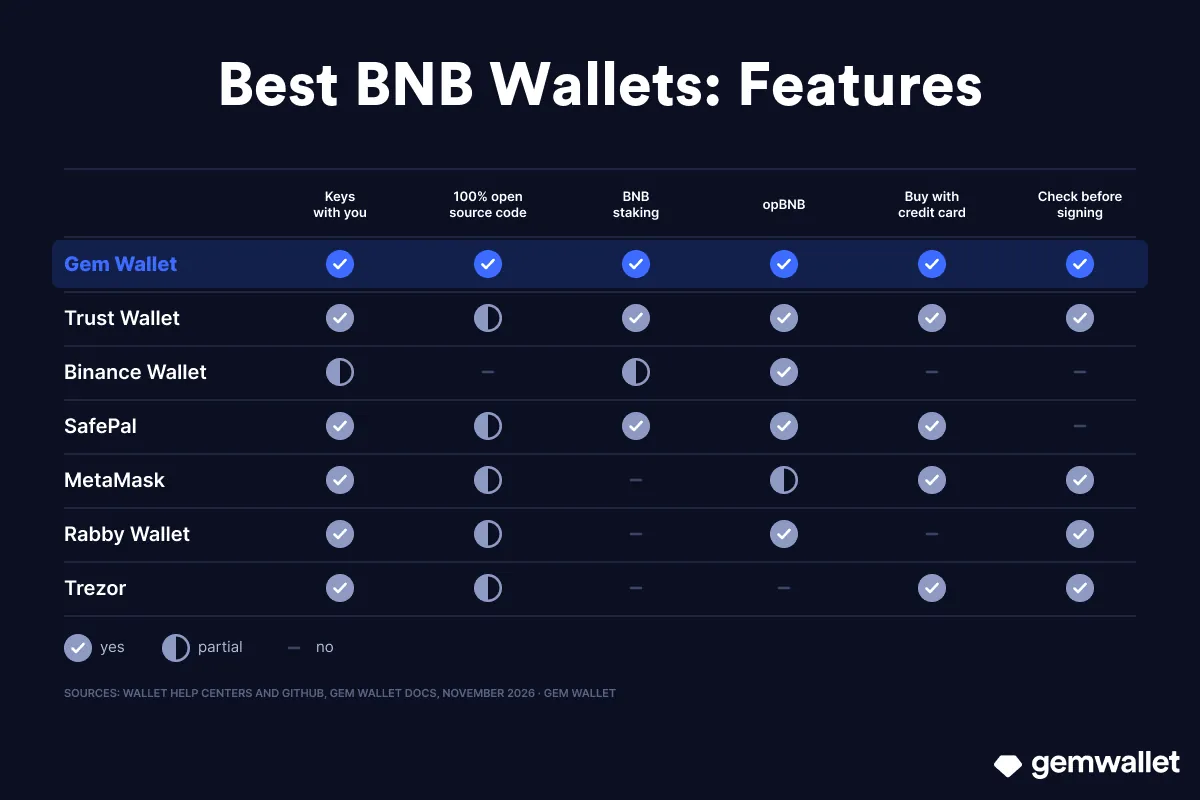 BNB Wallet features: keys, open-source code, staking, and buying. Source: Gem Wallet
1. Gem Wallet - BNB Staking, opBNB, and 100+ Networks
Gem Wallet is a self-custody wallet for iOS and Android where BNB, BEP20 tokens, and BNB Chain NFTs sit next to assets of 100+ other networks. One 0x address in it opens BNB Chain, opBNB, and Ethereum with other EVM networks.
Strengths:
- Self-Custody Wallet: The secret phrase is created and stored only on your phone, and neither the Gem Wallet team nor third parties have access to it.
- 100% Open-Source Code: All of Gem Wallet’s open-source code is on GitHub: the apps under the GPL-3.0 license and the core under MIT. In 2026, independent audits of Gem Wallet were carried out by CertiK in April and Cure53 in October.
- No Sign-Up or KYC: The wallet needs no email, phone number, or documents, and there is no identity check.
- Built-In DEX Aggregator: You can swap BNB and BEP20 tokens to BTC, ETH, USDT, and other assets: within BNB Chain via PancakeSwap, Uniswap, and OKX DEX, and across networks via THORChain, Chainflip, Relay, Mayan, and other providers. Gem Wallet generally charges a 0.5% fee on swaps, reduced to 0.25% for supported stablecoin-to-stablecoin swaps on the same network; network and protocol fees are added depending on the route.
- BNB Staking in the App: BNB staking starts from 1 BNB with one of the network’s 40+ active validators, rewards are added to the stake automatically, and unstaking takes 7 days. The BNB staking APR in Gem Wallet is 1.22% (November 27, 2026). The same app also lets you stake ETH, SOL, TRX, and other coins.
- BNB with a Credit Card: In Gem Wallet you can buy BNB with a Visa or Mastercard credit card and via Apple Pay - payments are processed by Mercuryo, MoonPay, and other providers, and you can sell BNB in countries where they operate.
- Check Before Signing: Gem Wallet runs the recipient address, token, and dApp website through the HashDit and GoPlus databases, and the confirmation screen shows how much will be charged and what approval the contract will get.
- NFTs and dApps: Gem Wallet shows and sends BNB Chain NFTs, and connects to PancakeSwap and other dApps via WalletConnect, without handing the key to the website.
Limitations:
- Phone Only: Gem Wallet has apps for iOS and Android, but no browser extension or desktop version.
- No Hardware Wallets: You cannot sign Gem Wallet transactions with Trezor or SafePal yet.
- Network Fee in BNB Only: Under the BNB Chain network rules, the fee is paid in the native coin, and you cannot pay it with a token in Gem Wallet.
Best For: Secure and private everyday use of BNB, BEP20 tokens, and dApps in the BNB Chain ecosystem, when the wallet is always on your phone and your assets are accessible 24/7.
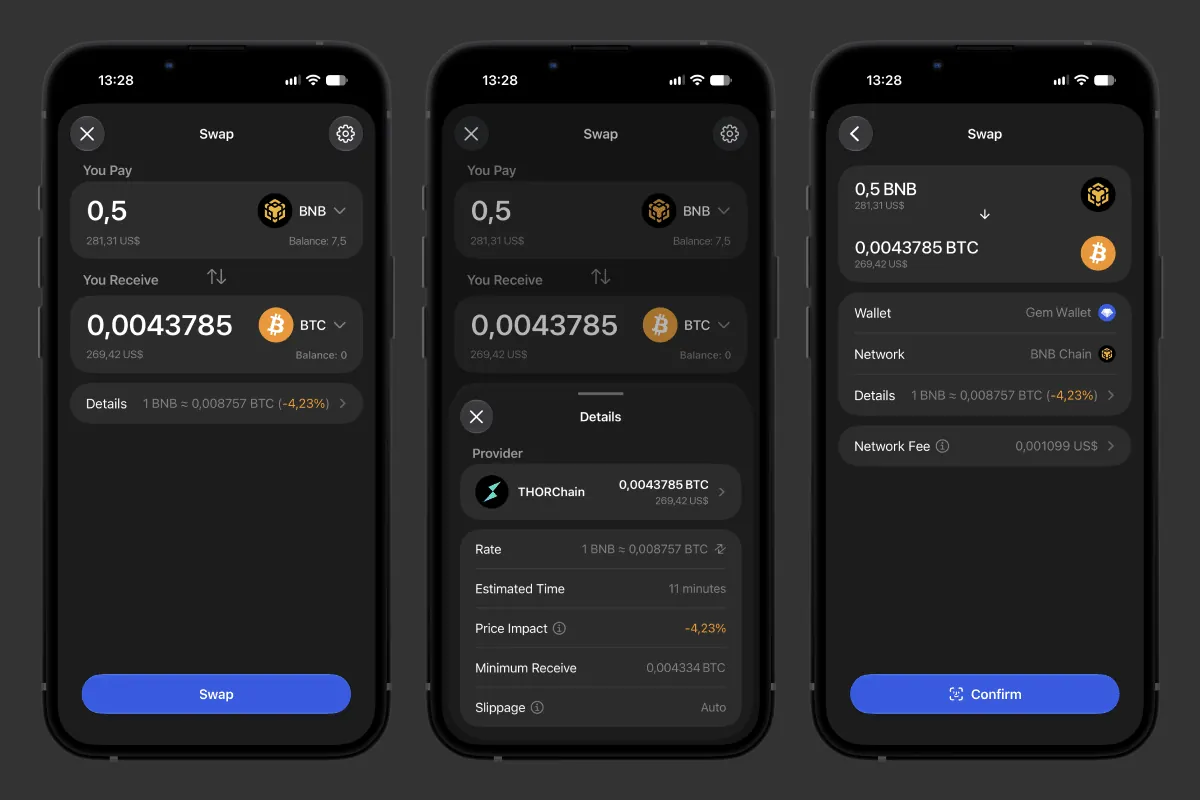 Swapping BNB to native BTC in Gem Wallet
2. Trust Wallet - BNB Staking and Gas in Stablecoins
Trust Wallet is a self-custody wallet for phone and browser where BNB Chain sits next to 100+ other networks. The opBNB network was added to it in September 2023. A detailed comparison is in the article “Gem Wallet vs Trust Wallet”.
Strengths:
- Native BNB Staking: From 1 BNB, you can delegate to a validator of your choice right in the app, and unstaking takes 7 days.
- FlexGas: You can pay the BNB Chain network fee with TWT, USDT, or USDC, even if there is no BNB on the address.
- Security Scanner: Before signing, Trust Wallet shows the transaction result and warns about scam contracts and risky approvals.
Limitations:
- Trust Wallet Swap Fee Not Published: On its swap page, Trust Wallet says it charges no additional service fee, but its help center does not name its own percentage.
- Closed Apps: Only the Wallet Core library code is open (Apache 2.0), and Trust Wallet does not publish the source code of the apps themselves.
Best For: Those who want BNB staking and gas paid in stablecoins in one mobile wallet.
3. Binance Wallet (Formerly Binance Web3 Wallet) - A Wallet Inside the Binance App
Binance Wallet is a wallet built into the Binance exchange app: it launched on November 8, 2023, as Binance Web3 Wallet and changed its name on December 9, 2024, because, according to Binance, it had become simpler and more versatile. The Binance Wallet extension works with 35 EVM networks, including BNB Chain and opBNB, as well as Solana, TRON, and Sui.
Strengths:
- No 12 Words to Write Down: The main wallet is created in a couple of taps inside the Binance app, and you do not need to write down a secret phrase.
- Binance Wallet Swap Fee from 0%: Within the first group - stablecoins and major coins - swaps in the app carry no wallet fee, and with tokens outside the groups the fee is 0.5% (Binance help center, November 2026).
- Liquid BNB Staking: In the Yield+ section, BNB turns into the slisBNB token, which earns rewards and stays in circulation.
Limitations:
- An Exchange Wallet: Binance Wallet lives inside a Binance account with identity verification, and the key is split into three parts - on the device, in the cloud under a password, and with Binance, so you do not have full control over the key: one part of it is always stored by the exchange.
- Closed Code: Binance publishes neither a repository nor a description of the Binance Wallet code.
- No Native Staking: The Binance Wallet help center does not offer delegating BNB directly to a network validator.
Best For: Those who already have a Binance account and want to try the network’s dApps and liquid BNB staking without installing a second app.
4. SafePal - An App and a Hardware Wallet for BNB
SafePal is a wallet founded in 2018 by Veronica Wong, and in the same year the project joined the first cohort of the Binance Labs incubator in San Francisco. Today SafePal is a mobile app, a browser extension, and the S1, S1 Pro, and X1 hardware devices that work together with the same app.
Strengths:
- Its Own Device as a Pair: A SafePal hardware wallet costs from $49.99 for the S1 to $89.99 for the S1 Pro, excluding VAT (SafePal store, November 2026): the S1 passes the signature via QR code, and the X1 via Bluetooth.
- SafePal Swap Fee of 0.2%: This is what SafePal keeps from every swap and bridge, not counting gas and provider fees (SafePal help center, November 2026).
- opBNB and NFTs: The app works with the opBNB network and shows BNB Chain NFTs.
- Gas Station: If there is no BNB on the address, you can buy some for gas with the SFP token or stablecoins.
Limitations:
- Partly Open Code: The device firmware is on GitHub under the GPL-3.0 license, while the app repository was last updated in January 2024.
- Staking Without Details: The Earn section offers BNB staking with validators, but the SafePal help center currently names neither the minimum amount nor the number of validators.
Best For: Those who want a mobile wallet and an affordable savings device from one maker.
5. MetaMask - An Extension for BNB Chain dApps
MetaMask is a self-custody wallet for browser and phone created by Aaron Davis and Dan Finlay of Consensys. BNB Chain is on its list of popular networks, and besides EVM networks MetaMask supports Bitcoin, Solana, TRON, and Stellar. A detailed comparison is in the article “Gem Wallet vs MetaMask”.
Strengths:
- Gas Without BNB: The Gas included feature takes the BNB Chain gas fee in USDT, USDC, or another token with a small MetaMask surcharge, and in swaps gas is simply deducted from the swapped amount.
- Risk Warnings: Transaction checks with result simulation are on by default and work on BNB Chain.
- Hardware Wallets: Ledger, Trezor, Lattice, and QR wallets connect to the extension, and Ledger, Keystone, and NGRAVE ZERO to the mobile app.
Limitations:
- MetaMask Swap Fee of 0.875%: The rate is the same for swaps within BNB Chain and across networks (MetaMask help center, November 2026).
- No BNB Staking: Staking in MetaMask is available only for ETH, and BNB is delegated through the BNB Chain website with the wallet connected.
- Non-Free License: MetaMask code is open for reading, but the Consensys license restricts its commercial use.
Best For: Those who open BNB Chain dApps in the browser and connect a hardware device to the wallet.
6. Rabby Wallet - A DeFi Extension with Approval Revoking
Rabby Wallet is a self-custody wallet by DeBank, the team behind an analytics service for DeFi portfolios, and its list of 80+ networks includes BNB Chain and opBNB. The Rabby Wallet repository has been open on GitHub since April 9, 2021, and besides the browser extension the wallet has a mobile app.
Strengths:
- Simulation Before Signing: Before signing, Rabby Wallet shows the transaction outcome - what will be sent and what will arrive, and suspicious transfers get a label.
- Approval Revoking: All approvals granted to BNB Chain dApps are collected on one wallet screen and revoked from there.
- Rabby Wallet Swap Fee of 0.25%: The rate is already included in the quote, with no separate line (Rabby Wallet help center, November 2026).
- GasAccount: After topping up one balance, you can pay gas on BNB Chain and any other Rabby Wallet network without holding BNB.
Limitations:
- EVM Only: You cannot hold BTC, SOL, or TRX in Rabby Wallet - the wallet does not support their networks.
- No BNB Staking or Buying: The Rabby Wallet help center describes neither BNB staking nor buying BNB with a credit card.
Best For: Active users of PancakeSwap and other BNB Chain DeFi protocols who regularly clean up their approvals.
7. Trezor - A Device for BNB Savings
Trezor is a hardware wallet by the Prague-based company SatoshiLabs, whose first model, the Trezor Model One, came out on July 29, 2014. The BNB Chain network was added to the Trezor Suite companion app in November 2024. Trezor Suite itself came out in July 2021 and fully replaced the old Trezor Wallet in January 2022.
Strengths:
- Open Firmware: The Trezor firmware is on GitHub under the GPLv3, LGPLv3, and MIT licenses, and anyone can check it.
- Readable Signing: On Ethereum and other EVM networks, the device screen shows the action, tokens, and amounts in words if the contract has a Clear Signing description.
- Swapping and Buying BNB: In Trezor Suite, you can swap BNB through third-party providers and buy it with a Visa or Mastercard credit card, while the key never leaves the device.
- Pairing with Hot Wallets: For BNB Chain dApps, Trezor connects to MetaMask, Rabby Wallet, and Exodus and signs their transactions on the device.
Limitations:
- A Paid Device: On November 27, 2026, during the Black Friday sale, the Trezor Safe 3 cost $39, the Safe 5 - $79, and the Safe 7 - $179 (trezor.io).
- Trezor Swap Fee Not Published: Trezor only says that fees in Trezor Suite are dynamic and does not name a percentage (Trezor help center, November 2026).
- Signing Only on the Device: Every transaction has to be confirmed on the Trezor itself, so without the device at hand you cannot send BNB, and there is no 24/7 access to your assets.
Best For: BNB savings you do not touch for months, when open firmware and confirmation on the device matter more than speed.
Which Is the Best BNB Wallet in 2027?
The best BNB Wallet for everyday use is Gem Wallet: you can buy BNB, stake it, swap BEP20 tokens, and connect to dApps from your phone in one app. Trust Wallet suits those who want to pay BNB Chain gas with stablecoins, MetaMask - those who open PancakeSwap and other dApps in the browser, Rabby Wallet - those who keep track of approvals in DeFi, and Trezor - BNB saved for years.
Binance Wallet is convenient for Binance account holders, and SafePal - for those who need an app and an affordable device from one maker. Beginners will find it easiest to start on a phone: Gem Wallet creates a BNB Wallet without registration in a couple of minutes.
Beyond fees, we compared the seven BNB Wallets on eight criteria, from the most important - open-source code - to hardware device support:
- Open Source: Open-source code lets any developer read the wallet line by line and make sure the keys are not sent anywhere. Gem Wallet publishes all of its code, and its Android build from F-Droid matches the source byte for byte - these are reproducible builds. Rabby Wallet opens its extension under MIT, Trezor and SafePal - their device firmware (with Trezor Suite released under a non-free license), Trust Wallet - a library, MetaMask code can be read under a non-free license, and Binance Wallet does not disclose its code.
- Audits: A published audit report shows which vulnerabilities the auditors found and which of them were fixed. Gem Wallet publishes reports by CertiK (April 2026) and Cure53 (October 2026), Rabby Wallet - by SlowMist and Least Authority, and Trust Wallet lists CertiK, Cure53, and Halborn among its auditors.
- Privacy: A self-custody wallet needs no email, phone number, or documents. All wallets in this list except Binance Wallet are created without an account, but MetaMask lets you sign in with Google, Apple, or Telegram, and then the wallet is linked to that account, while Binance Wallet works only inside an exchange account with KYC.
- dApps and Approvals: An approval gives a dApp contract access to your BEP20 tokens, and a good wallet shows it before signing and helps you revoke it later. Rabby Wallet has its own approvals screen, and Gem Wallet, Trust Wallet, MetaMask, Rabby Wallet, and Trezor Suite simulate a transaction before signing.
- BNB Staking: In native staking, BNB stays on your address and is delegated to a validator of your choice, while in liquid staking you get a token like slisBNB in return, which you can sell or put into DeFi. Native staking from 1 BNB is available in Gem Wallet and Trust Wallet, staking with validators - in SafePal’s Earn section, liquid staking - in Binance Wallet, and MetaMask, Rabby Wallet, and Trezor have no BNB staking.
- Buying BNB: BNB with a credit card is sold right in Gem Wallet, Trust Wallet, MetaMask, SafePal, and Trezor Suite - through third-party providers, many of which verify your identity. The Rabby Wallet and Binance Wallet help centers do not describe buying BNB in the wallet.
- Key Storage: With the secret phrase, the wallet is restored on a new phone, so it matters how many words it has and who holds a copy. Gem Wallet, Rabby Wallet, Trust Wallet, and MetaMask create a 12-word phrase, new Trezor devices use 20 words by default, SafePal uses 12 or 24, and Binance Wallet works without a phrase and splits the key into three parts.
- Hardware Wallets: When paired with a hardware device, the hot wallet prepares the transaction and the device signs it. The Rabby Wallet and MetaMask extensions connect the most devices, SafePal works with its own devices and Ledger, Trust Wallet - with Ledger in the extension, Binance Wallet does not describe device support, and Gem Wallet does not support hardware wallets.
Common BNB Wallet Mistakes
A BNB Wallet lets its owner down not with fees, which cost fractions of a cent, but with transfers without BNB, transfers to the wrong network, and fake tokens:
- Tokens but No BNB: Sending USDT BEP20 requires BNB for gas unless your wallet can pay gas with tokens itself. A reserve of 0.001 BNB covers almost 390 USDT transfers to recipients without USDT, so when you withdraw stablecoins from an exchange to a new address, take a little BNB too.
- USDT to a Recipient Without USDT: Such a transfer costs almost 50% more than usual - 51,615 gas units instead of 34,515, because the USDT contract creates the recipient’s balance for the first time. In dollars the difference is fractions of a cent, but with just enough BNB the transaction may fail.
- BEP20 Instead of ERC20 When Withdrawing from an Exchange: In the USDT withdrawal form, the exchange offers BNB Smart Chain (BEP20), Ethereum (ERC20), and opBNB, and a 0x address fits all three. Choose the network where the recipient expects you: USDT sent via BEP20 will not show up for them on the Ethereum network.
- An Old bnb1 Address: Addresses like bnb1… belonged to the BNB Beacon Chain network, which was finally shut down on November 19, 2024 (according to BNB Chain). BNB and tokens now live on BNB Chain at 0x addresses, and you can no longer send them to an old bnb1 address.
- Fake USDT: On BNB Chain, anyone can issue a token named USDT, and scammers send such tokens to other people’s addresses. The real USDT BEP20 is issued on the contract 0x55d398326f99059fF775485246999027B3197955 - check the contract before accepting a token as payment.
- A Forgotten Approval: Many dApps ask for an approval for an unlimited amount, and it stays valid even a year later unless you revoke it. You can view your approvals in the BscScan token approval checker, and each revocation is a separate transaction with a fee.
- An Address from Your Transfer History: Copying a recipient’s address from your history is dangerous: scammers send zero-value transfers there from a look-alike address with the same first and last characters. How to protect yourself from this scheme is explained in the article “Address Poisoning Is No Longer a Problem”.
How Much a Transaction on BNB Chain Costs
Any regular transaction on the BNB Chain network costs less than half a cent: a BNB transfer about $0.0006, a USDT transfer $0.001-0.0015, and a PancakeSwap swap about $0.004 (Gem Wallet calculation as of November 27, 2026).
Where the numbers come from: we took 175 real transactions from six BNB Chain blocks on November 27 and looked at how much gas each one used: a BNB transfer - 21,000 units, a USDT transfer - 34,515, a USDT transfer to an address without USDT - 51,615, an approval - 48,996, and a PancakeSwap swap - 138,685 (median). We multiplied the gas by that day’s gas price, 0.05 gwei, and converted it to dollars at the BNB rate. The rate changes, so the dollar amounts will shift over time, while gas usage barely changes. The current gas price is shown in our BNB Chain gas tracker.
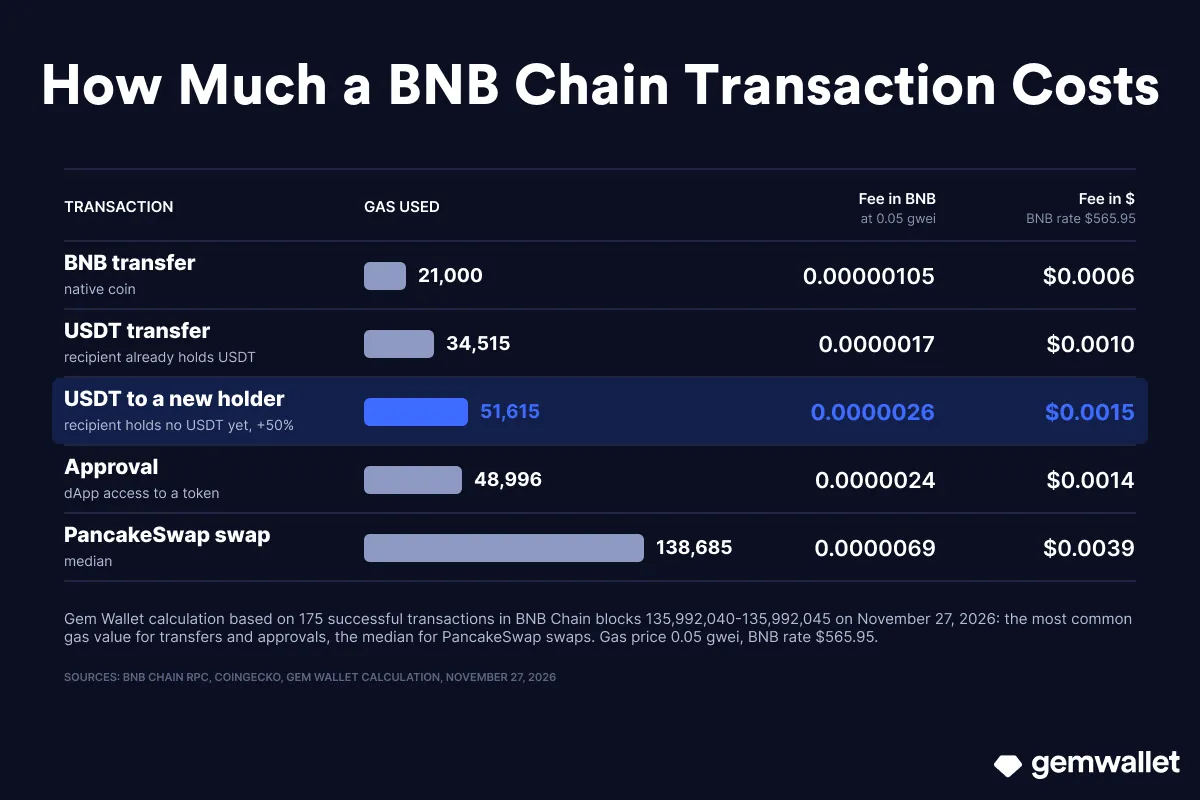 How much transactions on BNB Chain cost. Source: Gem Wallet
How to Create a BNB Wallet
Chosen your BNB Wallet? You can create it in a couple of minutes: download the app, write down your secret phrase on paper and keep it in a safe place - and the wallet is ready to receive BNB, BEP20 tokens, and NFTs. We have prepared a simple step-by-step guide in the article “How to Create a BNB Wallet”.
Disclaimer: This article is for informational and educational purposes only and is not financial or investment advice. Crypto assets are highly volatile, and you can lose all the money you invest. Do your own research and make decisions at your own risk.