

Table of Contents
The best Bitcoin Wallet is the one where the keys stay only with you, the code can be checked, and BTC is easy to buy, send, and swap. We compared Gem Wallet, Exodus, Trust Wallet, BlueWallet, Sparrow, Bitcoin Core, and Trezor on address types, fees, privacy, and open-source code using November 2026 data, and Gem Wallet took first place.
Key Takeaways
- A Stuck Transfer Waits Two Weeks: By default, a Bitcoin Core node removes an unconfirmed transfer from the mempool only after 336 hours, and without Replace-by-Fee (RBF) the sender cannot raise its fee (Bitcoin Core 32.1 code).
- Gem Wallet Is First in the Ranking: It is the only one of the seven wallets that combines secure and private BTC storage with no sign-up or KYC and 100% open-source code with buying BTC with a credit card and swapping BTC into coins of other networks in one app on your phone.
- A Transfer From a bc1q Address Is 37.6% Cheaper: A standard transfer from a Native SegWit address weighs 141 vB, and from a Legacy address - 226 vB, so at a rate of 2 sat/vB, for example, it costs 282 satoshis instead of 452 (our calculation based on transaction weight in the Gem Wallet code, November 2026).
 ChatGPT
 Gemini
 Grok
 Perplexity
What Is a Bitcoin Wallet?
A Bitcoin Wallet is a phone app, desktop program, or hardware device that stores the keys to your addresses on the Bitcoin network and signs BTC transfers with them. The wallet does not store the coins themselves: they are recorded on the blockchain as unspent outputs of past transactions (UTXOs), and the key proves that only you can spend them.
Every Bitcoin Wallet creates addresses of one of four types, and the type determines the weight of a transfer in vB, and therefore the fee:
- Legacy (P2PKH): The address starts with 1 - the oldest and heaviest format.
- Nested SegWit (P2SH-P2WPKH): The address starts with 3 - a transitional format from 2017.
- Native SegWit (P2WPKH): The address starts with bc1q, and a standard transfer from it weighs less than from Legacy and Nested SegWit - this is the format the wallets in this list create by default.
- Taproot (P2TR): The address starts with bc1p - a format from 2021 that not every wallet can spend from yet.
When you spend a UTXO, the network takes it whole, so the wallet returns the remainder - the change - to you as a separate output, either to a new change address or to the same address. Whether you get a new address for every receipt and where the change goes determine how easy it is to link all your transfers to each other. Why the fee depends on the transfer’s weight rather than its amount is explained in the article “Bitcoin Transaction Fee Explained”.
All the wallets in this list work on the Bitcoin mainnet, while the Lightning Network is a separate payment network on top of Bitcoin for instant small transfers.
A UTXO (unspent transaction output) is an amount of BTC from a past transfer that sits at your address and has not been spent yet. A vB (virtual byte) is the unit of transfer weight that the Bitcoin network uses to calculate the fee.
Hot vs Cold Bitcoin Wallet
A hot Bitcoin Wallet keeps the key on a device with internet access, while a cold Bitcoin Wallet keeps it in a separate device that signs transfers without going online. A hot wallet is convenient for paying, buying, and swapping BTC every day, and a cold one is for holding savings for years. See the full comparison in the article “Hot Wallet vs Cold Wallet”.
Hot Bitcoin Wallet
A hot Bitcoin Wallet is a phone or desktop app or an exchange account, where the key to the address is stored on a device or server connected to the internet. Such a wallet usually learns your balance through the developer’s server, and that server sees which addresses you check. The longer a key lives on a device that goes online, the higher the risk of malware and phishing, so savings are usually moved to a cold wallet. Who holds the key - you or a company - decides whether a hot wallet is custodial or self-custody.
Custodial Bitcoin Wallet
A custodial Bitcoin Wallet is an account on an exchange or in an app where the company, not you, holds the keys to your BTC. The company verifies your identity with documents (KYC) and can limit withdrawals at any moment. The best-known case in Bitcoin’s history is Mt. Gox: on February 7, 2014, the exchange stopped BTC withdrawals, on February 28 it filed for protection from creditors, and payouts to customers started only on July 5, 2024, more than 10 years later (Mt. Gox trustee, mtgox.com).
Self-Custody Bitcoin Wallet
A self-custody Bitcoin Wallet is an app in which the keys are created and stored only on your device. Neither the wallet’s developer nor anyone else can freeze your BTC, no documents are needed to send a transfer, and you sign every transfer yourself. In return, all the responsibility is yours: if the secret phrase or backup file is lost, access to your BTC cannot be restored.
Cold Bitcoin Wallet
A cold Bitcoin Wallet, or hardware wallet, is a device such as Trezor that creates the key and signs the transfer inside itself, passing only the finished signature to your computer or phone. Malware on your computer can’t reach the key, and you check the recipient’s address and the amount on the device’s own screen.
A cold Bitcoin Wallet is a paid device that works together with a companion app such as Trezor Suite, Sparrow, or Exodus, and you confirm every transfer with a button on the device. That’s why it is better suited for savings than for everyday payments.
Best Bitcoin Wallets Compared
We compared seven Bitcoin Wallets by type, networks, platforms, and open-source code, and they differ most in platforms: three of them work only with Bitcoin, and two only on a computer (help centers, websites, GitHub, and app stores, November 2026).
| Wallet | Type | Networks | Platforms | Open-Source Code | Best For |
|---|---|---|---|---|---|
| Gem Wallet | Hot | Bitcoin + 100+ networks | iOS, Android | 100% | BTC and other coins on your phone |
| Exodus | Hot | Bitcoin and other networks | Windows, macOS, Linux, iOS, Android | Partly | A portfolio on your computer |
| Trust Wallet | Hot | Bitcoin + 100+ networks | iOS, Android, extension | Partly (library) | Many networks and an extension |
| BlueWallet | Hot | Bitcoin only | iOS, Android, macOS | 100% | Only BTC on your phone |
| Sparrow | Hot | Bitcoin only | Windows, macOS, Linux | 100% | Privacy and coin control |
| Bitcoin Core | Hot (full node) | Bitcoin only | Windows, macOS, Linux | 100% | Verifying every block yourself |
| Trezor | Cold | Bitcoin and other networks | Device + Trezor Suite | Open firmware | Long-term storage |
In all seven wallets, the user holds the keys, and none of them asks for documents to create a wallet.
The wallets also differ noticeably in Bitcoin features. Four of the seven give a new address for every receipt, one more lets you turn it on, and five can speed up a transfer (RBF - resending the same transfer with a higher fee) (help centers and wallet code, November 2026).
| Wallet | Address Types | New Address for Every Receipt | Speeding Up a Transfer | Wallet Swap Fee |
|---|---|---|---|---|
| Gem Wallet | bc1q | No | No | Up to 0.5% |
| Exodus | bc1q (+ Legacy, Nested SegWit, and Taproot on desktop) | Turned on in settings | Yes | From 0.5% |
| Trust Wallet | bc1q | Not published | Not published | Not published |
| BlueWallet | bc1q, Legacy, Taproot | Yes | Yes | No swaps |
| Sparrow | All four | Yes | Yes | No swaps |
| Bitcoin Core | All four | Yes | Yes | No swaps |
| Trezor | All four | Yes | Yes | Not published |
Top 7 Bitcoin Wallets in 2027
Gem Wallet tops the Bitcoin Wallet ranking: in one app on your phone, it offers buying and selling BTC, a custom fee rate from 0.1 sat/vB, swaps from BTC into coins of other networks, and 100% open-source code. We ranked the other wallets by how many of these features they have, and placed the cold Trezor last as a separate class. Only Gem Wallet fully has all five features in the matrix below, while a fee rate from 0.1 sat/vB can also be set in BlueWallet and Trezor.
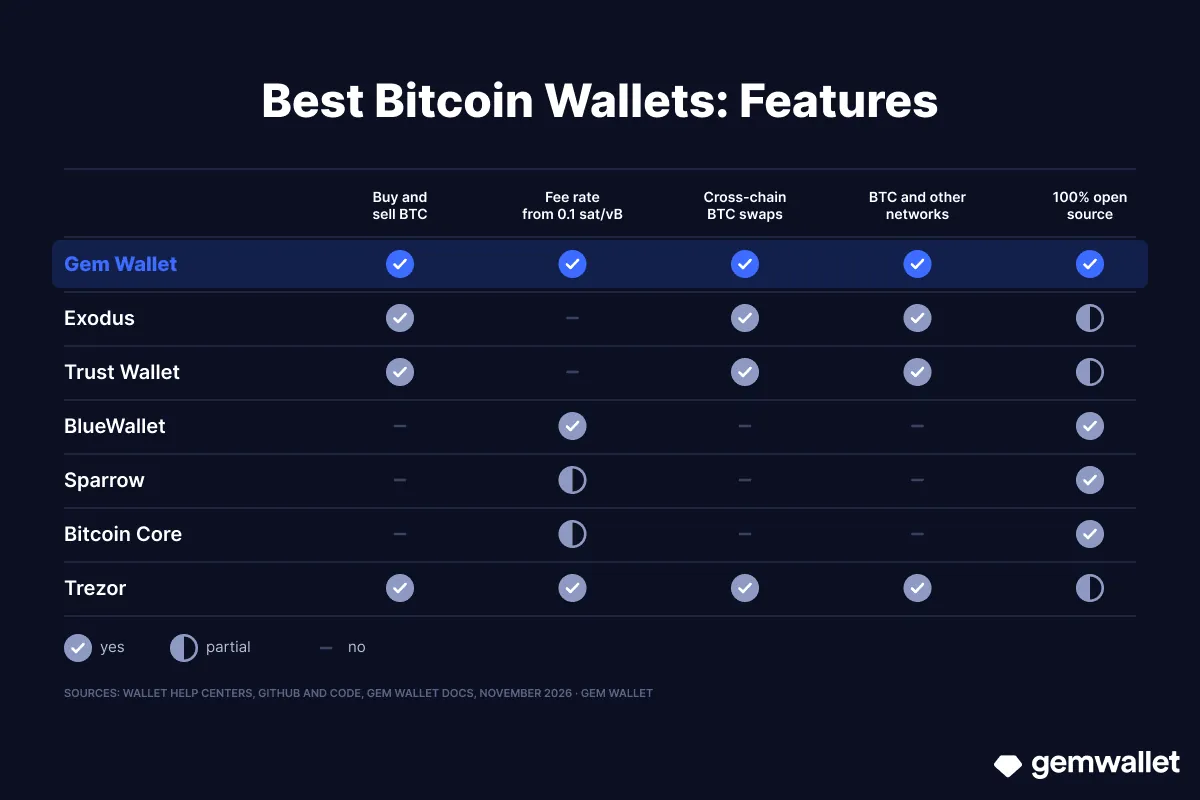 What the Bitcoin Wallets in this list can do: from buying and selling BTC to open-source code. Source: Gem Wallet
1. Gem Wallet - Bitcoin and 100+ Networks in One App
Gem Wallet is a self-custody mobile wallet with fully open-source code, where BTC is stored next to coins of 100+ other networks. Development of Gem Wallet started on June 8, 2023, and just 18 days later, on June 26, it was released on Google Play, followed by the App Store on July 17. Its own Bitcoin address is Native SegWit (bc1q), you can send BTC to addresses of all types, including 1, 3, and bc1p, and since September 5, 2026, the wallet reads payment links and QR codes according to the new BIP-321 standard.
Strengths:
- Keys Only With You: The secret phrase is created and stored on your phone, and neither the Gem Wallet team nor third parties have access to it.
- 100% Open-Source Code: The source code of the Gem Wallet iOS and Android apps is fully published on GitHub under the GPL-3.0 license, and the wallet’s security was audited in 2026 by CertiK (April) and Cure53 (October).
- No Sign-Up and No KYC: Gem Wallet does not ask for an email, phone number, or documents and does not verify your identity.
- Custom Network Fee: Besides the preset rates, since August 10, 2026, Gem Wallet lets you set your own rate from 0.1 sat/vB, and the total is recalculated on the screen before you sign.
- Built-In DEX Aggregator: You can swap BTC into ETH, SOL, USDT, and coins of other networks via THORChain, Maya Protocol, Relay, and other providers. Gem Wallet’s swap fee is up to 0.5% (Gem Wallet documentation, November 2026), and it is already included in the rate.
- Buying and Selling BTC: You can buy BTC right in the app with a credit card, Apple Pay, and other payment methods - via Mercuryo, MoonPay, Paybis, and other providers, and sell BTC through the providers in the app if selling is available in your country.
Limitations:
- Phone Only: Gem Wallet works on iOS and Android, and there is no separate desktop version.
- No Hardware Wallets: Ledger and Trezor do not connect to Gem Wallet yet.
- One Address for Receiving and Change: Gem Wallet receives BTC to one bc1q address and returns change to it, so all transfers are visible in the history of one address.
- No Speed-Up or Coin Control: You can’t speed up a stuck transfer in the app, and the wallet itself decides which previously received amounts (UTXOs) go into a transfer, starting with the smallest ones - you can’t choose them manually.
Best For: Secure everyday use of BTC with no sign-up or KYC, when you need to buy, send, and swap Bitcoin in one app next to other coins.
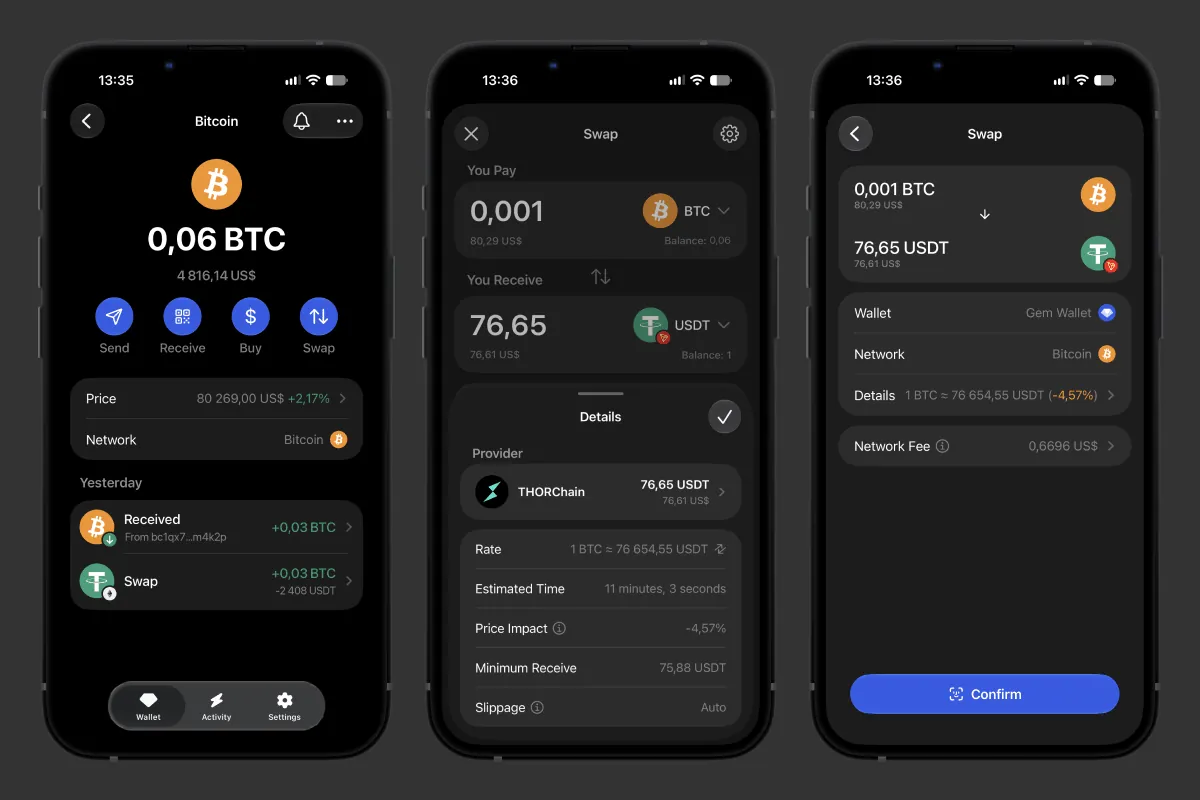 Swapping BTC for USDT via THORChain in Gem Wallet
2. Exodus - Bitcoin on Desktop and Mobile
Exodus is a self-custody wallet for desktop and mobile, founded in 2015, which as of November 2026 works on Windows, macOS, Linux, iOS, and Android. We compare the two wallets in detail in the article “Gem Wallet vs Exodus”.
Strengths:
- All Address Types on Desktop: In the desktop app, you can choose a Legacy, Nested SegWit, Native SegWit, or Taproot address.
- Speeding Up a Transfer: A stuck BTC transfer can be sped up right in Exodus - via RBF or a new transaction from the change.
- Ledger and Trezor: The desktop app works with Trezor, and the mobile app with Ledger Nano X, Ledger Flex, and Trezor Safe 7.
Limitations:
- Partly Open Code: Exodus publishes Bitcoin libraries on GitHub, but some app components remain closed.
- One Address by Default: Exodus receives BTC to one address and returns change to it, and new addresses appear only after you turn them on in settings.
- Swap Fee “From 0.5%”: Exodus states only the lower limit, while the final percentage is included in the rate and depends on the pair.
Best For: Those who manage a portfolio with BTC on a computer and want to speed up stuck transfers in one click.
3. Trust Wallet - Bitcoin Among 100+ Networks
Trust Wallet is a self-custody multichain wallet that appeared in 2017 and was acquired by Binance in July 2018. It works on iOS, Android, and as a browser extension and supports more than 100 networks (Trust Wallet help center, September 2026). We compare the two wallets in detail in the article “Gem Wallet vs Trust Wallet”.
Strengths:
- A Hundred Networks and an Extension: BTC is stored in one app with coins of 100+ networks, and on a computer you can use the same wallet as an extension for Chrome, Brave, Edge, and Opera.
- Custom Fee Rate: Before sending BTC, you can set the rate in sat/byte manually.
- Buying and Swapping BTC: BTC can be bought with a credit card through the built-in purchase and swapped into coins of other networks right in the wallet.
Limitations:
- Partly Open Code: The Trust Wallet Core library (Apache-2.0 license) is published on GitHub, but the code of the apps themselves is not.
- Swap Fee Not Stated: The Trust Wallet help center says the wallet charges no service fee, but Trust Wallet does not state the swap fee included in the rate.
- Ledger Only in the Extension: Hardware wallets do not connect to the mobile app.
Best For: Those who hold BTC among coins of many networks and use the wallet both on their phone and in the browser.
4. BlueWallet - A Bitcoin-Only Wallet for Your Phone
BlueWallet is a self-custody Bitcoin-only wallet whose code has been developed openly on GitHub since January 2018. It works on iOS, Android, and macOS, and all of its code is open under the MIT license.
Strengths:
- A New Address for Every Receipt: BlueWallet shows a new address for every incoming transfer and sends change to a separate change address.
- Coin Control and Freezing: Before sending, you can choose which UTXOs to spend and freeze suspicious coins.
- Speeding Up and Canceling a Transfer: An outgoing transfer can be sped up or canceled via RBF, and an incoming one sped up via CPFP, that is, with a new transaction with a higher fee.
- Your Own Electrum Server: BlueWallet connects to your server instead of the BlueWallet server.
- Hardware Wallets via QR Code: Transfers are signed by Coldcard, Keystone, OneKey, and other devices.
Limitations:
- No Built-In Swaps: You can’t swap BTC into another coin inside BlueWallet, and buying leads to a third-party service.
- Bitcoin Only: For other coins, you’ll need a separate wallet.
Best For: Those who keep only BTC on their phone and want to choose the coins for a transfer themselves.
5. Sparrow - A Bitcoin Wallet for Desktop
Sparrow is a self-custody Bitcoin-only wallet for Windows, macOS, and Linux, released by developer Craig Raw. The first version came out on April 12, 2020, and since version 1.5.0 Sparrow publishes reproducible builds: the program file can be matched against the source code.
Strengths:
- All Four Address Types: Sparrow creates Legacy, Nested SegWit, Native SegWit, and Taproot wallets.
- Coin Control and Privacy: Every UTXO is shown separately, and the built-in Tor connects the wallet to .onion servers without revealing your IP address.
- Your Own Data Source: Sparrow connects to your Bitcoin Core node or Electrum server and takes the default fee rate from mempool.space.
- Hardware Wallets: Sparrow signs transfers via Trezor, Ledger, BitBox02, Coldcard, Jade, Keystone, and other models.
Limitations:
- Desktop Only: Sparrow has no mobile version.
- No Buying or Swapping: You can’t buy or swap BTC in Sparrow, only store, receive, and send it.
Best For: Those who keep BTC on a computer together with a hardware wallet and choose which coins to spend themselves.
6. Bitcoin Core - A Full Node With a Built-In Wallet
Bitcoin Core is Bitcoin full node software with a built-in wallet, a direct descendant of the client Satoshi Nakamoto released in January 2009. The program got the name Bitcoin Core in version 0.9.0 on March 19, 2014, and the current version as of November 2026 is 32.1 (bitcoincore.org website).
Strengths:
- Verification Without Intermediaries: Bitcoin Core downloads and verifies every block itself, so no server learns which addresses you check.
- New Addresses From a Pool: The wallet prepares 1,000 addresses in advance and gives a new one for every receipt and every change output.
- Coin Selection With Up to Four Algorithms: Bitcoin Core tries up to four ways to select coins for a transfer and keeps the one with the least overpayment for fees and change.
- Tor and Speeding Up a Transfer: The node can run over Tor, and a stuck transfer can be sped up via RBF.
Limitations:
- Hundreds of Gigabytes on Disk: The full blockchain takes about 600 GB and grows by 5-10 GB a month, while pruning mode needs from 10 GB.
- No Secret Phrase: Bitcoin Core stores the keys in a wallet file, so a backup is a file or a descriptor export, not a secret phrase of 12 words, as in BlueWallet, or 24 words, as by default in Sparrow.
Best For: Those who run their own node and want to verify every transfer themselves without trusting someone else’s server.
7. Trezor - A Hardware Wallet for Storing BTC
Trezor is a hardware wallet from SatoshiLabs in Prague: the Model One, introduced on July 29, 2014, opened the market for such devices. Trezor was created by Marek Palatinus (Slush) and Pavol Rusnák, and it has a separate Bitcoin-only firmware with no other coins.
Strengths:
- Key on the Device: The key never leaves the Trezor, and you check the recipient’s address and the amount on its screen before signing.
- Open Firmware: The Trezor firmware is publicly available under the GPL-3.0 license, and the code of the Trezor Suite app can be read too.
- A Full Set for Bitcoin: Trezor Suite has all four address types, a new address for every receipt, coin control, transfer speed-up, and Tor.
Limitations:
- Paid Device: Trezor Safe 3 costs $59, Safe 5 - $129, and Safe 7 - $249 (trezor.io, November 2026).
- Swaps via Third-Party Services: Buying and swapping BTC in Trezor Suite go through partners, some of which are centralized services with identity verification, and Trezor does not publish its own swap fee.
Best For: BTC savings you hold for years, checking every transfer on the device’s screen.
Which Is the Best Wallet for Bitcoin in 2027?
For secure everyday use of Bitcoin, the best choice is Gem Wallet: in one app on your phone, you buy BTC with a credit card, send it with your own fee rate, and swap it into coins of other networks without giving away your keys or signing up in the wallet itself. BlueWallet suits those who need only Bitcoin on their phone, Sparrow and Bitcoin Core suit those who keep BTC on a computer and manage coins themselves, and Trezor is for long-term savings.
Beginners will find it easier to start with a mobile app: Gem Wallet creates a Bitcoin Wallet with no sign-up in a couple of minutes.
The difference between the wallets comes down to four things:
- Address and Fee: The Bitcoin network fee depends on the transfer’s weight, not its amount, so the address type affects the price of every transfer. You can choose the address type in Sparrow, Bitcoin Core, Trezor, BlueWallet, and Exodus on desktop, while Gem Wallet and Trust Wallet create a bc1q address - the cheapest one for a standard transfer.
- Privacy: The Bitcoin blockchain is public, so privacy depends on two things - how many addresses you have and which server sees their requests. Gem Wallet, Exodus, and Trust Wallet get balance data through the wallet’s servers, you can connect your own node or server to BlueWallet, Sparrow, and Trezor Suite, and Bitcoin Core is a node itself. Tor is built into Sparrow, Bitcoin Core, and Trezor Suite.
- Open-Source Code: Code that is published in full lets any developer check that the wallet doesn’t send keys to someone else’s server. Like Sparrow and Bitcoin Core, Gem Wallet publishes reproducible builds: the Android version from F-Droid can be matched byte by byte with the code on GitHub. The code is fully open at Gem Wallet, BlueWallet, Sparrow, and Bitcoin Core, Trezor has open firmware, and Exodus and Trust Wallet open only some components.
- Hardware Wallets: A hot wallet that works with a hardware one sends BTC while the device signs, and the key never goes online. Sparrow connects the most models, and BlueWallet signs transfers via devices with QR codes. Bitcoin Core works with them via HWI, which its developers call experimental.
Common Bitcoin Wallet Mistakes
Most money and privacy on Bitcoin is lost because of an unfortunate address type, one address for all transfers, and a fee that can no longer be changed after sending:
- Sending From an Old Legacy Address: A standard transfer with one input and two outputs weighs 226 vB from a 1… address and 141 vB from a bc1q address, so with Legacy you pay 60% more: at a rate of 2 sat/vB, that’s 452 satoshis instead of 282, and at 1 sat/vB, as on mempool.space in early November 2026, it’s 226 instead of 141. At a BTC price of $80,269, that’s $0.18 instead of $0.11 at the usual rate of 1 sat/vB (the median on mempool.space from November 2025 to November 2026) and $1.09 instead of $0.68 at the peak on February 5, 2026 (6 sat/vB). A transfer from a 3 address costs 18% more than from bc1q ($0.13), and from bc1p - 9% more ($0.12).
- Many Small Legacy Coins: Every extra input from a Legacy address adds 148 vB to a transfer, and from a bc1q address - about 68 vB, so dozens of small receipts to an old address cost the most.
- One Address for All Transfers: Anyone can open an address in a block explorer and see all its receipts and spending. If the address has ever been linked to your name, for example when withdrawing from an exchange with KYC, the rest of the history is visible too, so it’s better to use a new address for every receipt.
- Too Low a Rate Without Speed-Up: A transfer with a rate lower than the mempool’s can wait in the queue for days, and by default a Bitcoin Core node removes it from the mempool after 336 hours - two weeks. If the wallet doesn’t support RBF, the sender can no longer raise the fee, so check the rate on mempool.space before sending.
- A Bitcoin Cash Address Instead of Bitcoin: Old Bitcoin Cash addresses also start with 1 or 3, and an exchange or wallet may show a BCH address in this format. BTC sent to such an address arrives on the Bitcoin network, but a recipient with a BCH wallet won’t see it, so check the transfer’s network with the recipient.
- Empty Balance After Import: From one secret phrase, wallets derive different addresses for each type: the m/44’ path leads to Legacy, m/49’ to Nested SegWit, m/84’ to Native SegWit, and m/86’ to Taproot. If the balance is zero after import, the coins are not lost: turn on the same address type in the new wallet as in the old one, and if the new wallet creates only bc1q, send the BTC from the old address in your previous wallet.
- Dust From Strangers: Someone may send a few hundred satoshis to your address so that, when you spend them together with other coins, they can link your addresses. If your wallet lets you choose coins, it’s best to freeze such dust and not spend it.
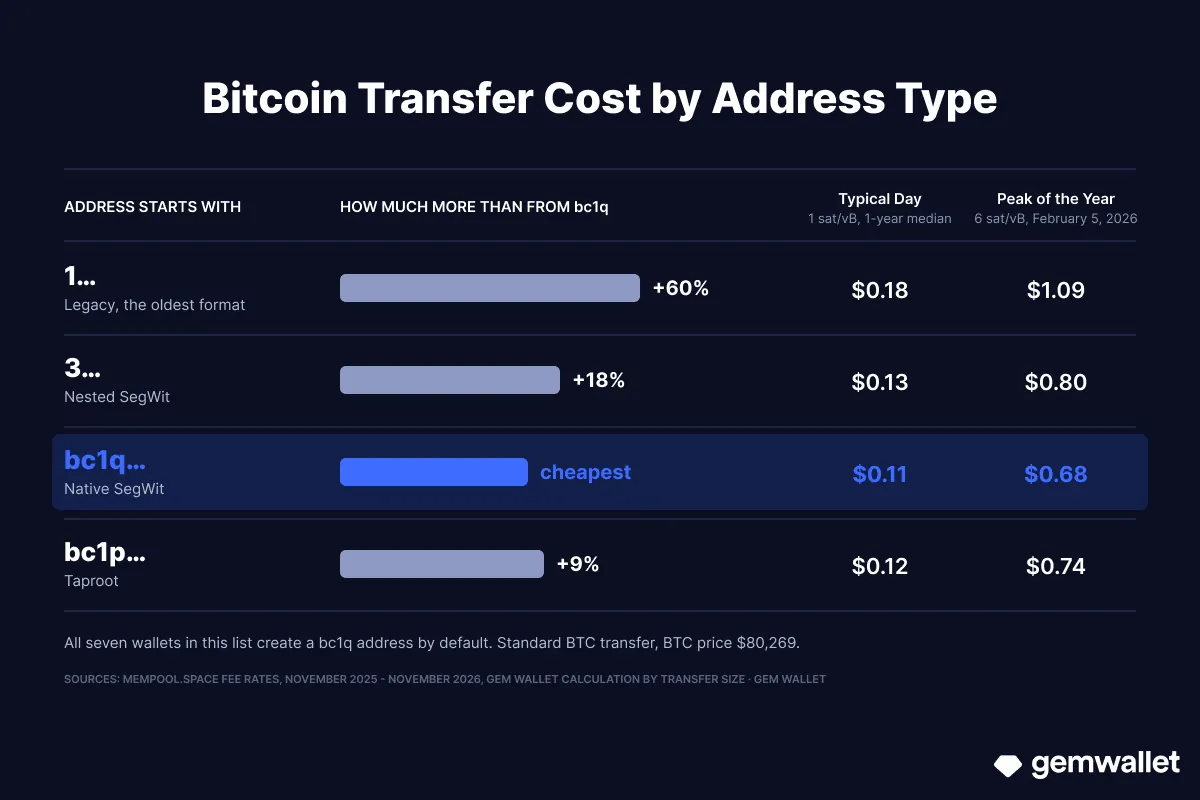 How much a BTC transfer costs from different addresses: bc1q is the cheapest. Source: Gem Wallet
How to Create a Bitcoin Wallet
Once you’ve chosen a Bitcoin Wallet, create it in a couple of minutes and a few taps: download the app, save your secret phrase, and your first bc1q address is ready to receive BTC. All the steps with tips are in our guide “How to Create a Bitcoin Wallet”.
Disclaimer: This article is for informational and educational purposes only and is not financial or investment advice. Crypto assets are highly volatile, and you can lose all the money you invest. Do your own research and make decisions at your own risk.