

Table of Contents
암호화폐 지갑을 설정하려면 안전한 앱을 다운로드하고, 새 지갑을 만들고, 생성된 12단어 비밀 구문을 적어 두면 됩니다. 비밀 구문은 어떤 기기에서든 영원히 자금을 제어할 수 있는 유일한 키입니다.
핵심 요점
- 지갑은 코인이 아니라 키를 보관합니다 - Bitcoin과 Ethereum은 블록체인에 존재하며, 지갑은 소유권을 증명하고 모든 전송을 승인하는 개인 키를 보관합니다.
- 핫 월렛은 두 가지 유형으로 나뉩니다 - 커스터디얼(거래소가 키를 보관하며 자금을 동결할 수 있음)과 논커스터디얼(개인 키를 직접 관리하며 누구도 접근을 막을 수 없음)입니다.
- 논커스터디얼 지갑은 가입 없이 설정할 수 있습니다 - 이름, 이메일, 신원 인증이 필요 없습니다. 개인 키는 기기에서 바로 생성되며 기기 밖으로 나가지 않습니다.
암호화폐 지갑이란 무엇인가요?
암호화폐 지갑은 블록체인상의 암호화폐 자산을 제어하는 개인 키를 보관하는 소프트웨어나 기기입니다. 지갑이 보관하는 것은 코인이 아니라 접근 권한입니다.
Bitcoin, Ethereum 및 다른 모든 토큰은 블록체인, 즉 공개 원장에 영구적으로 기록되어 존재합니다. 지갑이 보관하는 것은 개인 키입니다. 개인 키는 해당 자산이 사용자의 것임을 증명하는 암호학적 증거이자, 자산을 옮길 수 있게 해 주는 유일한 수단입니다. 지갑을 주머니가 아닌 열쇠고리라고 생각하면 됩니다. 열쇠고리를 잃어버려도 코인이 사라지지는 않지만, 다시는 코인에 접근할 수 없게 됩니다.
2025년 기준 전 세계에서 5억 명이 넘는 사람들이 어떤 형태로든 암호화폐를 보유했습니다. 이들 중 상당수는 자신이 개인 키를 전혀 제어하지 못한다는 사실을 모른 채 거래소에 암호화폐를 보관합니다. 이 차이를 이해하는 것이 이 가이드가 가장 먼저 바로잡으려는 부분입니다.
핫 월렛과 콜드 월렛
암호화폐 지갑은 개인 키가 온라인에 저장되는지, 오프라인에 저장되는지라는 한 가지 기준에 따라 두 가지 범주로 나뉩니다.
- 핫 월렛: 인터넷에 연결된 소프트웨어로, 앱, 데스크톱 프로그램, 브라우저 확장 프로그램 등이 있습니다. 일상적인 암호화폐 사용을 위해 만들어졌습니다. 어디에 있든 Solana나 BNB를 구매하고, USDT를 보내 항공권, 호텔, 구독료를 결제하고, 24시간 연중무휴로 시장에 참여할 수 있습니다.
- 콜드 월렛: 개인 키를 완전히 오프라인으로 보관하는 물리적 기기(Ledger, Trezor)입니다. 가격은 70달러부터 시작합니다. 원격 탈취로부터 안전하지만, 모든 거래에 기기가 물리적으로 있어야 하므로 일상적인 활발한 사용에는 실용적이지 않을 수 있습니다.
각각 언제 적합한지 자세히 비교한 내용은 핫 월렛 vs 콜드 월렛을 참고하세요.
핫 월렛의 유형
핫 월렛은 누가 개인 키를 보유하는가라는 하나의 질문에 따라 다시 나뉩니다.
커스터디얼 지갑
거래소에서 암호화폐를 구매한 뒤 그대로 두었다면 커스터디얼 지갑을 사용하고 있는 것입니다. 거래소가 사용자를 대신해 개인 키를 생성하고 보관합니다. 사용자는 아이디, 비밀번호, 자금에 대한 청구권을 갖지만 키는 사용자의 것이 아닙니다.
커스터디얼 지갑을 사용한다는 것은 다음과 같은 위험을 감수한다는 뜻입니다.
- 계정 동결 - 거래소는 어떤 이유로든 경고 없이 접근을 차단할 수 있습니다
- 출금 제한 - 언제, 얼마를 옮길 수 있는지는 플랫폼이 결정합니다
- 플랫폼 파산 - 거래소가 무너지면 자금에 접근하지 못할 수 있습니다
2022년 11월 FTX가 붕괴했을 때, 이 플랫폼은 고객들이 더 이상 출금할 수 없게 된 약 80억 달러의 빚을 지고 있었습니다. 2025년 2월 Bybit은 해킹으로 15억 달러를 잃었으며, 이는 암호화폐 역사상 최대 규모였습니다. 두 경우 모두 커스터디얼 사용자는 자금에 일어난 일을 직접 통제할 수 없었습니다.
논커스터디얼 지갑
논커스터디얼 지갑은 거래소나 제3자, 서버 없이 개인 키를 기기에 직접 저장합니다. BTC, ETH, SOL, HYPE 및 다른 모든 자산은 24시간 연중무휴 오직 사용자만 제어합니다. 누구도 결코 자금을 동결하거나 전송을 막거나 접근을 제한할 수 없습니다. 지켜야 할 것은 12단어 비밀 구문 하나뿐입니다. 오프라인에 보관하고 백업해 두면 암호화폐에 영구적으로, 검열 없이 접근할 수 있습니다.
커스터디얼 vs 논커스터디얼: 실제로 무엇이 다른가
차이를 결정하는 것은 세 가지입니다. 누가 키를 제어하는지, 접근 권한을 복구해야 할 때 어떻게 되는지, 제3자가 자금에 무엇을 할 수 있는지입니다.
| 기능 | 커스터디얼 | 논커스터디얼 |
|---|---|---|
| 개인 키 보유 주체 | 거래소 / 플랫폼 | 사용자(기기에 보관) |
| 계정 복구 | 고객 지원을 통한 비밀번호 재설정 | 비밀 구문으로만 가능 |
| 신원 인증(KYC) | 필수 | 불필요 |
| 제3자에 의한 자금 동결 가능 여부 | 예 | 아니요 |
| DeFi 및 DApp 접근 | 아니요 | 예 |
2026년 암호화폐 지갑 설정 방법: 단계별 가이드
설정은 5분이 채 걸리지 않습니다. 각 단계를 자세히 살펴보겠습니다.
- 공식 App Store 또는 Google Play에서 지갑 다운로드
- 새 지갑을 만들고 PIN 설정
- 12단어 비밀 구문을 종이에 적기(디지털로는 절대 금지)
- 앱에서 구문 확인
- 받기 주소를 찾아 자금을 넣기 전에 테스트 거래 보내기
1단계: 공식 출처에서 선택하고 다운로드하기
신뢰할 수 있는 논커스터디얼 지갑, 예를 들어 100개 이상의 블록체인을 지원하는 완전한 오픈 소스 지갑인 Gem Wallet을 iOS의 App Store나 Android의 Google Play 같은 공식 앱 스토어에서만 다운로드하세요.
설치 전에 공식 웹사이트에서 개발자 이름을 확인하고, 별점만 보지 말고 리뷰 수도 살펴보세요. 메시지나 이메일의 링크로는 절대 설치하지 말고, 스토어에서 앱을 직접 검색하세요.
2단계: 새 지갑 만들기
앱을 열고 “Create a new wallet"을 선택합니다. 모든 것이 기기에서 로컬로 생성됩니다. 가입도, 이메일도 필요 없으며, 지갑은 어떤 개인 정보도 수집하지 않습니다.
3단계: 비밀 구문 적어 두기
지갑은 정해진 순서의 12개 단어를 생성합니다. 이것이 모든 자금에 접근할 수 있는 유일한 키입니다. 이 단어를 가진 사람은 누구든 어떤 기기에서나 지갑을 완전히 제어할 수 있습니다. 백업 없이 잃어버리면 자금은 영원히 사라집니다.
모든 단어를 표시된 순서 그대로 종이에 손으로 적으세요. 다음은 하지 마세요.
- 구문을 스크린샷으로 찍기
- 메모 앱, 메신저 앱, 이메일에 입력하기
- Google Drive, iCloud, Dropbox 등 클라우드 서비스에 저장하기
클라우드 백업에 저장된 비밀 구문은 사람들이 지갑을 잃는 가장 흔한 원인 중 하나입니다. 안전하게 보관하는 방법에 대한 전체 가이드는 비밀 구문을 안전하게 보관하는 방법을 참고하세요.
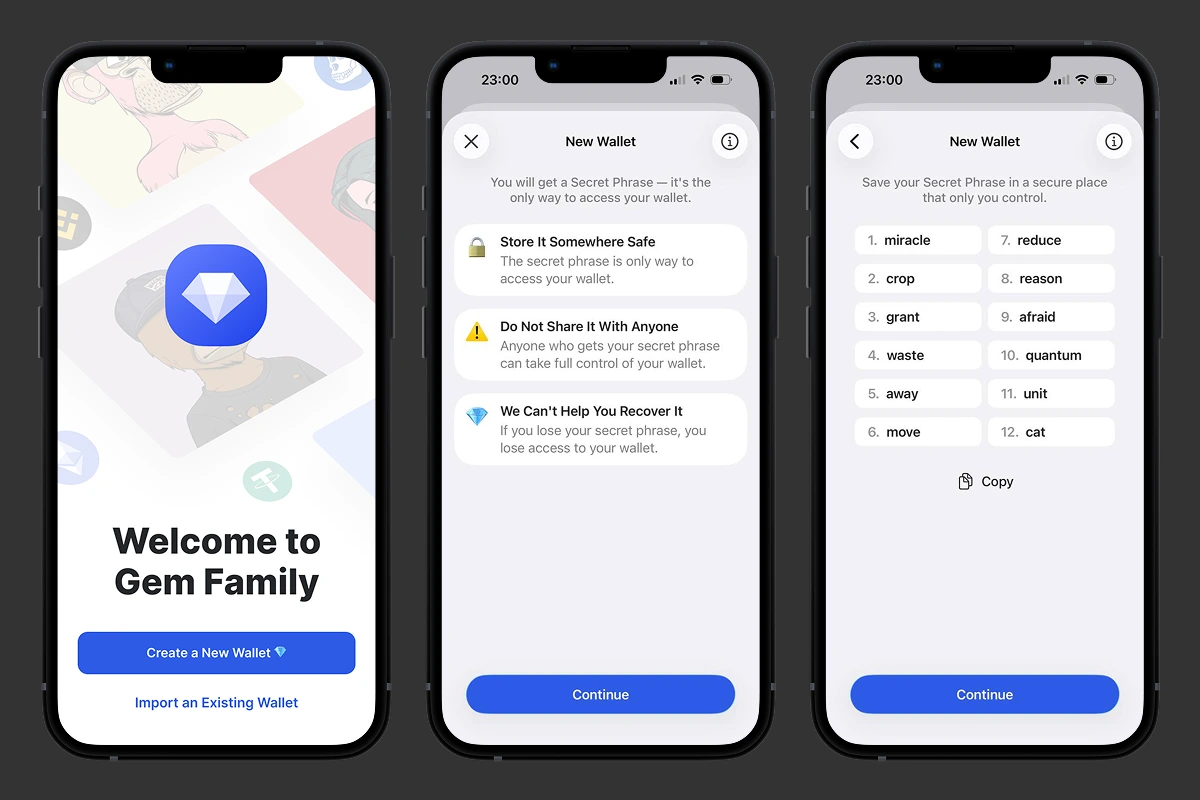 Gem Wallet에서 암호화폐 지갑 만들기: 12단어 비밀 구문은 한 번만 표시되므로 “계속"을 탭하기 전에 적어 두세요.
4단계: 구문 확인하기
지갑이 단어를 올바른 순서로 입력하라고 요청합니다. 기억에 의존하지 말고 종이에 적은 내용을 보고 입력하세요. 확인에 실패했다면 돌아가서 메모를 다시 확인하세요. 이 과정을 통해 지갑에 자금이 들어가기 전에 백업이 정확한지 확인할 수 있습니다.
5단계: 받기 주소 찾기
앱에서 “받기"를 탭하면 지갑 주소와 QR 코드를 볼 수 있습니다. 이 주소는 공개 정보이므로 자유롭게 공유해도 됩니다. 비밀 구문은 정반대입니다. 어떤 이유로든 누구와도 절대 공유하지 마세요. 무언가가 비밀 구문을 요구한다면 그것은 사기입니다.
전송할 때마다 확인해야 할 두 가지:
- 네트워크 일치 - 네트워크는 송금인이 사용하는 네트워크와 일치해야 합니다. 네트워크가 틀리면 자금은 사라지고 복구할 수 없습니다.
- 주소 정확성 - 복사 버튼이나 QR 코드를 사용하고, 절대 직접 다시 입력하지 마세요. 보내기 전에 처음 네 글자와 마지막 네 글자를 비교하세요. 이렇게 하면 클립보드 악성코드를 잡아낼 수 있습니다. 이 악성코드는 특히 TRON 네트워크의 TRC20 자산에서 흔합니다.
지갑 설정이 끝나면 자금을 넣을 수 있습니다. 거래소에서 토큰을 전송하거나, 친구에게 암호화폐를 보내 달라고 하거나, Mercuryo, MoonPay, Paybis 등을 통해 Gem Wallet에서 바로 신용카드로 암호화폐를 구매할 수 있습니다. 구매는 150개 이상의 국가에서 가능합니다. 중개자 없이 스왑, 스테이킹, 거래를 하며 자산을 안전하고 프라이빗하게 관리하세요.
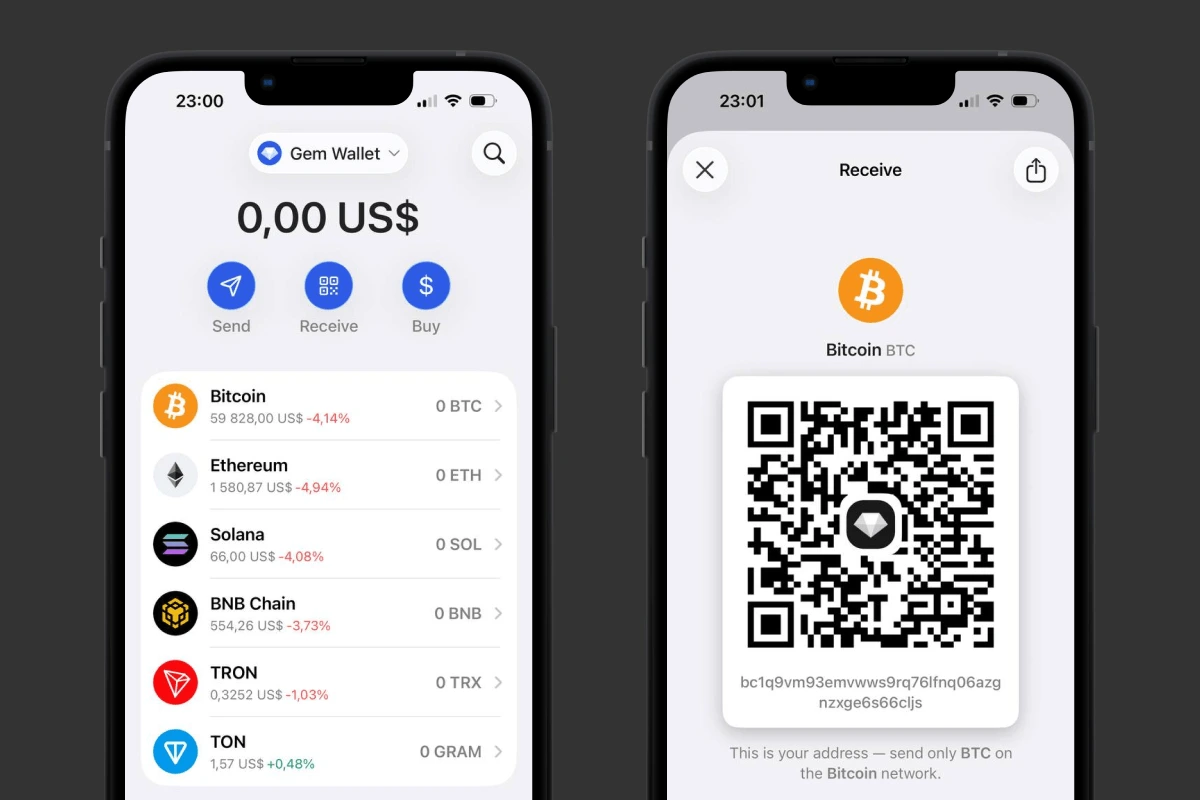 Gem Wallet에서 Bitcoin 지갑 설정: 가입 없이 몇 초 만에 받기 주소가 준비됩니다.
iOS 또는 Android용 Gem Wallet을 다운로드하고 오늘부터 암호화폐를 안전하게 관리하세요.
면책 조항: 이 글은 정보 제공과 교육 목적으로만 작성되었으며 금융 또는 투자 조언이 아닙니다. 암호화폐 자산은 변동성이 매우 크며 투자한 자금을 모두 잃을 수 있습니다. 직접 조사한 뒤 본인의 책임하에 결정하세요.