


Table of Contents
To withdraw crypto from Binance, open Withdraw, paste your wallet address, choose the same network as your wallet, and confirm the transfer. Do it before July 1 and check the address and network by hand before sending - the transfer is irreversible, and one mistake can cost you everything.
Key Takeaways
- Deadline - Binance is pausing its services in the EU on July 1, 2026, but withdrawals stay open even after that date.
- Main risk - a wrong network or a swapped address makes a transfer unrecoverable, so check every detail by hand.
What’s Happening With Binance in the EU
Binance is pausing services for EU residents on July 1, 2026 because it didn’t secure a MiCA license and withdrew its application in Greece on June 24. The exchange said it plans to get a license in another EU country, so its exit may be temporary. From that date, new spot orders, deposits, registrations, and Earn, Staking, and Launchpool products are turned off, but withdrawals and Convert (for selling) stay available. That leaves enough time to move your assets - but don’t wait: the closer the deadline, the heavier the load on support and the more active the scammers.
This situation makes one thing clear: while your crypto sits on an exchange, access to it doesn’t depend on you. The only coins that are truly yours are the ones whose keys you hold yourself - this is what self-custody means.
How to Withdraw Crypto From Binance: 3 Steps
The whole withdrawal takes a few minutes and comes down to three steps.
- Copy your wallet address
- Choose the coin and network
- Confirm the transfer
Let’s break down each step.
Step 1: Get Your Wallet Address
Open the wallet or exchange you’re withdrawing to, tap Receive (on an exchange, Deposit), and select the coin. Copy the receiving address or scan the QR code - this is where your crypto from Binance will go.
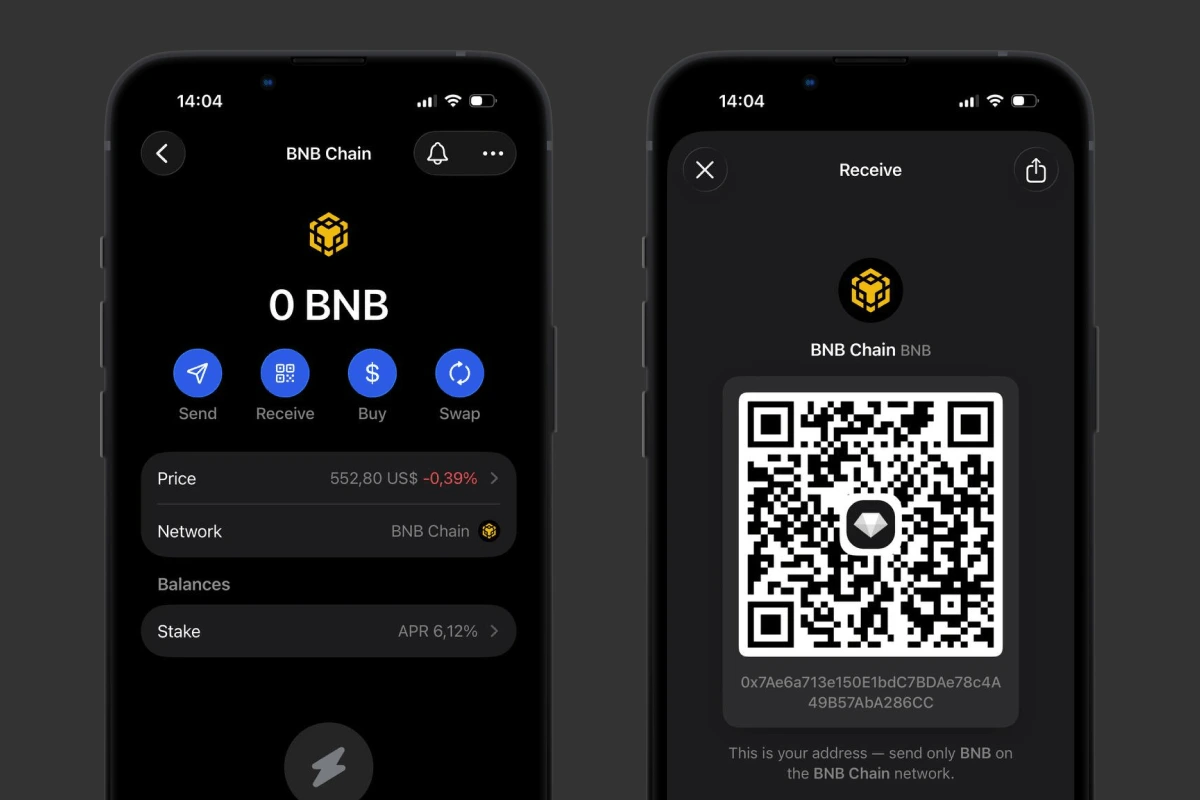 Getting the receiving address for a withdrawal. Source: Gem Wallet
Step 2: Choose the Coin and Network on Binance
In the Binance app, open Assets at the bottom, go to your Spot account, and tap Send → Withdraw Asset. Pick the coin, paste your wallet address, and choose the same network as your wallet - for example, BNB on the BEP20 network must go to a BEP20 address.
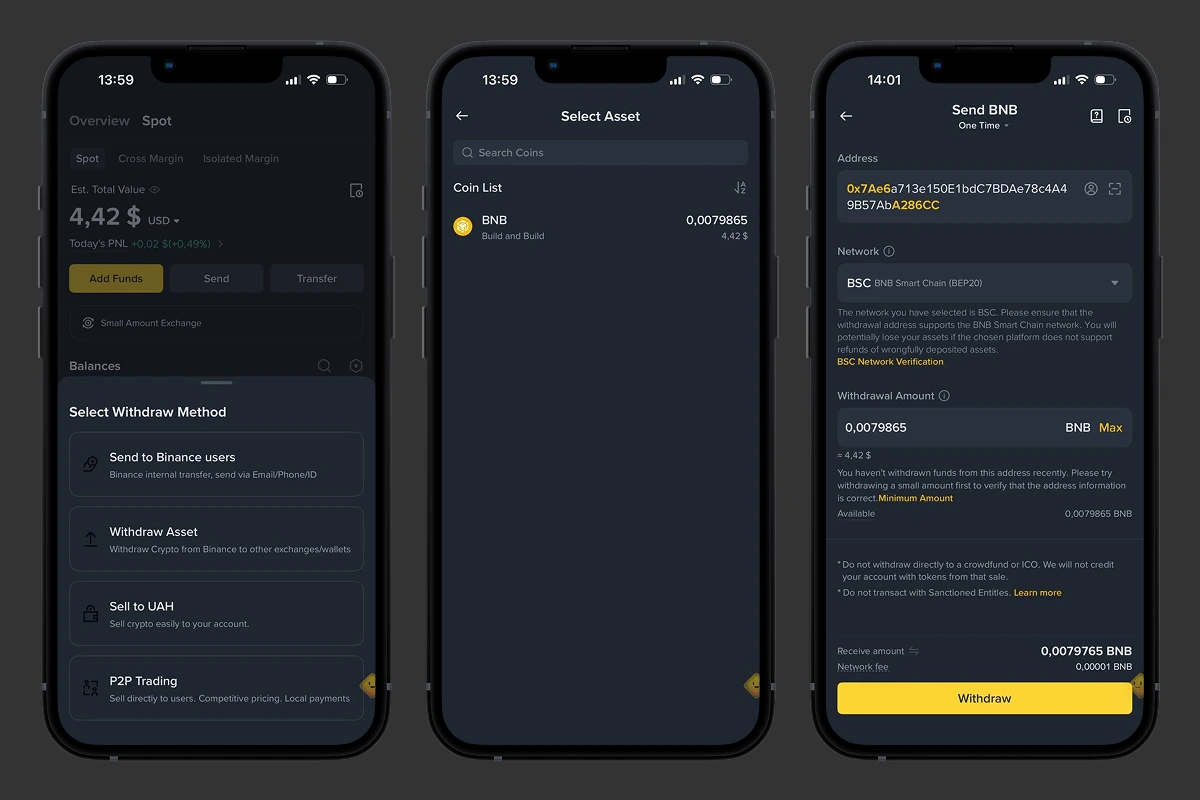 Withdrawing crypto from the exchange to a wallet address. Source: Binance
Step 3: Confirm the Withdrawal
Enter the amount, double-check the address and network, and confirm the transfer. Complete the security check (2FA or email), and the funds will reach your wallet within a few minutes.
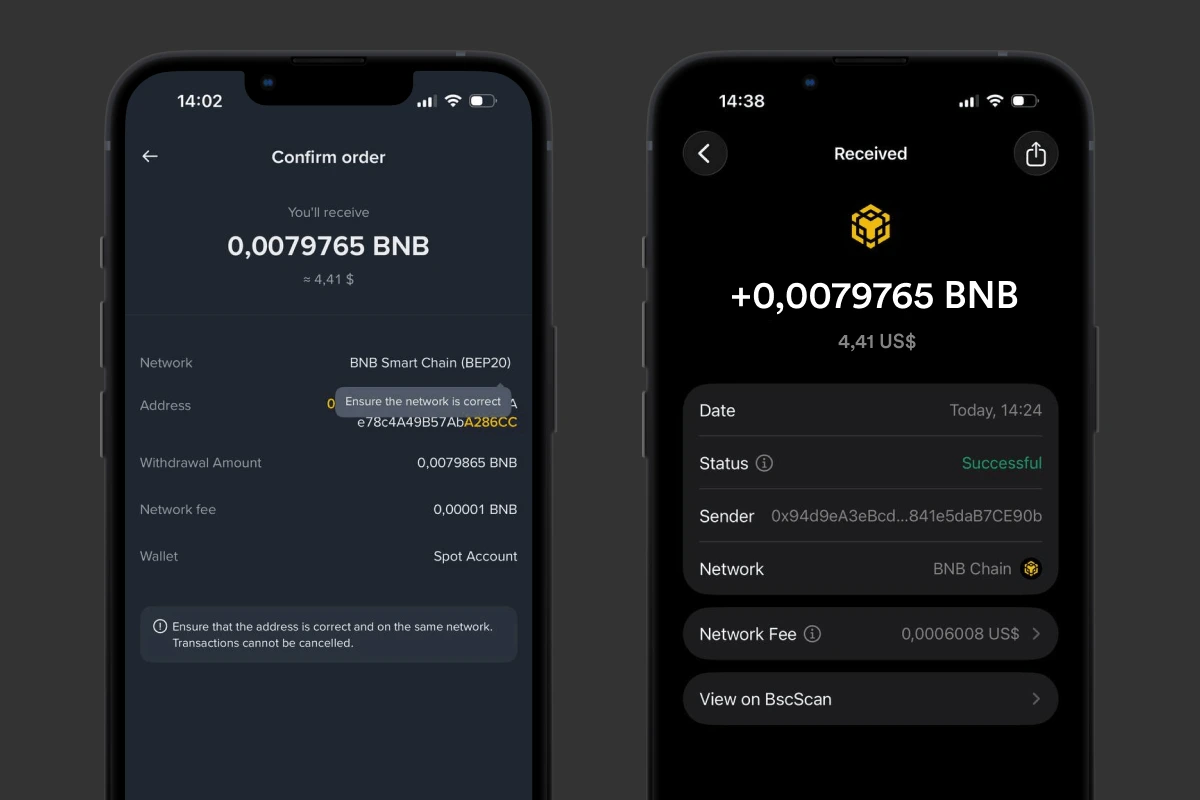 Confirming the transfer and receiving the crypto. Source: Gem Wallet
For a more detailed walkthrough, see the Transfer Crypto from Binance guide.
3 Rules for a Secure Binance Withdrawal
A withdrawal is irreversible, so before you confirm, close the three main risks.
- Check the Address by Hand: Clipboard malware can swap the copied address for a scammer’s, so always verify the first and last 4-6 characters right on the Binance screen.
- Send a Test Transfer First: Send a small amount, wait for it to arrive, and only then move the rest - this confirms the address and network are correct.
- Official App and 2FA Only: Don’t follow links from emails, messengers, or social media - during the pause, scammers mass-send fake “withdrawal instructions” to steal access.
Even careful copying won’t protect you from an infected device, so make it a habit to store your secret phrase offline and verify addresses with your own eyes before your first large transfer.
How to Reduce Binance Withdrawal Fees
A Binance withdrawal fee is a network charge, not a flat platform fee, so you can cut it noticeably in three ways:
Choose a Cheaper Network: The fee depends on the network, not the coin. A USDT transfer on BEP20 costs about $0.01-0.10, on ERC20 it averages around $0.10-0.50, and on TRC20 it’s around $1-4; figures as of June 2026. Pick the cheapest network both Binance and your wallet support.
Consolidate Into a Few Main Coins: While Convert still works for selling, you can reduce a long list of small tokens to about five main coins - for example, Bitcoin, ETH, Solana, and others - and withdraw three to five positions instead of dozens.
Withdraw Less Often, in Larger Amounts: Each withdrawal carries a fixed network fee, so one larger transfer beats a dozen small ones.
In a self-custody wallet, you pay only the network fee when you transfer - with no extra withdrawal charge on top, the kind exchanges don’t always make transparent.
Where to Move Your Assets After Withdrawing From Binance
Sure, you could pick another licensed exchange - but a far safer alternative is a self-custody wallet such as Gem Wallet: only you own your assets, and you don’t depend on regulators. And a wallet gives you more than storage - you can actively use your crypto: buy, swap, stake, and connect the wallet to DeFi. How to choose such a wallet and why it became the real Binance alternative in 2026 - read the full breakdown: The Real Binance Alternative →


