


Table of Contents
A Watch Wallet is a wallet for viewing the balance and transaction history of a public crypto address without access to managing its funds.
Key Takeaways
- View only: a Watch Wallet shows the balance, assets and available transaction history of a public address.
- One address, one network: the network is selected before the address is pasted, and each address becomes a separate wallet in the list.
- More than 100 blockchains: a Watch Wallet works in every network supported by Gem Wallet.
What Is a Watch Wallet in Crypto
A Watch Wallet is a crypto wallet added to the app by a public address, without a secret phrase or a private key. It lets you view assets and transactions but does not give access to managing funds. This format is also called a Watch-Only Wallet or a view-only wallet. For more details, see our documentation.
A public address is a wallet identifier on the blockchain: it is used to view the balance and transaction history, but it does not allow managing funds.
What Is a Bitcoin Watch-Only Wallet
A Bitcoin Watch-Only Wallet is a wallet for viewing the balance and transaction history of a public Bitcoin address without importing the private key. It tracks incoming and outgoing BTC, but it cannot sign a transaction or move bitcoins. In Gem Wallet such an address is listed separately and marked as a view-only wallet.
Can Any Crypto Wallet Be Tracked
Any public address in any supported network can be tracked, and the permission of its owner is not required: the blockchain publishes balances and transactions openly. A Watch Wallet does not reveal private data, it shows the same information as a block explorer, but next to the rest of your wallets in the app.
What You Can Do in a Watch Wallet
In a Watch Wallet you can track the public data of a selected blockchain address.
- Balance and Portfolio Value: View the coins and tokens of the address and their current value in the selected currency.
- Transaction History: Check incoming and outgoing operations, transfer amounts and dates without switching to a block explorer every time.
- NFTs: View the NFTs that belong to the address, in the networks with NFT support.
- Price Alerts: Set a notification, for example when Bitcoin reaches a selected price or changes by a set percentage.
- Several Addresses in One App: Add personal, public and work addresses to a single wallet list. A Watch Wallet is marked with a dedicated icon, so it is easy to tell apart from the wallets you control.
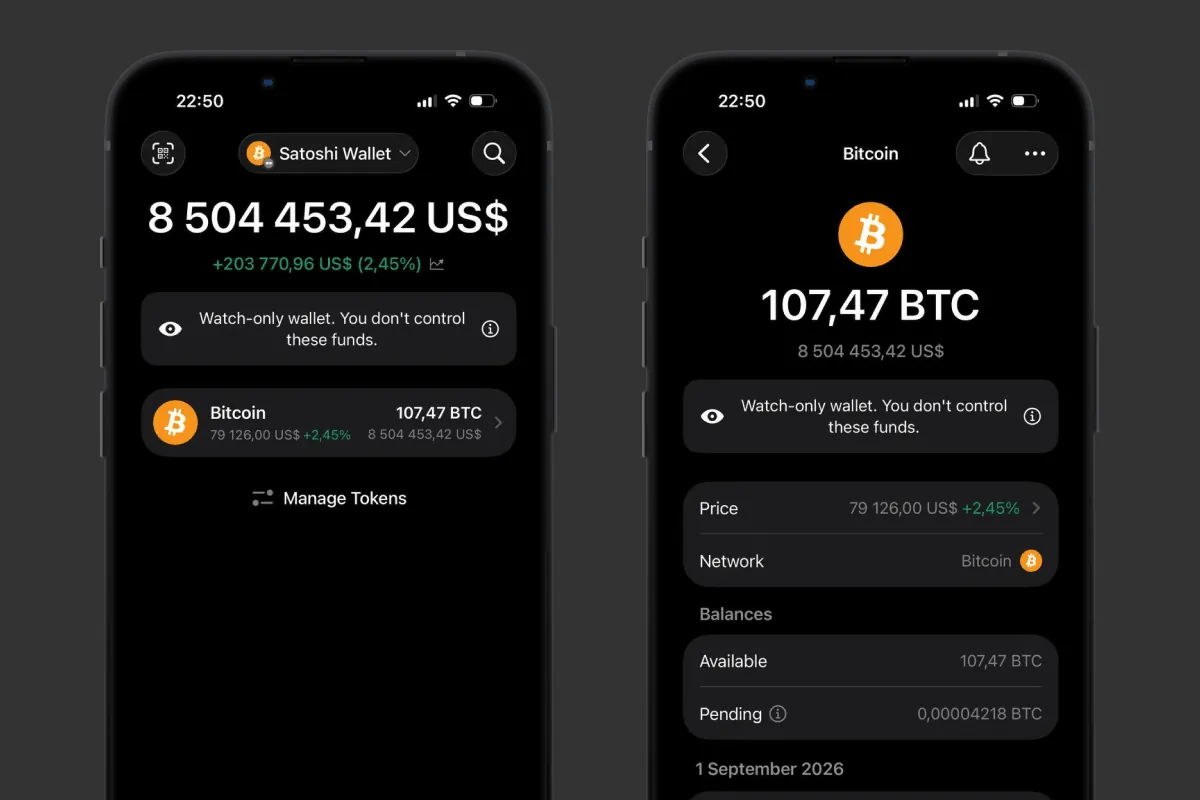 What you can see in a Watch Wallet: balance, portfolio value and transaction history. Source: Gem Wallet
What You Cannot Do in a Watch Wallet
A Watch Wallet cannot sign transactions, because no secret phrase or private key is imported into it. The following operations are therefore unavailable in view-only mode:
- Sending and Swapping: You cannot transfer assets to another address or swap crypto.
- Buying and Selling: You cannot buy or sell assets from a tracked address - for example, the USDT on its balance stays visible, but you cannot sell it.
- Staking: A Watch Wallet cannot send assets to staking, receive rewards or withdraw staked coins.
- Signing Operations: A Watch Wallet cannot be connected to a DApp to confirm a transaction or used to sign a message.
- Exporting Keys: A Watch Wallet has no secret phrase or private key in its settings, because they were never imported into Gem Wallet.
Can You Receive Funds to a Watch Wallet
Yes, a Watch Wallet displays an ordinary public blockchain address, so coins and tokens arrive on it as usual and appear in the balance and transaction history. You cannot manage them through a Watch Wallet, so send crypto to such an address only if you control its secret phrase or private key.
How to Add a Watch Wallet in Gem Wallet
Gem Wallet is a self-custody wallet with fully open-source code that lets you add a Watch Wallet in any of more than 100 supported networks. No secret phrase or private key is requested or stored, no registration is required, and no new address is created.
- Open the Wallet List: Tap the wallet name at the top of the home screen and choose to import an existing wallet.
- Select the Network: Pick a specific network - Bitcoin, Ethereum, Solana or any other. The Address tab appears only after a network is selected, and in multi-coin mode it is not there.
- Open the Address Tab: It sits next to the Phrase tab, and in networks that support key import there is also a Private Key tab.
- Paste the Public Address: Paste it from the clipboard, scan the QR code or enter a name such as alice.eth. A warning appears under the field saying that you cannot send or sell funds from this address.
- Confirm the Import: Tap Import, set a clear name and tap Done - the wallet opens with the note “You are watching this wallet”.
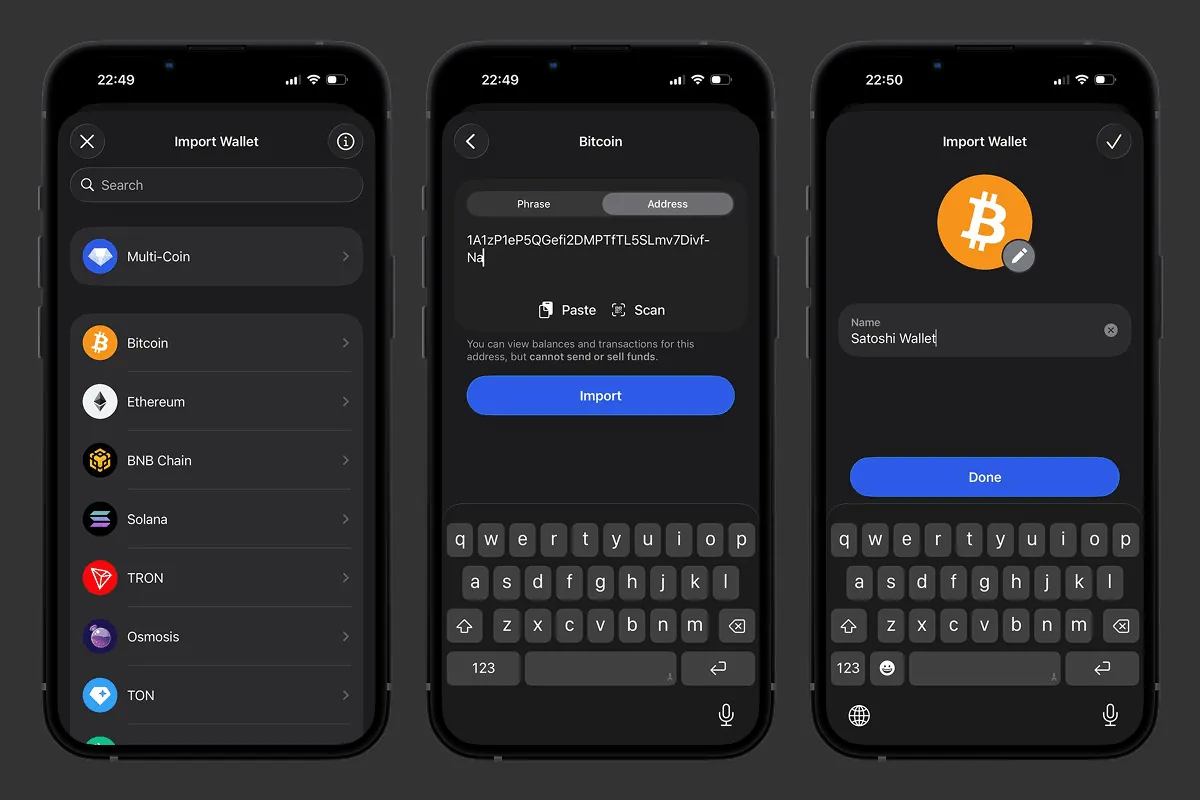 Adding a Watch Wallet by a public address in Gem Wallet
The address is validated against the format of the selected network before the import: an address from another network or with a typo is simply not accepted by the app.
Why a Watch Wallet Does Not Show a Balance in Another Network
A Watch Wallet displays assets only in the blockchain that was specified when the address was added. For example, one EVM address works in Ethereum, Base and BNB Chain, but to view the balance in each network it has to be added separately. This way assets of different blockchains are displayed separately and do not mix in one wallet.
Can I Manage Assets in a Watch Wallet
No, a Watch Wallet does not give access to managing assets. It is added by a public address only and does not contain the secret phrase or private key required to sign transactions. Only the owner of the keys to that address can send, swap, sell or stake the funds, and Gem Wallet support does not restore access to them.
If someone offers to “unlock” a Watch Wallet for a fee, it is a scam. Having an address in the app does not confirm ownership of its assets and does not make it possible to withdraw funds.
How to Use a Watch Wallet
A Watch Wallet helps to collect different public addresses in one app and check them without importing secret data.
- Track a Separate Storage: Add the address of a hardware wallet and follow the balance from your phone: the device stays at home and the secret phrase is never moved onto it.
- Control Long-Term Assets: Keep the address with savings next to your everyday wallet and track the changes in portfolio value.
- View a Company or Project Address: Follow the incoming and outgoing transactions of a public address without giving employees access to the funds.
- Track Public Addresses: Add the addresses of crypto projects, funds or large holders and view their publicly available activity in one list.
- Collect Addresses from Different Networks: View Bitcoin, Ethereum, Solana, TRON and other supported blockchains in one app.
Add a public address to Gem Wallet today and track its balance and transaction history in one app - securely and privately.


