


Table of Contents
From July 1, 2026, Binance suspends its services for EU users, having failed to secure a MiCA license. You can withdraw your assets at any time - but what should you choose instead: another exchange, or a more secure option, a self-custody wallet where only you control your assets?
Key Takeaways
- What happened - Binance withdrew its MiCA application on June 24 and suspends EU services on July 1, 2026; withdrawals stay open.
- Exchange vs wallet - an exchange holds your keys and can freeze, delist, or lose its license; in a self-custody wallet only you hold the keys, and they can’t be frozen.
- Everything in one wallet - Gem Wallet supports 100+ blockchains, is fully open-source (CertiK audit, April 2026), and has built-in buying, swapping, and staking.
What Changes for Binance Users in the EU on July 1
From July 1, 2026, Binance suspends new spot orders, deposits, sign-ups, and its Earn, Staking, and Launchpool products for EU users, leaving only withdrawals and Convert (sell only), after it withdrew its MiCA license application in Greece on June 24. Binance says it plans to apply for a license in another EU country, so the limits may be temporary - but until then, EU users need to decide where their assets sit.
Where to Move Your Assets After Binance
You have two paths. The first is to move to another MiCA-licensed exchange - Coinbase, Kraken, Bitpanda, and others already hold the license - if you want to stay on a custodial platform. The second is self-custody: a wallet where only you hold the keys, which removes the root cause entirely.
Another exchange is a valid choice, but it doesn’t fix the underlying problem - it just changes who holds your keys. Any centralized exchange can still freeze an account, delist an asset, or lose its license, and that risk isn’t theoretical: Mt. Gox handled around 70% of all Bitcoin traffic before 740,000 BTC vanished in 2014, and FTX held deposits from more than 7 million customers before collapsing in 2022. In both cases, those who held their own keys lost nothing.
What a Self-Custody Wallet Is and Why It’s More Secure Than an Exchange
A self-custody wallet is a crypto wallet where the private keys and secret phrase are held only by you, not a company. It’s more secure than an exchange for one reason: an exchange can be shut down, stripped of its license, or frozen, while access to a self-custody wallet depends only on you, so your funds stay under control through any market event.
Gem Wallet - an Alternative to Binance and Any Other Exchange
Gem Wallet is a self-custody wallet: the private keys are stored only on your device, so neither an exchange nor a regulator can freeze or close access to your crypto - unlike a Binance account. It needs no KYC, email, or phone to use, which keeps Gem Wallet a secure and private option for everyone withdrawing assets from Binance.
| Feature | Binance (exchange) | Gem Wallet (self-custody) |
|---|---|---|
| Who holds the private keys | The exchange | You, on your device |
| Account freeze or closure | Possible | Not possible |
| Identity verification (KYC) | Required | Not required |
| Dependence on a license (MiCA) | Yes - EU services suspended on July 1 | No - exchange rules don’t apply |
| What you actually own | An entry in the exchange’s system | The on-chain assets themselves |
Beyond control over the keys, Gem Wallet has two differences from an exchange that matter:
- Fully Open-Source: Gem Wallet’s code passed a CertiK security audit in April 2026, so anyone can verify the app does exactly what it claims, whereas an exchange’s closed code is something users can’t inspect.
- 100+ Blockchains: Gem Wallet supports all blockchains, so every asset you withdraw from Binance - Bitcoin, ETH, SOL, USDT, every TRC20, ERC20, and BEP20 token, plus memecoins like TRUMP, BONK, and DOGE, and even NFTs - sits in one wallet, with no app switching or separate accounts.
What You Can Do in Gem Wallet: Swaps, Staking, Buying, and DeFi
Moving from an exchange to a self-custody wallet doesn’t cost you the usual features - it upgrades them: swapping, staking, buying crypto, and direct DeFi access, all inside the wallet, with no exchange account and no handing over your keys.
Built-In DEX Aggregator: Swap All Assets Inside the Wallet
Swapping is built right into the wallet: Gem Wallet’s DEX aggregator routes trades through popular DEX providers - THORChain, Chainflip, Uniswap, PancakeSwap, and others - to swap, for example, BNB for USDT or ETH for SOL at a good rate, with no exchange deposit and no handing over your keys.
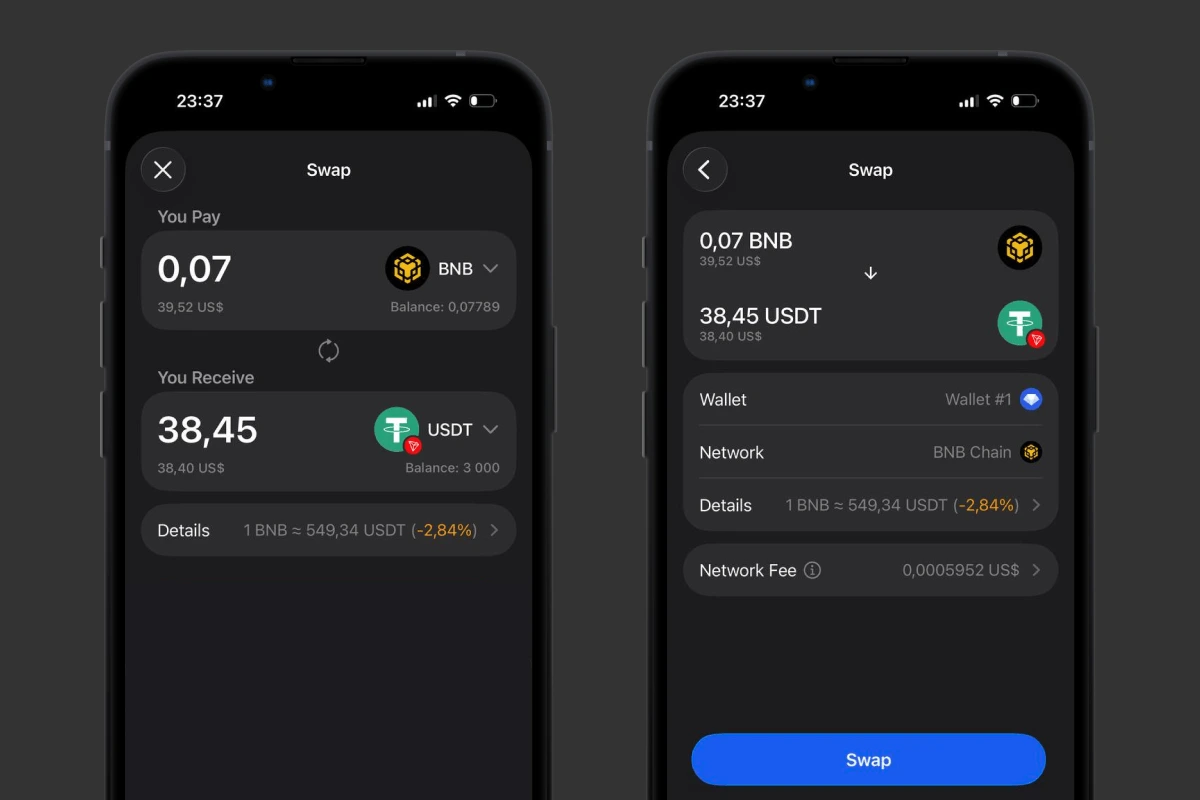 Swapping BNB for USDT right in Gem Wallet through the built-in DEX aggregator.
Stake Directly On-Chain, Without an Exchange
Staking TRX, BNB, ETH, SOL, and other coins works directly on-chain in Gem Wallet, so assets staked in Binance Earn are easy to bring back under your control: withdraw them from Binance, unstake, and move them to the wallet. What’s more, by staking TRON right in the app you cut the fee on USDT transfers on TRC20 to almost zero - a bonus Binance Earn doesn’t offer.
DeFi and Perps Access Through WalletConnect
Through WalletConnect, Gem Wallet connects to DApps like Uniswap and Hyperliquid DEX right from the app, and perps trading on Hyperliquid is built into the wallet - DeFi access a custodial exchange like Binance doesn’t give you.
Buy Crypto With a Credit Card Right in the App
You can buy crypto with a credit card right in Gem Wallet through Mercuryo, MoonPay, and Paybis across 170+ countries, and the funds land straight at your address, bypassing an exchange account.
And that’s only part of it - we’ve gathered all the Gem Wallet benefits in a separate article.
How to Move From Binance to Gem Wallet in 3 Steps
Moving your assets from Binance to Gem Wallet takes three steps, and it’s worth doing before July 1.
- Set Up the Wallet: Create Gem Wallet and save your secret phrase offline - it’s the only key to your funds.
- Copy Your Address: In Gem Wallet tap “Receive” and pick the right network to get the address for the asset you want.
- Withdraw From Binance: Paste the address into the withdrawal form, choose the same network, and confirm.
A step-by-step guide with screenshots is in the guide to transferring crypto from Binance.
Download Gem Wallet on iOS or Android and move your assets off Binance while it’s paused in the EU. When Binance returns with a license, the choice is yours - and until then, your crypto stays under your control, securely and privately.


