


Table of Contents
To set up a crypto wallet, download a secure app, create a new wallet, and write down the 12-word secret phrase it generates - the only key that controls your funds, from any device, forever.
Key Takeaways
- A wallet stores keys, not coins - your Bitcoin and Ethereum live on the blockchain; the wallet holds the private key that proves ownership and authorises every transfer.
- Hot wallets split into two types - custodial (exchange holds your keys, can freeze your funds) and self-custody (you hold your keys, no one can block access).
- Self-custody setup requires zero registration - no name, email, or identity verification: your private key is created directly on your device and never leaves it.
What Is a Crypto Wallet?
A crypto wallet is software or a device that stores the private keys controlling your crypto assets on the blockchain - it doesn’t hold coins, it holds access.
Your Bitcoin, Ethereum, and every other token live on the blockchain - permanently recorded in a public ledger. What the wallet stores is the private key: the cryptographic proof that those assets belong to you and the only thing that lets you move them. Think of it as a keyring, not a pocket. Losing the keyring doesn’t make the coins disappear, but it means you can never reach them again.
More than 500 million people worldwide held some form of cryptocurrency as of 2025. A large share of them keep it on exchanges without realising they don’t control a private key at all. Understanding that distinction is the first thing this guide fixes.
Hot Wallets vs Cold Wallets
Crypto wallets split into two categories based on one thing: whether the private key is stored online or offline.
- Hot Wallet: Software connected to the internet - an app, desktop program, or browser extension. Built for everyday crypto use: wherever you are, you can buy Solana or BNB, send USDT to pay for flights, hotels, or subscriptions - and stay in the market 24/7.
- Cold Wallet: A physical device (Ledger, Trezor) that keeps private keys fully offline. Prices start from $70. Secure against remote theft, but may not be practical for daily active use - every transaction requires the device to be physically present.
For a detailed comparison of when each makes sense, see hot wallet vs cold wallet.
Types of Hot Wallets
Hot wallets divide further based on one question: who holds the private key?
Custodial Wallets
When you buy crypto on an exchange and leave it there, you’re using a custodial wallet. The exchange generates and holds your private keys on your behalf. You get a username, a password, and a claim on the funds - but the keys are not yours.
Using a custodial wallet means accepting the following risks:
- Account freeze - the exchange can lock your access without warning, for any reason
- Withdrawal restrictions - the platform decides when and how much you can move
- Platform failure - if the exchange collapses, your funds may be unreachable
When FTX collapsed in November 2022, the platform owed customers roughly $8 billion they could no longer withdraw. In February 2025, Bybit lost $1.5 billion in a hack - the largest in crypto history. In both cases, custodial users had no direct control over what happened to their funds.
Self-Custody Wallets
A self-custody wallet stores the private key directly on your device - no exchange, no third party, no server. Your BTC, ETH, SOL, HYPE, and every other asset are controlled by you alone, 24/7. No one can freeze your funds, block a transfer, or restrict access - ever. The only thing to safeguard is the 12-word secret phrase: keep it offline and backed up, and you have permanent, uncensorable access to your crypto.
Custodial vs Self-Custody: What Actually Separates Them
Three things decide the difference: who controls the keys, what happens when you need to recover access, and what a third party can do with your funds.
| Feature | Custodial | Self-Custody |
|---|---|---|
| Who holds private keys | Exchange / platform | You, on your device |
| Account recovery | Password reset via support | Secret phrase only |
| Identity verification (KYC) | Required | Not required |
| Can funds be frozen by a third party | Yes | No |
| Access to DeFi and DApps | No | Yes |
How to Set Up a Crypto Wallet in 2026: Step by Step
The setup takes under five minutes. Let’s go through each step in detail.
- Download a wallet from the official App Store or Google Play
- Create a new wallet and set a PIN
- Write down your 12-word secret phrase on paper - never digitally
- Verify the phrase in the app
- Find your receive address and send a test transaction before funding
Step 1: Choose and Download From the Official Source
Download a reliable self-custody wallet - for example, Gem Wallet, a fully open-source wallet with 100+ blockchain support - only from the official app store: App Store on iOS or Google Play on Android.
Before installing: check the developer name on the official website, look at the review count not just the star rating, and never install from a link in a message or email - search for the app in the store directly.
Step 2: Create a New Wallet
Open the app and select “Create a new wallet”. Everything is created locally on your device - no registration, no email, the wallet does not collect any of your personal data.
Step 3: Write Down Your Secret Phrase
The wallet generates 12 words in a fixed order - the only key to all your funds. Anyone who has them gets full control over the wallet from any device. Lose them without a backup and the funds are gone forever.
Write every word on paper, in the exact order shown, by hand. Do not:
- Screenshot the phrase
- Type it into a notes app, messaging app, or email
- Store it in any cloud service - Google Drive, iCloud, Dropbox
Secret phrases in cloud backups are one of the most common reasons people lose wallets. For a complete guide on keeping it safe, see how to secure your secret phrase.
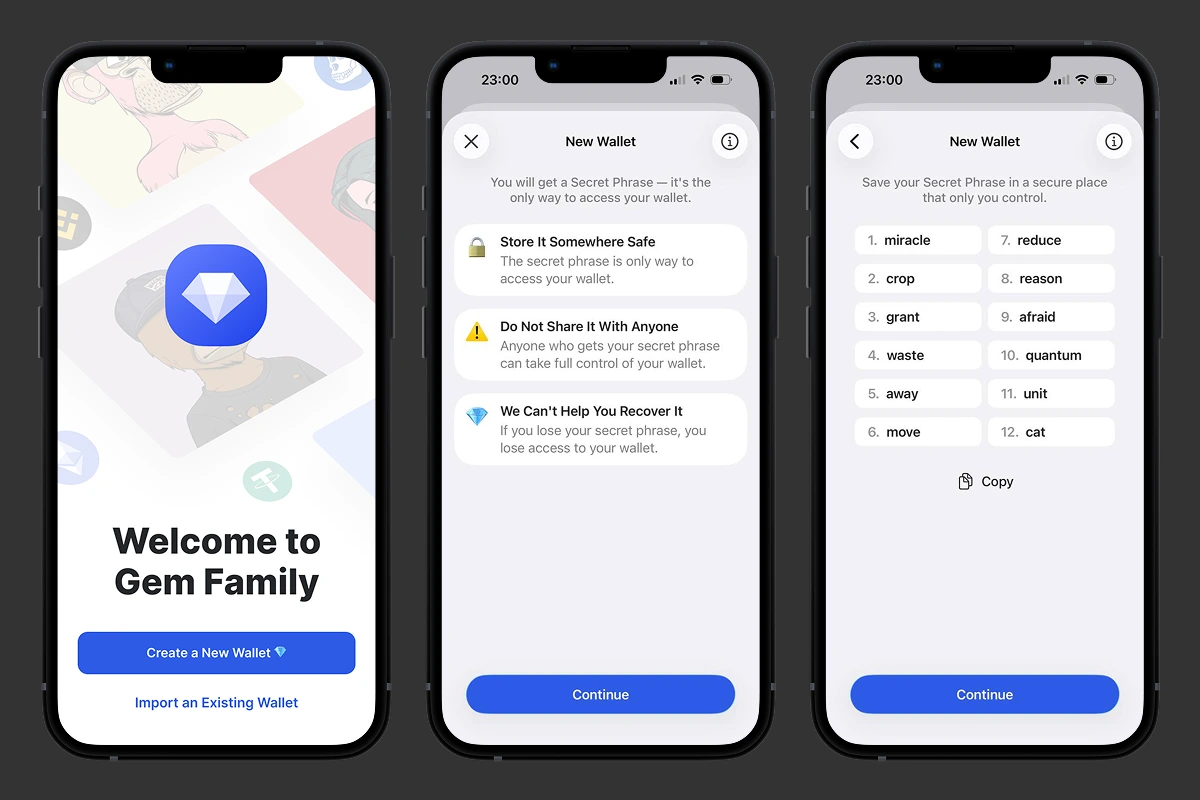 Creating a crypto wallet in Gem Wallet: the 12-word secret phrase appears once - write it down before tapping Continue.
Step 4: Verify the Phrase
The wallet will ask you to enter the words in the correct order - do this from your paper copy, not from memory. Failed the check - go back and verify your notes. This confirms your backup is accurate before any funds enter the wallet.
Step 5: Find Your Receive Address
Tap “Receive” in the app to see your wallet address and QR code. This address is public - share it freely. Your secret phrase is the opposite: never share it with anyone, for any reason. If something asks for it - it is a scam.
Two things to check before every transfer:
- Network match - the network must match the one the sender is using. Wrong network = funds gone, no recovery.
- Address accuracy - use the copy button or QR code, never retype manually. Compare the first and last four characters before sending. This catches clipboard malware - especially common with TRC20 assets on the TRON network.
Once your wallet is set up, you can fund it: transfer tokens from an exchange, ask a friend to send crypto, or buy crypto directly in Gem Wallet with a credit card through Mercuryo, MoonPay, Paybis, and others - available in 150+ countries. Manage your assets securely and privately - swap, stake, and trade without intermediaries.
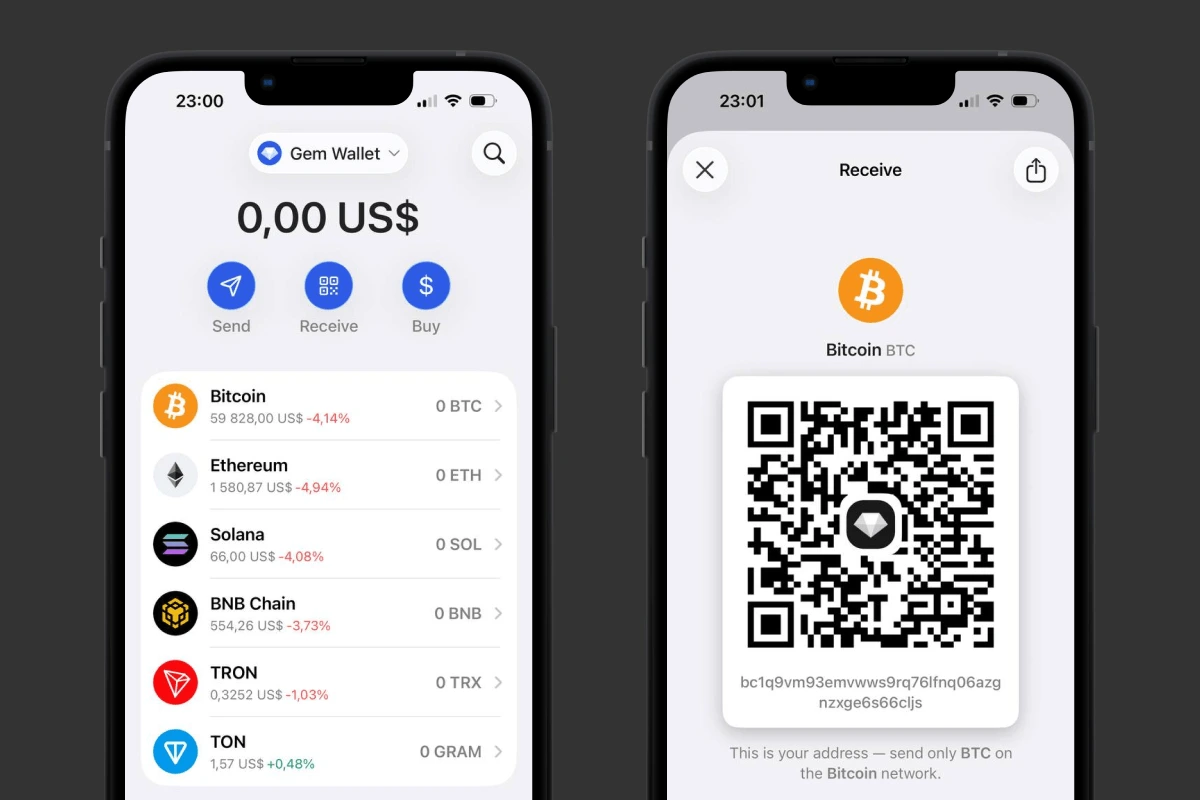 Setting up a Bitcoin Wallet in Gem Wallet: receive address ready in seconds, no registration required.
Download Gem Wallet on iOS or Android and start managing your crypto securely today.


