

Table of Contents
لإزالة وصول DApp إلى توكناتك، عليك أن تجد الموافقة التي تحتفظ بها وتلغيها في معاملة منفصلة على البلوك تشين - أما فصل DApp فلا يزيل الإذن، وتبقى توكناتك مكشوفة حتى تضبط قيمة الموافقة على 0.
أبرز النقاط
- الموافقات تعيش على البلوك تشين - فإغلاق التطبيق أو جلسة WalletConnect لا يغيّر شيئًا؛ ويبقى إذن الإنفاق فعالًا حتى تلغيه.
- الموافقات غير المحدودة ترفع حجم الضرر - فإذن واحد غير محدود يتيح لعقد ما إنفاق رصيد التوكن الحالي والمستقبلي بالكامل.
- الإلغاء يمنع الإنفاق المستقبلي لا السرقة الماضية - فإعادة ضبط قيمة الموافقة تمنع التحويلات الجديدة لكنها لا تستعيد أصولًا نقلها برنامج الاستنزاف بالفعل.
ما هي موافقات التوكنات لـ DApps؟
موافقة التوكن لـ DApp هي إذن يمنحه مالك المحفظة لعقد ذكي بإنفاق توكن محدد حتى مبلغ معين. ودون هذه الموافقة، لا تستطيع منصة تداول لامركزية أو سوق إقراض أو أي DApp أخرى تحريك توكناتك - فالموافقة هي ما يتيح لها تنفيذ swap لها أو staking أو تحويلها نيابة عنك عند تفاعلك معها.
العقد الذكي برنامج قائم على البلوك تشين ينفذ إجراءات تلقائيًا عند استيفاء شروط محددة مسبقًا.
كيف تعمل موافقات التوكنات لـ DApps
تتبع موافقة التوكن تسلسلًا ثابتًا: تربط محفظتك بـ DApp، ثم تطلب DApp موافقة، ويجري تسجيلها على البلوك تشين، ومنذ تلك اللحظة تنفذ DApp الإجراء الموافق عليه دون أن تسأل مرة أخرى. وهكذا تعمل DApps معروفة مثل Aave و Uniswap. ولأن الإذن يعيش على البلوك تشين لا في جلسة التطبيق، فإنه يبقى ساريًا بعد وقت طويل من توقفك عن استخدام DApp.
وتأتي الموافقات في بضعة أشكال متمايزة:
- الموافقة المحدودة: يمكن لـ DApp إنفاق المبلغ الذي تحدده فقط، 500 USDC مثلًا، وعليها طلب موافقة جديدة لإنفاق أكثر.
- الموافقة غير المحدودة: يمكن لـ DApp إنفاق أي مبلغ من التوكن المختار، بما في ذلك التوكنات التي تصل إلى محفظتك لاحقًا.
- موافقة التوكن: يحصل العقد الذكي على إذن بإدارة توكن قابل للاستبدال محدد، مثل USDC أو USDT.
- موافقة NFT: قد يشمل الإذن توكنًا واحدًا من NFT (التوكنات غير القابلة للاستبدال) أو مجموعة كاملة، عبر
setApprovalForAllمثلًا.
وموافقة التوكن لا تكشف عبارتك السرية ولا تمنح DApp وصولًا غير مقيد إلى المحفظة بأكملها. فهي تنطبق فقط على التوكن أو NFT والمبلغ والعقد الذكي الموافق عليها.
متى يمنح مستخدمو محافظ العملات الرقمية موافقات التوكنات؟
تظهر موافقات التوكنات أثناء إجراءات DeFi اليومية: تنفيذ swap للتوكنات، والإقراض، و staking، وبيع NFT. وقد تبقى فعالة بعد إتمام الإجراء أو بعد فصل DApp.
تنفيذ swap للتوكنات على DEX: لنقل إنك تنفذ swap لعملة USDC مقابل ETH على Uniswap - فأنت أولًا توافق لعقد Permit2 (مدير أذونات من Uniswap Labs) باستخدام USDC. ويمكن أن تبقى الموافقة غير المحدودة فعالة بعد اكتمال عملية swap أو إلغائها.
تزويد بروتوكول إقراض بالتوكنات: لإقراض USDT على Aave، توافق لعقد Aave Pool بنقل التوكنات خارج المحفظة. وقد تبقى موافقة غير مستخدمة بعد سحب الوديعة أو بعد فصل DApp.
وضع التوكنات في staking عبر DApp: عند تنفيذ staking عبر Aave Umbrella، توافق لعقد staking بنقل التوكنات المختارة إلى المجمع. وإذا تجاوزت الموافقة قيمة الوديعة، فقد تظل الموافقة المتبقية فعالة بعد خروجك من staking.
عرض NFT للبيع: عند عرض NFT على OpenSea، قد تطلب المنصة الوصول إلى NFT واحد أو إلى المجموعة كاملة عبر setApprovalForAll. وتبقى الموافقة الشاملة للمجموعة سارية حتى يلغيها المستخدم في معاملة منفصلة.
المطالبة بالتوكنات من airdrop: قد يخفي موقع airdrop مزيف موافقة غير محدودة أو توقيع Permit خلف زر Claim عادي. وبعد أن تؤكد، يمكن لبرنامج استنزاف المحافظ نقل التوكنات أو NFT الموافق عليها دون أي طلب جديد في المحفظة.
ما هي مخاطر موافقات التوكنات؟
الخطر ليس في الموافقة نفسها بل في ما قد تتحول إليه بمرور الوقت. وثلاثة مخاطر هي الأهم:
- الموافقة غير المحدودة: يمكن للعقد إنفاق الرصيد الحالي والمستقبلي بالكامل من التوكن الموافق عليه، لا المبلغ الذي قصدت استخدامه فحسب.
- الموافقة العالقة: يظل الإذن فعالًا شهورًا أو سنوات بعد آخر مرة تعاملت فيها مع DApp، لذا تبقى الموافقة المنسية قابلة للاستغلال.
- العقد المخترق: حتى DApp شرعية قد تتعرض للاختراق بعد منحك الموافقة، فتسلّم المهاجم الوصول الذي وقّعت عليه بالفعل.
ما هي برامج استنزاف محافظ العملات الرقمية؟
برنامج استنزاف محفظة العملات الرقمية أداة خبيثة تستخدم موقع تصيد أو DApp مزيفة لخداعك ودفعك إلى منح إذن بتحويل توكناتك أو NFT الخاصة بك. وبدلًا من تخمين عبارتك السرية، يجعلك البرنامج توقّع على الوصول طوعًا، ثم يستخدمه لنقل أثمن أصولك إلى الخارج. وبرامج الاستنزاف تهديد كبير ونشط: فقد سرقت $494 مليون من نحو 332,000 عنوان محفظة في 2024، بزيادة 67% عن العام السابق (Scam Sniffer, 2024).
كيف تستغل برامج الاستنزاف موافقات التوكنات
عادة ما يمر هجوم الاستنزاف بسلسلة خطوات متوقعة:
- يصل المستخدم إلى موقع مزيف لعملية سك أو airdrop أو استثمار.
- يطلب الموقع من المستخدم ربط محفظته.
- يوقّع المستخدم موافقة أو توقيع permit.
- يفحص برنامج الاستنزاف المحفظة ويحدد أثمن الأصول.
- يجري نقل التوكنات أو NFT الموافق عليها دون أي تأكيد جديد.
وربط المحفظة وحده لا يتيح لأحد تحريك أصولك - فالخطر لا يبدأ إلا بعد أن توقّع موافقة أو معاملة خبيثة. وهذا التوقيع الواحد هو الخط الفاصل بين اتصال غير ضار ومحفظة مستنزفة.
لماذا لا يلغي فصل DApp موافقتها
الفصل والإلغاء إجراءان مختلفان، وواحد منهما فقط يزيل إذن الإنفاق الممنوح لعقد ما. فالفصل يغلق الواجهة بين محفظتك و DApp؛ أما الموافقة فتظل تعيش على البلوك تشين.
| الإجراء | ما الذي يفعله | ما الذي يبقى فعالًا |
|---|---|---|
| الفصل | يغلق الاتصال بين المحفظة وواجهة DApp | الموافقات الممنوحة سابقًا على البلوك تشين |
| الإلغاء | يزيل إذن الإنفاق للعقد الذكي أو يعيد ضبطه | على DApp طلب موافقة جديدة للوصول إلى التوكن مرة أخرى |
ولتوضيح الفرق، ربطنا Gem Wallet بـ Uniswap، وهي DApp شرعية، ومنحنا Permit2 موافقة غير محدودة على USDC. وبعد فصل Uniswap، لم تبق أي جلسات WalletConnect فعالة، لكن Revoke.cash ظل يعرض الموافقة مع رصيد USDC الكامل كقيمة معرضة للخطر. فالفصل يغلق الاتصال بـ DApp فحسب - وتبقى الموافقة على البلوك تشين حتى تنفذ معاملة إلغاء منفصلة.
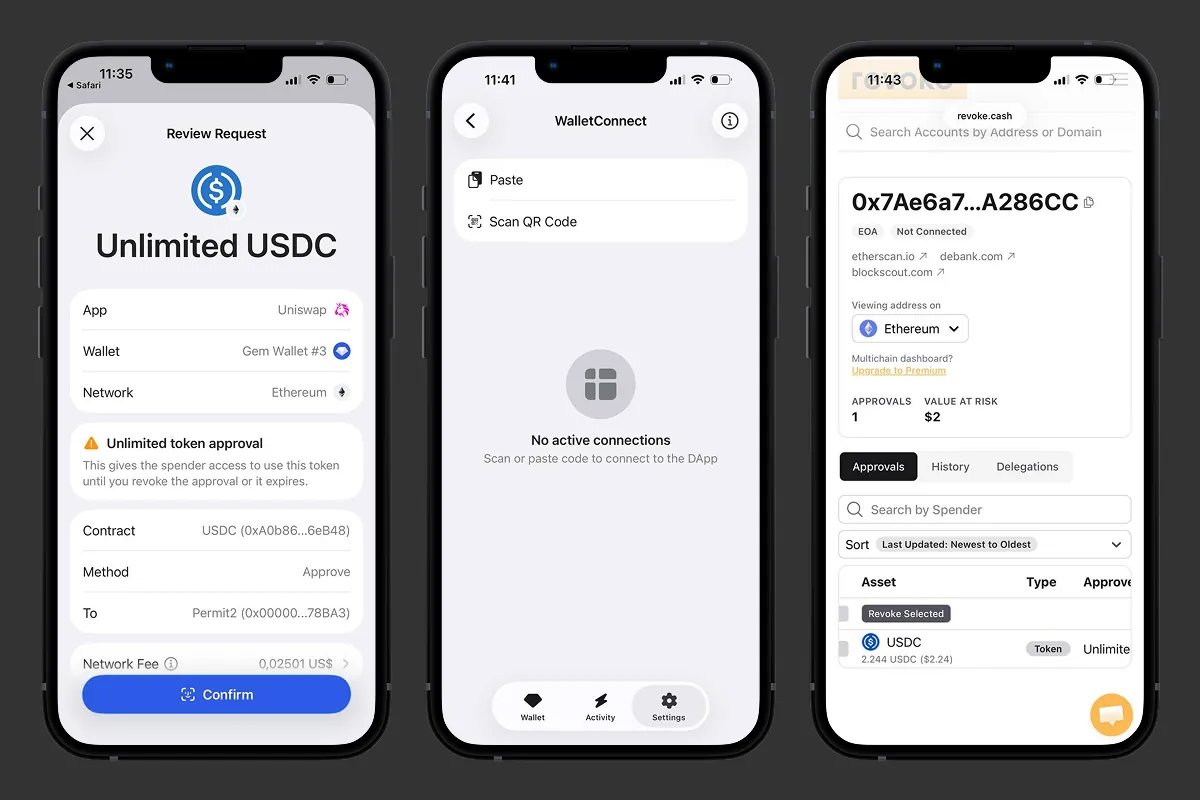 وافق في Uniswap، وافصل DApp - ومع ذلك تبقى الموافقة فعالة على البلوك تشين في Gem Wallet.
كيفية إلغاء موافقات التوكنات لـ DApps: خطوة بخطوة
لا يستغرق إلغاء الموافقة سوى بضع دقائق. وإليك العملية كاملة في لمحة:
- افتح أداة فحص الموافقات.
- أدخل عنوان محفظتك.
- اختر البلوك تشين.
- راجع الموافقات الفعالة.
- نفّذ الإلغاء أو خفّض قيمة الموافقة.
- أكّد المعاملة.
- تحقق من النتيجة.
لنستعرض كل خطوة بالتفصيل.
الخطوة 1: افتح أداة فحص موافقات موثوقة
افتح أداة فحص موافقات مثل Revoke.cash أو Etherscan Token Approval Checker، واكتب العنوان بنفسك بدلًا من اتباع رابط. فهناك نسخ تصيد من هذه الأدوات، لذا تحقق مرتين من النطاق قبل ربط أي شيء.
الخطوة 2: أدخل عنوان محفظة عملاتك الرقمية
ابدأ في وضع القراءة فقط بلصق عنوان محفظتك العام - فهذا يتيح لك رؤية كل موافقة فعالة دون ربط أو توقيع. ولا يلزم الربط عبر WalletConnect إلا عندما تصبح جاهزًا للإلغاء.
الخطوة 3: اختر البلوك تشين الصحيح
اختر الشبكة التي منحت فيها الموافقة، لأن كل شبكة تخزّن موافقاتها الخاصة. ويجب فحص إيثريوم و BNB Chain و Polygon و Base وغيرها من الشبكات كلًا على حدة - فالموافقة على شبكة لا تظهر على أخرى.
الخطوة 4: راجع الجهة المنفقة وقيمة الموافقة
لكل بند، تحقق من التوكن والعقد الذكي (الجهة المنفقة) والمبلغ الموافق عليه وتاريخ منحه والقيمة المعرضة للخطر. فالجهة المنفقة المجهولة أو المبلغ غير المحدود على توكن تملكه هي أوضح علامة على وجوب إزالة الموافقة.
الخطوة 5: نفّذ إلغاء موافقة التوكن أو خفّضها
أزل تمامًا الموافقة التي لم تعد بحاجة إليها، أو خفّض قيمة الموافقة إلى المبلغ الذي تنوي استخدامه فعلًا. والضغط على Revoke ينشئ معاملة تعيد ضبط قيمة الإنفاق المسموح بها لذلك العقد إلى 0.
الخطوة 6: أكّد المعاملة في محفظتك
يفتح الطلب في محفظتك، مثل Gem Wallet، عبر WalletConnect. وقبل أن تؤكد، تحقق مما يلي:
- المبلغ: تتغير قيمة الموافقة إلى 0 USDC.
- العقد: USDC.
- الطريقة: Approve.
- الجهة المنفقة: Permit2.
- الشبكة: إيثريوم.
ويتطلب التأكيد رسوم شبكة (ETH مثلًا)، لأن هذه هي المعاملة على البلوك تشين التي تزيل الإذن فعليًا. وافق عليها في Gem Wallet لإرسالها.
الخطوة 7: تحقق من إزالة الموافقة
أعد تحميل Revoke.cash وتأكد من اختفاء الموافقة أو تغيّر مبلغها. وفي اختبارنا، تحدثت لوحة المعلومات لتعرض 0 موافقة، وقيمة معرضة للخطر قدرها $0، وقائمة موافقات فارغة - وهو دليل على أن العقد لم يعد قادرًا على إنفاق USDC حتى يطلب مرة أخرى.
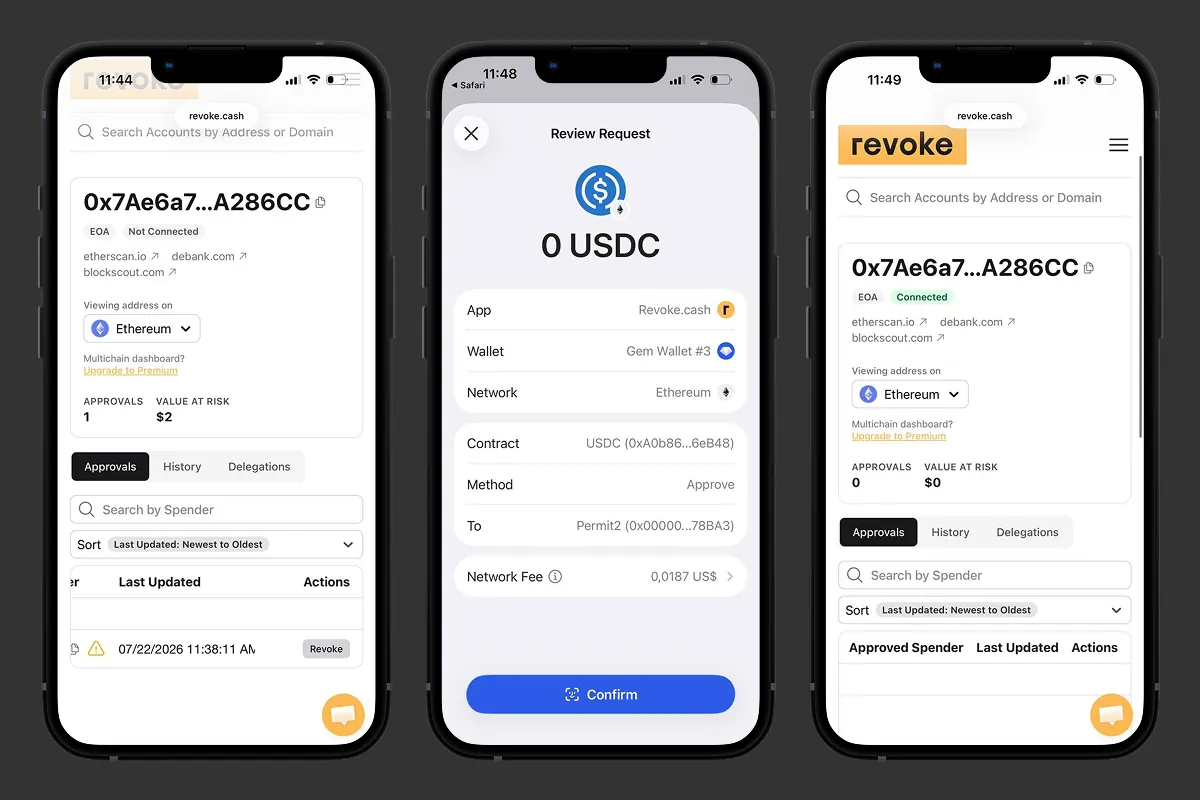 اضغط على Revoke، وأكّد قيمة الموافقة 0 USDC في Gem Wallet، وتحقق من اختفاء الموافقة.
أي موافقات التوكنات ينبغي أن تلغيها؟
ليست كل موافقة بحاجة إلى إزالة، لكن بعضها مرشح بوضوح لذلك. وينبغي أن تلغي الموافقة في الحالات التالية:
- DApp غير مستخدمة: لم تعد تستخدم DApp التي تحتفظ بها.
- جهة منفقة مجهولة: لا تعرف عقد الجهة المنفقة.
- مبلغ غير محدود: جرى منح الموافقة لمبلغ غير محدود.
- عرض NFT قديم: يرتبط الإذن بعرض NFT أغلقته.
- اختراق معلن: أفصح المشروع عن اختراق أو ثغرة مستغلة.
- مصدر مشبوه: ظهرت الموافقة بعد عملية سك أو airdrop مشكوك فيها.
- سبب منسي: لا تتذكر لماذا منحتها من الأساس.
ماذا تفعل إذا تعرضت محفظة عملاتك الرقمية للاستنزاف بالفعل
بادر فورًا إلى إلغاء كل موافقة فعالة: فالإلغاء يوقف الإنفاق اللاحق لكنه لن يستعيد الأصول المسروقة بالفعل. وإذا انكشفت عبارتك السرية أو مفتاحك الخاص، فأنشئ محفظة جديدة على جهاز نظيف وانقل إليها ما تبقى من أموال. وإذا كان sweeper bot يراقب العنوان، فلا ترسل gas إلى العنوان المخترق دون خطة منفصلة لإنقاذ الأصول.
كيفية استخدام DApps دون التعرض للاستنزاف
الإلغاء ينظّف الأذونات التي منحتها بالفعل - لكن العادة الأكثر أمانًا هي اكتشاف الموافقة الخطرة قبل أن توقّعها أصلًا. وبضع قواعد تغطي معظم الحالات:
- تحقق من النطاق: افحص عنوان URL الدقيق لـ DApp قبل الربط.
- تجاهل إغراء الموافقات: لا توقّع موافقات غير واضحة لمجرد المطالبة بـ airdrop.
- حدّد سقف المبلغ: قيّد المبلغ الموافق عليه بدلًا من منح موافقة غير محدودة.
- انتبه إلى setApprovalForAll: تعامل مع أذونات NFT الشاملة للمجموعة بحذر إضافي.
- افحص الجهة المنفقة: تأكد من أن عنوان الجهة المنفقة يخص البروتوكول الحقيقي.
- نظّف بانتظام: أزل الموافقات القديمة وفق جدول منتظم.
- اعزل المخاطر: استخدم محفظة منفصلة لـ DApps الجديدة وغير الموثوقة.
استخدم DApps على أكثر من 100 بلوك تشين مع Gem Wallet - وهي محفظة مفتوحة المصدر بالكامل وتعتمد الحفظ الذاتي وتخزّن المفاتيح الخاصة على جهازك ولا تجمع أي بيانات شخصية. نزّل Gem Wallet واتصل بالتطبيقات المتوافقة مع WalletConnect مع الاحتفاظ بتحكم كامل في مفاتيحك.
إخلاء مسؤولية: هذه المقالة لأغراض إعلامية وتعليمية فقط، ولا تُعد نصيحة مالية أو استثمارية. الأصول المشفرة شديدة التقلب، وقد تخسر كل الأموال التي تستثمرها. ابحث بنفسك واتخذ قراراتك على مسؤوليتك الخاصة.